AI website builders for small business: what each one does, and what's still your job
Anurag Shukla·Updated 8 Oct 2026·10 min read

Every major website builder now has AI that drafts a site from a description of your business: pages, layout, copy and images, in minutes. What it can't do is know your business. You still have to check every line, add your real prices, photos and proof, connect your domain and keep it up to date. Google is fine with AI-written pages as long as they're helpful and checked, but it treats large amounts of unreviewed content as spam. Choose a builder by what happens after the first draft: the plan you'll need to publish, the price when it renews, and whether you can take the site with you.
A year or two ago, an AI website builder was a novelty. Now every major builder has one, and they all make roughly the same promise: describe your business, and get a website in minutes. The first draft really does arrive that fast. What I wanted to know, writing this, was what happens after it.
I'm a tech writer, so I read the documentation, the help centres and the small print of nine builders, checked on 8 October 2026, and set out what the AI does, what's still your job, and what it costs to actually publish. One disclosure first. We make Kahu Sites at KahuLogic, which writes and looks after sites for businesses, so it's in here too, clearly marked as ours.
The AI handles the second step brilliantly and helps with the others. The rest is still yours, and it's the part that decides whether the site brings in customers.
What we learned from publishing too fast
Here's a lesson we learned the hard way, and it's why I'd tell anyone using an AI builder to slow down. Our own blog had grown to more than 150 short articles, published in three batches, each about 420 words, all signed by “Kahu team”. On 3 October 2026 we looked at them against Google's spam policy on scaled content, which covers lots of pages made in bulk without much value for readers, however they were made. They matched it closely enough that we hid all but one from Google's results, and we're now rewriting the best of them, one a week, with a named author, real prices, sources and screenshots. You're reading one.
The point isn't that AI is bad. It's that speed was never the hard part. An AI builder will give you ten pages before lunch. Making each one accurate, specific and genuinely useful still takes a person who knows the business.
What Google says about AI-written pages
Google's position is clear and has been since 2023: it rewards quality, however the content was made. Its guidance on generative AI says AI can help with research and structure, but the result has to meet the same standards as anything else, and it's critical to fact-check and review everything the AI writes, including titles, descriptions and image alt text. Its spam policy names using generative AI to produce many pages without adding value as an example of scaled content abuse.
 Google Search Central
For a small business site, that's easy to meet. Six good pages, each checked by you, are exactly what Google wants. A hundred AI-generated suburb pages that all say the same thing are exactly what it doesn't.
The builders, one by one
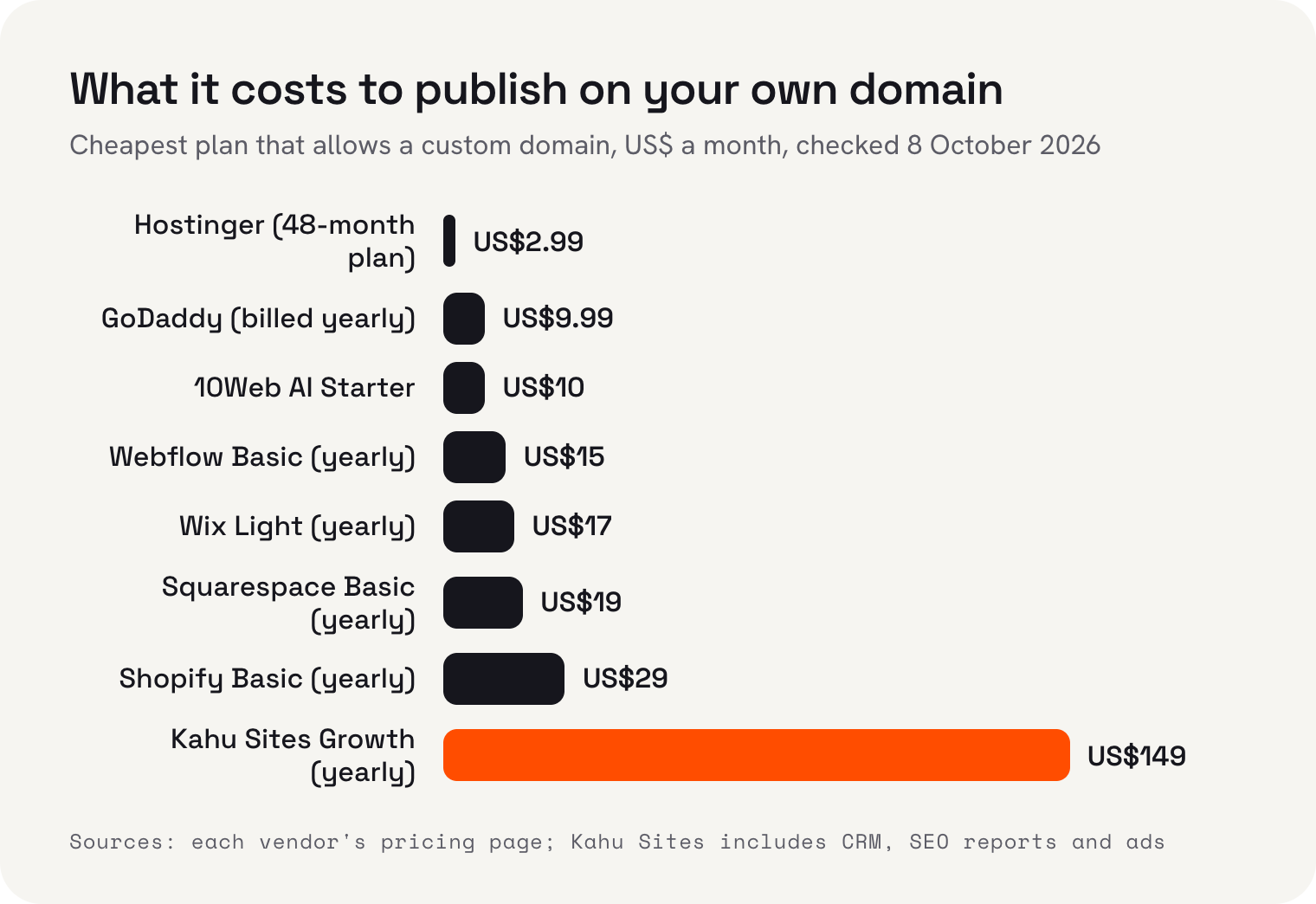
Here's what each one's AI does, from its own pages, and what you still have to do yourself. Prices are what each company published for its cheapest plan that lets you publish on your own domain, in US dollars, checked on 8 October 2026.
 Wix
 Squarespace
 Hostinger
 GoDaddy
 Webflow
 Framer
- Durable
- 10Web
 Shopify
- Wix (Wix Harmony and its Aria agent)Builds pages and sections from a prompt, writes copy for your industry, creates visuals, and includes SEO tools like meta tags and a sitemap. You review, refine, connect a domain and publish. Your own domain needs a paid plan; Light is US$17 a month billed yearly. A Wix site can't be exported to another host.
- Squarespace (Blueprint AI)Builds a multi-page site with a consistent look, writes starter copy, generates images and suggests colours and fonts. Squarespace's own help centre says you must carefully review everything its AI generates. Basic is US$19 a month billed yearly, after a 14-day free trial. Export is partial, as a WordPress file, and leaves out store pages and styles.
- Hostinger AI Website BuilderBuilds a site from one prompt, or through chat in its agent mode, and writes blog posts and product descriptions. US$2.99 a month on a 48-month plan (US$143.52 up front), renewing at US$10.99, with a free domain for a year. You can try both modes free without a card.
- GoDaddy (Airo)Generates a site from prompts, including copy and images, with AI tools for logos and social posts. Paid plans start at US$9.99 a month billed annually, with a free domain. GoDaddy lists downloading your code as a paid-plan feature.
- Webflow AI site builderGenerates a site with layout, images and copy, plus a reusable design system, aimed at people who'll keep refining the design. A custom domain needs a paid site plan, from US$15 a month billed yearly.
- Framer AIAn agent builds editable pages and sections from a description and checks metadata and alt text. Popular with designers. The free plan uses a Framer address; a custom domain needs a paid plan, and there's no HTML export for hosting it yourself.
- DurableBuilt for speed, promising a site in 30 seconds, with an AI image studio and a built-in contact list for leads. The free plan uses a durable.site address; paid plans connect your own domain. We couldn't find an option to export the site.
- 10WebGenerates a WordPress site from a prompt, and can recreate an existing site from its address. AI Starter is US$10 a month, or US$120 for a year. Because it's WordPress underneath, the site is more portable than most.
- Shopify (Sidekick and its AI store builder)For shops: generates store designs from a description and, through Sidekick, writes product descriptions, emails and social posts. Basic is US$29 a month billed yearly. Shopify's help centre says AI output can contain errors and should be reviewed.
Two things stand out reading them side by side. First, the AI features are converging: they all write copy, choose a layout and make images. Second, the real differences are everywhere except the AI: what the plan costs when it renews, whether you can take your site elsewhere, and who you'll ask for help when something breaks.
What the research says about AI designs
Nielsen Norman Group, the usability research firm, tested AI design and prototyping tools against a human designer's work in 2025. Without detailed instructions, the AI's output looked generic and interchangeable, and even the better results had weak visual hierarchy, poor contrast and inconsistent spacing. Their summary: good from afar, but far from good. Detailed prompts and real design files produced much better results.
That matches what you'd expect. The AI fills gaps with the average of every business like yours. The more you give it, like your real services, your prices, your area, your photos and how you talk to customers, the less it has to guess, and the less your site looks like everyone else's.
How to brief an AI builder so the draft sounds like you
Every builder here asks the same kind of question at the start: what's your business, who's it for, what do you want people to do? The quality of the draft depends almost entirely on how you answer. Give it one vague sentence and you'll get the average website for your industry. Give it the raw material and you'll get something you can actually use.
- 1Name what you sell, in your customers' wordsNot “beauty services” but “gel nails, lash lifts and brow shaping”. Search engines and customers both look for the specific words.
- 2Say who it's for and whereThe suburbs, towns or countries you serve, and who usually buys: families, tradespeople, busy professionals, first-time visitors.
- 3Give real prices, or where they startAI builders will happily leave prices out or invent a range. Put in your own, so the draft doesn't promise something you don't charge.
- 4Paste in a few real reviewsWith the customer's permission, first names only. Real words from customers are more convincing than anything the AI writes.
- 5Describe how you soundFriendly and local, or calm and clinical, or straight to the point. Several of the builders above let you describe a tone, and it changes every page.
- 6Upload your own photosSwap every stock image for your own as soon as you can. A builder can't photograph your work for you.
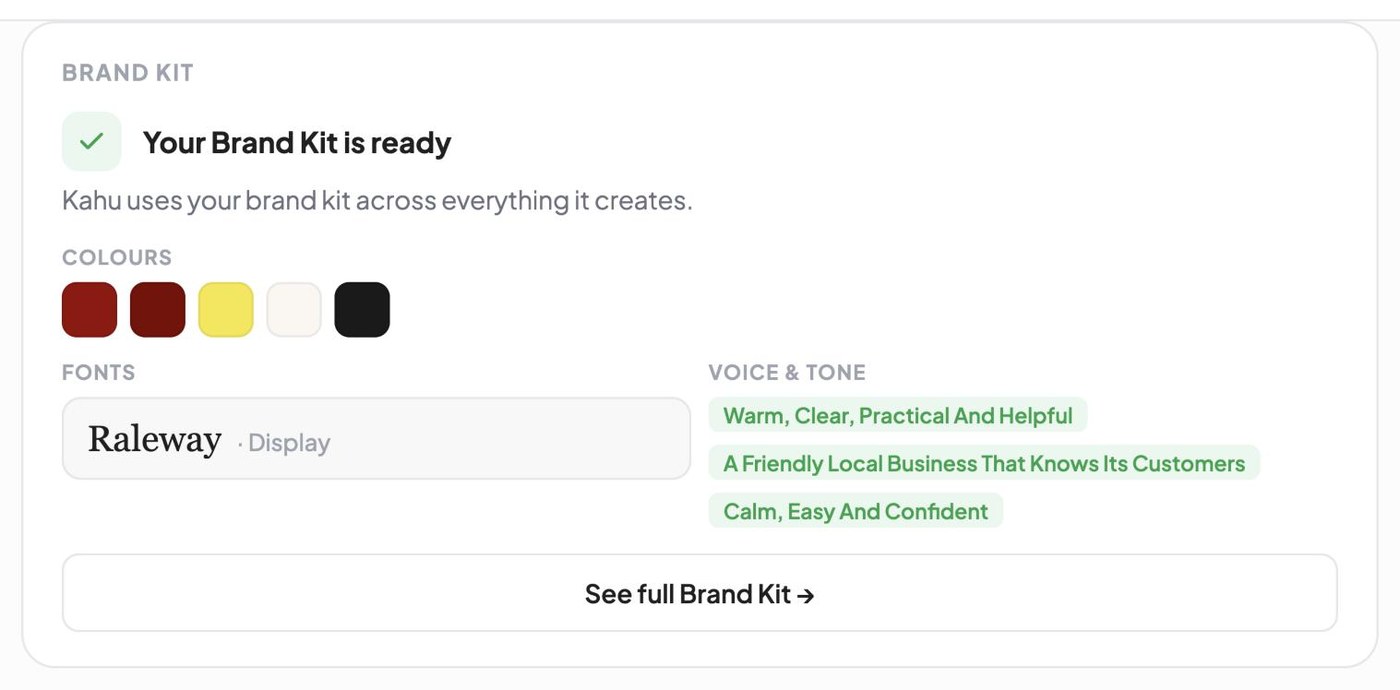
In Kahu, the same idea is called a Brand Kit: your colours, fonts and voice, which Kahu then uses across everything it writes and makes for the business. Whatever tool you use, the principle holds. The AI is only as specific as what you give it.
Six things to check before you pick one
- The plan you need to publish on your own domain, not the free or trial plan.
- What that plan costs when the introductory price ends.
- Whether you can take the site with you, or only your domain.
- Whether the AI writes from your answers or invents details you'll have to remove.
- How you'll change the site in six months: in an editor, in chat, or by asking someone.
- Who you can ask for help, and how quickly.
Before you press publish: a five-minute check
Google's guidance on AI content says to fact-check and review everything the AI writes, including the parts readers barely see, like page titles, descriptions and image alt text. Here's what that looks like on a small business site.
- Every service listed is one you actually offer, at a price you actually charge.
- Opening hours, address, service areas and phone number match your Google Business Profile exactly.
- No promises you don't keep: “24/7”, “same-day”, “guaranteed” and “award-winning” are the usual ones AI adds.
- Licence or registration numbers are real and can be looked up.
- Each page has a title and description that say what that page is about, not the business name repeated.
- Images have alt text that describes the image, not a list of keywords.
It's dull work, and it's the part that decides whether the site helps you or quietly misleads your customers. Ten minutes now saves the awkward phone call later.
Where Kahu fits
Kahu Sites works differently from the builders above. You pick a design, and Kahu writes your site in your own words, hosts it and changes it whenever you ask, in chat. Nothing goes live until you say so. A free web address is included, and you can bring your own domain when you're ready. It's included from the Growth plan, at US$179 a month, or US$149 billed yearly, with a free 7-day trial and no card needed.

It's not the cheapest way to get a site, and if you enjoy building, one of the builders above will suit you better. It's for businesses that would rather describe what they want than open an editor, and the same plan includes Kahu CRM for enquiries, SEO reports, and Google and Meta ads.
 Where Kahu fits


I'm Anurag Shukla, a tech writer at KahuLogic, a New Zealand company with a team across Australia, New Zealand and India. We build and look after websites for small businesses, and this is how I'd read any builder's small print, whether or not you ever use us.
Frequently asked questions
Does Google penalise websites written by AI?
Not for being written by AI. Google says it focuses on the quality of content, not how it was made. It does treat large amounts of unoriginal, low-value pages as spam, however they were produced, and it says to fact-check and review everything AI writes.
Which AI website builder is best for a small business?
It depends on what you'll do after the first draft. Wix and Squarespace are the easiest all-round builders, Hostinger is the cheapest to start, Shopify is for shops, and Webflow and Framer suit people who want design control. Check the renewal price and whether you can leave before you choose.
Can an AI builder write my whole website?
It can write a complete first draft. You still need to check every line, replace anything it guessed with your real services, prices and photos, and add proof like reviews and licence numbers.
Are AI website builders free?
Several let you build and preview free. To publish on your own domain, all of the builders here need a paid plan, from about US$3 a month on a long Hostinger plan to US$19 or more on Squarespace.
Can I move my AI-built site to another platform later?
It varies. Wix sites can't be exported; Squarespace exports only part of a site; Framer has no export for self-hosting. Sites built on WordPress, like 10Web's, are the most portable. Your domain can always move.
Do I need to know how to code?
No. Every builder here works without code. You'd only need a developer for something unusual, like a custom booking or quoting system.
Sources and further reading
- Google Search Central: using generative AI contentdevelopers.google.com
- Google Search Central: spam policiesdevelopers.google.com
- Google Search Central Blog: Google Search's guidance about AI-generated content (2023)developers.google.com
- Google Search Central: creating helpful, people-first contentdevelopers.google.com
- Wix: AI website builderwix.com
- Wix press release: Wix Harmony (January 2026)wix.com
- Wix: plans and pricingwix.com
- Wix Help Center: exporting your Wix site elsewheresupport.wix.com
- Squarespace: AI website buildersquarespace.com
- Squarespace Help Center: using Squarespace AIsupport.squarespace.com
- Squarespace: pricingsquarespace.com
- Squarespace Help Center: exporting your sitesupport.squarespace.com
- Hostinger: AI website builderhostinger.com
- Hostinger: Horizonshostinger.com
- GoDaddy: website buildergodaddy.com
- Webflow: AI site builderwebflow.com
- Webflow: pricingwebflow.com
- Framer: AIframer.com
- Framer Help: exporting to HTML and self-hostingframer.com
- Durabledurable.com
- Durable: pricingdurable.com
- 10Web: AI website builder10web.io
- 10Web: pricing10web.io
- Shopify: AI store buildershopify.com
- Shopify: Sidekickshopify.com
- Shopify: pricingshopify.com
- Nielsen Norman Group: AI prototyping in real design contexts (2025)nngroup.com