How to make a website for a small business: a practical guide
Pooja Sharma·Updated 8 Oct 2026·12 min read

Start with what you already know: what you sell, who it's for and where, your prices or where they start, your licences or credentials, and photos of real work. Build six pages from that (home, one page per service or product line, where you work, your work and reviews, about, and contact or booking) and put your phone number or booking button on every one. Build it yourself, pay a designer, or have it built and kept up to date for you. Then set up your free Google Business Profile and tell Google the site exists.
A small business website has one job: turn someone who's just found you into a customer. That might be a call, a booking, an enquiry or a sale. People hear about you from a friend, a search, a map or a social post, and then they look you up before they get in touch. Your website is where they decide whether you're the right business for them.
This is the guide I'd give a friend opening their first café, salon, clinic, shop or trade business: what to put on the site, what it really costs, and the handful of things that get it found. I write for a living, and most of what makes a small business site work is writing, not design. One disclosure first. We build websites at KahuLogic, and Kahu Sites is one of the options below, so I've put published prices next to all of them and you can make up your own mind.
Write down six things before you touch a builder
A good small business site is built from the same raw material every time, and none of it is design. Get it into the notes app on your phone first. It's the slow part, and no builder can do it for you.
- What you sell, in your customers' words. Not everything you could do, just the services or products you want more of. Each main one becomes a page.
- Who it's for and where. Name the suburbs, towns or countries you serve. “We cover the area” tells a customer far less than the places you actually go or ship to.
- Your prices, or at least where they start. A range is fine. It saves you from the enquiries that were never going to turn into a sale.
- Proof you're the real thing: licences, registrations, qualifications, memberships and insurance. More on why below.
- Photos of your real work, your place and your people. Your own photos beat any stock image, even slightly imperfect ones.
- How people should reach you (call, message, form or online booking) and how quickly you'll get back to them.
If you only do one thing this weekend, make it this list. Every page in the next section is built from it, and every builder, designer or AI tool will ask you for it anyway.
The six pages most small business sites need
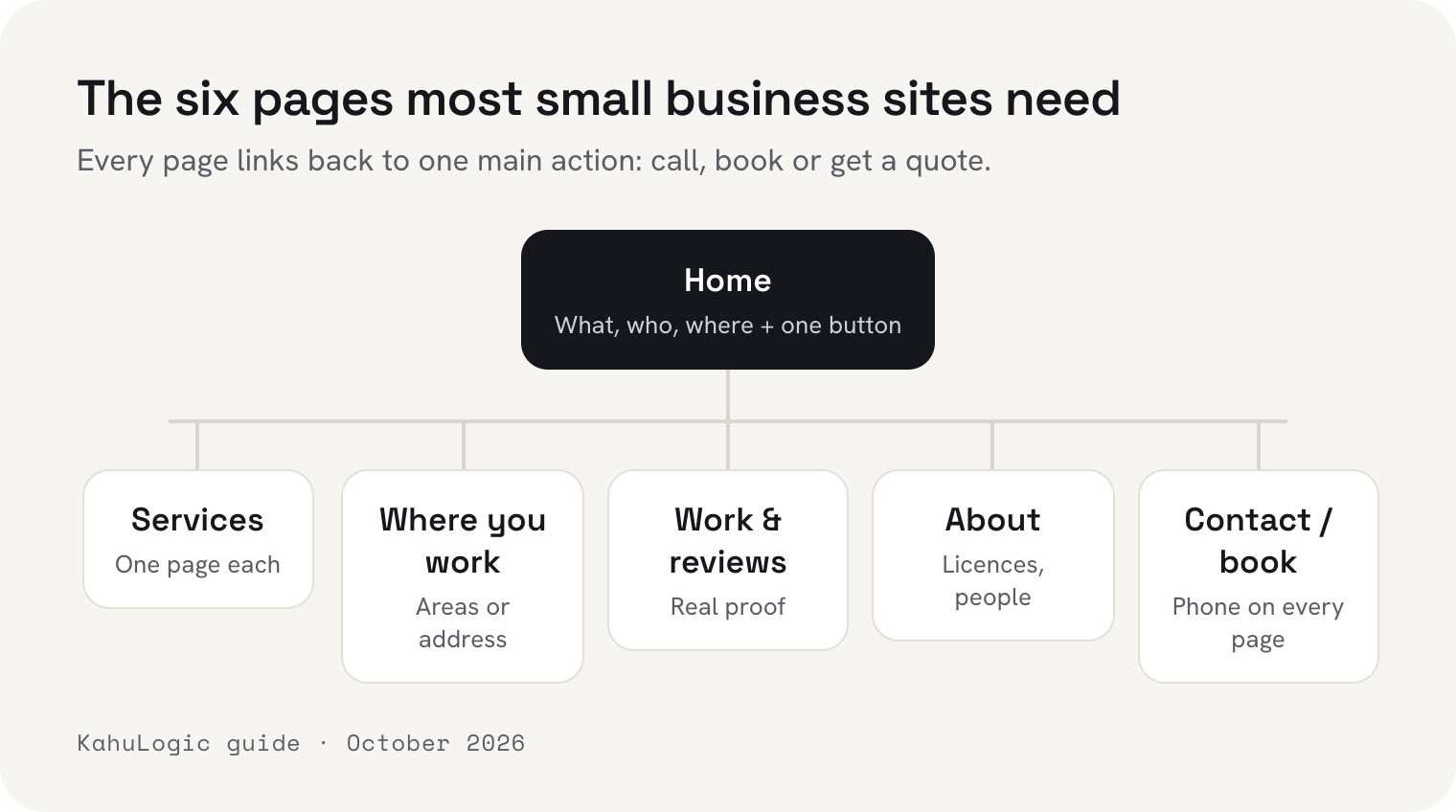
- 1HomeWhat you do, who it's for and where, in one sentence. Your main action at the top (call, book, get a quote or shop), then a few photos and reviews underneath.
- 2One page per service or product lineHaircuts and colour, physio and massage, blocked drains and hot water: whatever your list says. Explain what it is, who it's for, roughly what it costs, how long it takes and what happens next. These are the pages search engines send people to.
- 3Where you workYour address and opening hours if people come to you, or the areas you serve and deliver to if you go to them. If something costs extra past a certain point, say so here.
- 4Your work and reviewsReal examples, with a line on each: what the customer needed and what you did. Reviews with first names.
- 5AboutYour face, your story in a few lines, and your licences, qualifications and insurance. People buy from people they can check.
- 6Contact or bookName, contact details and what they need. Nobody wants to fill in twelve boxes on a phone. Add online booking if you take appointments, and put your phone number here too, for the people who'd rather just ring.
Six pages is plenty to start with. Add more when you've got more to say, not because a template came with them.
Show your licence and credentials (sometimes it's the law)
If your trade or profession is licensed, put the number on your website. In some places that's a legal requirement, not just good manners. In Australia, for example, New South Wales requires licensed builders and tradespeople to show their name and licence number in all their advertising, online included, and Queensland's building regulator names websites and social media pages outright. The rules vary a lot by country, state and profession, so check with your own regulator or professional body.
Even where nothing requires it, a number a customer can check costs you nothing. Many regulators keep public registers, like California's contractor licence check or New Zealand's register of Licensed Building Practitioners. Put your number on the site and link to the place it can be looked up.
What a small business website really costs
There are three usual routes, and these are prices the companies publish on their own websites, checked on 7 October 2026, in US dollars where they publish them. Prices change by country, so check what you're shown where you are.
 Wix
 Squarespace
 Hostinger
Building it yourself costs nothing up front, and Hostinger goes lower still, from US$2.99 a month on a four-year plan, then US$10.99. A .com is about US$11 a year, and builders often include the first year. You write it and you change it, in the editor.
A designer charges a one-off fee and usually hosting or a care plan on top. Small studios that publish their packages charged about US$1,500 to US$2,500 in the United States, £499 to £995 + VAT in the United Kingdom, A$999 to A$2,750 in Australia, and NZ$499 (incl. GST) to about NZ$3,000 + GST in New Zealand, for about five pages. Most add hosting or a care plan, from about US$30 to US$75 a month in the American examples. Wix's own guide puts a web design agency at US$3,000 to US$10,000 or more.
Kahu isn't the cheap way to get five pages online, and if that's all you want, a builder and a free Saturday will do it. What the monthly fee pays for is having the site written in your own words and kept up to date for you: you ask in chat, and nothing goes live until you say so. The same plan includes Kahu CRM for your enquiries, SEO reports, and Google and Meta ads. If you won't use any of that, don't pay for it.
Our product manager, Geeti Anand, has written the full line-by-line breakdown, with email, payment fees and what each route costs over three years, in how much does a business website cost.
Write it the way you'd explain it to a customer
Skip “quality service” and “customer satisfaction guaranteed”. Every business says them, so they tell a customer nothing. Write what you'd say if they were standing in front of you: what you do, how it works, roughly what it costs and when they can have it.
AI builders are genuinely useful for the first draft. Wix, Squarespace (Blueprint AI) and Hostinger all have one that writes a whole site from a few answers about your business, and you don't need to know any code. Treat whatever they write as a draft. They'll cheerfully promise a 24/7 service you don't run, or a guarantee you've never given, and it's your business making that claim, not the software.
Two small things make a big difference. Use the names of the places you serve in your page text, the way people search (“physio” plus the suburb, or “hot water repairs” plus the town). And make your phone number a link, so one tap on a phone rings you.
Build it for the phone in your customer's hand
I'd bet the phone share is higher for local businesses, because people search when they need you: on the way somewhere, or standing next to the problem.
So test your site the way they'll use it. Open it on your own phone, on mobile data, and try to ring yourself and send yourself an enquiry with one thumb. Then run it through Google's free PageSpeed Insights. Google's own bar for a good page is the two numbers above, plus nothing jumping around while it loads.

Get found on maps: your Google Business Profile does half the work
For a local business, the map results at the top of Google matter as much as the website itself. A Google Business Profile is free. Google says it ranks local results on relevance (how well your profile matches the search), distance and prominence, and that “more reviews and positive ratings can help your business's local ranking.”
 Google Business Profile
 Apple Maps (Apple Business)
If you work from home or go to your customers, you don't have to publish your address. Google lets a service-area business hide it and list the areas it covers instead, up to 20 of them. Fill in every field, use exactly the same business name and phone number as your website, and ask for a review after every job or visit, while the customer's still pleased. Then put yourself on Apple Maps through Apple Business, so people who search there can find you too.
Tell Google your site exists
Google finds new sites on its own in the end, but “in the end” can take weeks. Set up Google Search Console (it's free), add your site, submit your sitemap, then use URL Inspection to ask Google to index your most important pages.
 Google Search Console
 Google PageSpeed Insights
We did exactly this when we relaunched kahulogic.com in September. Google had found our new pages but hadn't got round to crawling most of them. We asked for the ten that mattered most, and within three days all ten were in Google's index.
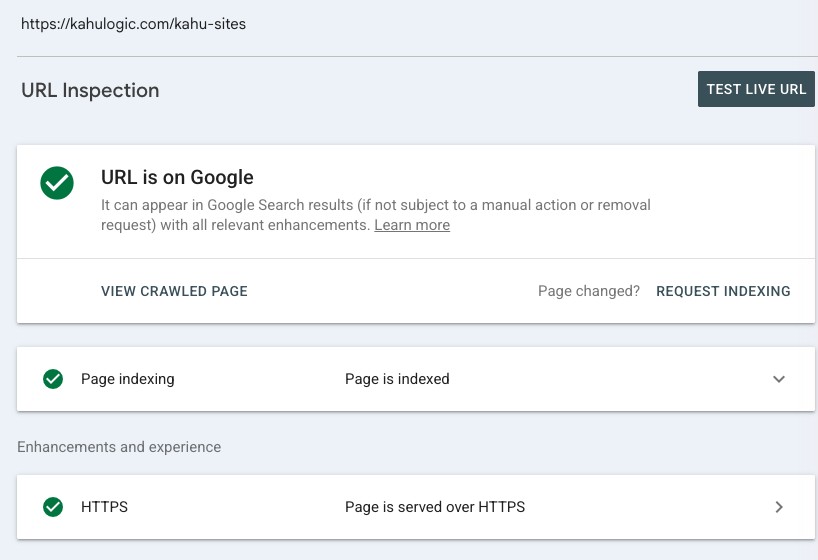
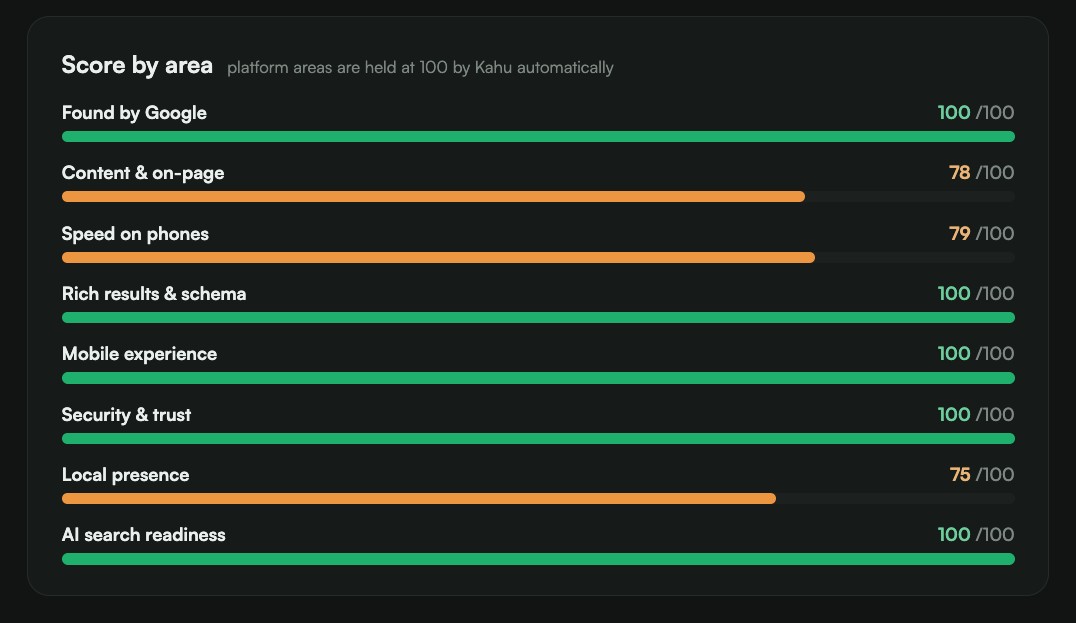
If your site runs on Kahu, the Search Visibility page checks the technical side for you and shows what's left to fix. Here's ours, warts and all.
Reply before your competitor does
A site that brings in enquiries nobody answers is worse than no site. A Harvard Business Review study of more than 2,000 US companies found that firms that tried to contact an online lead within an hour were nearly seven times as likely to qualify it, meaning a real conversation with the person deciding, as firms that waited even an hour longer. That was sales teams, not cafés or clinics, but anyone who's asked three businesses for a quote knows the first one to reply has a head start.
Send enquiries to your phone, not just to an inbox you check on Sundays. If your site runs on Kahu, every enquiry from it lands in Kahu CRM with where it came from, so you can see at a glance who's still waiting on you.
 Where Kahu fits


Launch checklist
Before you tell anyone the site is live, go through this on your own phone:
| Check | Why it matters |
|---|---|
| Your phone number or booking button is on every page | On a phone, a tap is quicker than any form |
| Your main action shows without scrolling | It's the job the site is there to do |
| Your licences, registrations or credentials are on the site | A legal requirement for some trades and places, and reassurance everywhere |
| Your address and hours, or the places you serve, are there | It's how customers, and Google, know you're right for them |
| Your main services show a price or a range | It filters out the enquiries that go nowhere |
| The photos are your own | People want to see your work, not a stock photo |
| PageSpeed Insights passes on mobile | Main content within 2.5 seconds is Google's idea of good |
| Your site and your Business Profile link to each other | Same name, same number, both places |
| Your sitemap is submitted in Search Console | Google finds your pages sooner |
| You've sent yourself a test enquiry | So you know it actually reaches you |
The building is the easy part. The list you wrote at the start is what makes the site worth finding.
I'm Pooja Sharma, a content writer at KahuLogic, a New Zealand company with a team across Australia, New Zealand and India. We build and look after websites for small businesses, and this is the advice I'd give whether or not you ever use us.
Frequently asked questions
Do I still need a website if I have a Facebook page or a Google Business Profile?
Yes. Social pages and listings are worth having, but they're space you rent on someone else's platform, on their rules and next to your competitors. Lead sites and marketplaces usually charge per enquiry or take a commission (Builderscrack, a New Zealand marketplace for trades, deducts tokens from a member's plan for each job they connect with). Your own website is the one place you control, and your profiles and posts can all point people to it.
Should I get a .com or a country domain?
If you can get a short .com, take it. If you only serve one country, its own ending (.co.uk, .com.au, .ca, .co.nz) makes it obvious you're local, and some endings have rules: a .com.au, for example, needs an Australian business or company number. If you get both, point them at the same site.
How much does a small business website cost?
If you build it yourself, from about US$3 a month on a long Hostinger plan to around US$25 a month on Squarespace, plus about US$11 a year for a .com, which builders often include for the first year. The small design studios we checked charged a one-off US$1,500 to US$2,500 in the US, or £499 to £995 + VAT in the UK, for five or so pages, plus hosting. Those are published prices from October 2026, and our guide to how much a business website costs has the full breakdown.
Can I build my website with AI?
Yes, as a first draft. Wix, Squarespace and Hostinger all have AI builders that write a site from a few answers about your business. Read every line before you publish, fix anything that isn't true, and swap the stock photos for your own.
Do I need to know how to code?
No. Every option here is drag-and-drop or done in chat. You'd only need a developer for something unusual, like a custom quoting or booking system.
How many pages does a small business website need?
Six to start: home, one page per service or product line, where you work, your work and reviews, about, and contact or booking. Add pages when you have something new to say.
Sources and further reading
- NSW Government: rules for building trade advertisementsnsw.gov.au
- QBCC: advertising rules for licenseesqbcc.qld.gov.au
- California Contractors State License Board: check a licensecslb.ca.gov
- MBIE: Licensed Building Practitioners register (New Zealand)kete-lbp.mbie.govt.nz
- StatCounter: desktop vs mobile vs tablet market share, worldwidegs.statcounter.com
- Google: a free Business Profilebusiness.google.com
- Google: tips to improve your local rankingsupport.google.com
- Google: service-area businessessupport.google.com
- Apple Business: put your business on Apple Mapsbusiness.apple.com
- web.dev: Core Web Vitalsweb.dev
- Google PageSpeed Insightspagespeed.web.dev
- Google Search Central: ask Google to recrawl your URLsdevelopers.google.com
- Harvard Business Review: The Short Life of Online Sales Leads (2011)hbr.org
- auDA: .com.au domain namesauda.org.au
- Porkbun: .com domain pricesporkbun.com
- Wix: plans and pricingwix.com
- Squarespace: pricingsquarespace.com
- Hostinger: website builder pricinghostinger.com
- Wix: AI website builderwix.com
- Squarespace: Blueprint AIsquarespace.com
- Wix Blog: how much does a website cost in 2026?wix.com
- Studio 202 Design: website package pricing (US)studio202.com
- Triad Web Design Services: pricing (US)triadwebservice.com
- Succeeding Small: web design packages (US)succeedingsmall.co
- DotGO: how much does a website cost (UK)dotgo.uk
- Studio 36 Digital: web design services (UK)studio36digital.co.uk
- Highscore Web Design: website design packages (UK)highscore.co.uk
- JetBlok Studio: website packages (AU)jetblok.com.au
- Perth Tradie Websites: website package (AU)perthtradiewebsites.com.au
- WebRefresh: website design packages (NZ)webrefresh.co.nz
- Trades Online: website design pricing (NZ)tradesonline.co.nz
- Builderscrack: how it works for tradesbuilderscrack.co.nz