Local SEO for small businesses: get found on the map, wherever you are
Muskaan Sharma·Updated 8 Oct 2026·13 min read
Local SEO means showing up when people nearby search for what you do, on Google's map, Apple Maps, Bing and local directories. Google ranks local results on relevance, distance and prominence, and you can't pay for a better local ranking. So claim a free Google Business Profile with your real business name, add Apple Business and Bing Places, and ask happy customers for reviews without offering anything in return. Then make sure your website states the same name, address and phone number and includes LocalBusiness structured data.
Think about the last time you searched for a café, a dentist or a locksmith. You probably didn't scroll through ten pages of results. You looked at the map, picked one of the first few businesses, checked the reviews and tapped call or directions. That short moment is what local SEO is about: being one of the few businesses someone sees, and looking like the right choice when they do.
I'm a user researcher, so my job is watching how people actually look for things, not how we wish they would. Local search is one of the most decisive journeys there is. People aren't browsing; they want something nearby, usually soon. The good news is that most of what decides whether they find you is free, and most of it is in your hands.
One disclosure first. We build websites for small businesses at KahuLogic, so the website part of this guide touches on our own product. Everything else, from your Google listing to Apple Maps and the local directories, is free, works whoever built your site, and is something you manage yourself. Connecting a Google Business Profile to Kahu is in progress and launching soon; today you run your profile directly in Google.
What local SEO actually covers
Local SEO is everything that helps a business appear when people search for something near them, or in a particular place. It has three parts. There are the map listings: Google Business Profile, Apple Business for Apple Maps, and Bing Places. There's your own website, which those listings point to and which search engines read to understand where you are and what you do. And there are the local directories and review sites that people in your country already trust.
The order matters. Your Google Business Profile is usually the first thing a local searcher sees, often before your website. Your website backs it up. The directories add weight and catch the people who start their search somewhere else. If you only have an afternoon, spend it on the listings first, then your site, then the directories.
 Google Business Profile
 Apple Business
- Bing Places
How Google decides who shows up
Google is unusually open about this. Its Business Profile help pages say local results are based mainly on three things. Relevance is how well your profile matches what someone searched for. Distance is how far you are from the searcher, or from the place they named. Prominence is how well known your business is, and Google says that includes information from across the web, such as links and articles, as well as your review count and rating.
That line is worth remembering the next time someone calls offering guaranteed first place on Google Maps. You can't change your distance from a searcher. What you can change is relevance, by filling in your profile completely and accurately, and prominence, by earning reviews and being mentioned in the places people look. Everything in the rest of this guide feeds one of those two.
Your business name: the easiest rule to break
Google's guidelines for Business Profiles say your name should match your real-world name, the one on your signage, shopfront and stationery. They specifically rule out adding taglines, phone numbers, website addresses, or keywords about your services or location to the name. So “Rosa's Hair Studio” is fine. “Rosa's Hair Studio, Best Balayage in Town, Call Now” is not.
I understand the temptation. When you watch people scan a map, the name is the first thing they read, and stuffing it with keywords feels like a shortcut. But it breaks the rules, and it puts your listing at risk. Put the description of what you do in the description and category fields, where it belongs, and let the name be your name.
The same goes for every other detail. Choose the categories that genuinely describe your business, add your real opening hours, and upload photos of your actual premises, team or work. Each one helps Google match your profile to the right searches, which is the relevance part of the ranking, and each one answers a question a customer would otherwise have to ring you about.
Service areas if you go to your customers
Not every business has a door customers walk through. A mobile hairdresser, a cleaner, a dog groomer with a van or an electrician goes to the customer. Google calls these service-area businesses, and its guidelines say that if you don't serve customers at your address, you should hide it and list the areas you serve instead.
Google lets you add up to 20 service areas, and its guidelines say those areas should generally be within about two hours' drive of where you're based. Edits to your service areas can take up to 48 hours to show, so don't panic if a change doesn't appear straight away. List the towns, suburbs or regions you really cover. Listing places you'd rarely travel to won't help you rank there, and it will annoy the customers who call.
Reviews, done the right way
Reviews feed prominence directly: Google names your review count and rating as part of how it judges how well known you are. They also do something no ranking factor can. When I watch people choose between three businesses on a map, the reviews are where they slow down and read. A handful of recent, specific reviews often does more than any amount of description.
The way to get more is simply to ask. Google suggests sharing a direct link to your review form, or a QR code that opens it, so customers can leave a review in a few taps. Put the link in your follow-up email, on your receipt or invoice, or on a card at the counter. Ask at the moment people are happiest: when the job is finished, the meal is over or the haircut is done.
That means no discount, no free coffee, no prize draw for people who leave a review. Google's contribution policy bans incentivised reviews, and that applies even when you'd be happy with an honest one. Ask everyone, not only the customers you expect to be pleased, and reply to the reviews you get, good and bad. A calm, helpful reply to a poor review is read by every future customer who sees it.
Apple Business and Bing Places: the listings people skip
Plenty of people never open Google Maps. Anyone on an iPhone who asks for directions or searches in Apple Maps sees Apple's version of your business. In March 2026 Apple announced Apple Business, which launched on 14 April 2026 in more than 200 countries and regions and replaced Apple Business Connect. Apple says the core of it is free. Through it you claim your location on Maps and add your logo, opening hours and photos.
Bing Places does the same job for Bing search and Bing Maps. Microsoft moved it to bing.com/forbusiness in October 2025, and it lets you import your details from Google rather than typing them in again. If you've already got a tidy Google Business Profile, setting up Bing takes very little extra effort.
Neither of these is likely to bring as many people as Google. But both are free, both take an afternoon or less, and both mean that someone searching on a different phone or a different search engine finds your correct hours instead of nothing at all.
The website side of local SEO
Your listings point people to your website, and search engines read your website to check what your listings say. So the two should agree. Use exactly the same business name, address and phone number on your site as on your Google, Apple and Bing listings, written the same way everywhere. Small differences, like an old phone number on your contact page or a different spelling of your street, make it harder for anyone, human or machine, to be sure they've found the right business.
Then make your page titles say what and where. Google's guidance on title links asks for titles that are descriptive and specific, and it calls out vague ones like “Home”. “Mobile dog grooming in Leeds” tells a searcher and a search engine far more than a business name on its own. Each important page deserves its own clear title.
Behind the scenes, there's one more piece: structured data. This is a small block of code that states your business details in a format search engines read reliably. Google's documentation for LocalBusiness structured data sets out what to include.
- Required: your business name and address
- Recommended: your phone number and website address
- Recommended: your location on the map (latitude and longitude)
- Recommended: your opening hours, in a structured format
- Recommended: a price range
- Use the most specific business type that fits, not just the general one
If you serve more than one town, consider a page for each place you genuinely work in, with real details about what you do there. A page per suburb that repeats the same paragraph with a different place name helps nobody. A page that tells someone in that area how you serve them, how far you travel and what it costs is worth having.
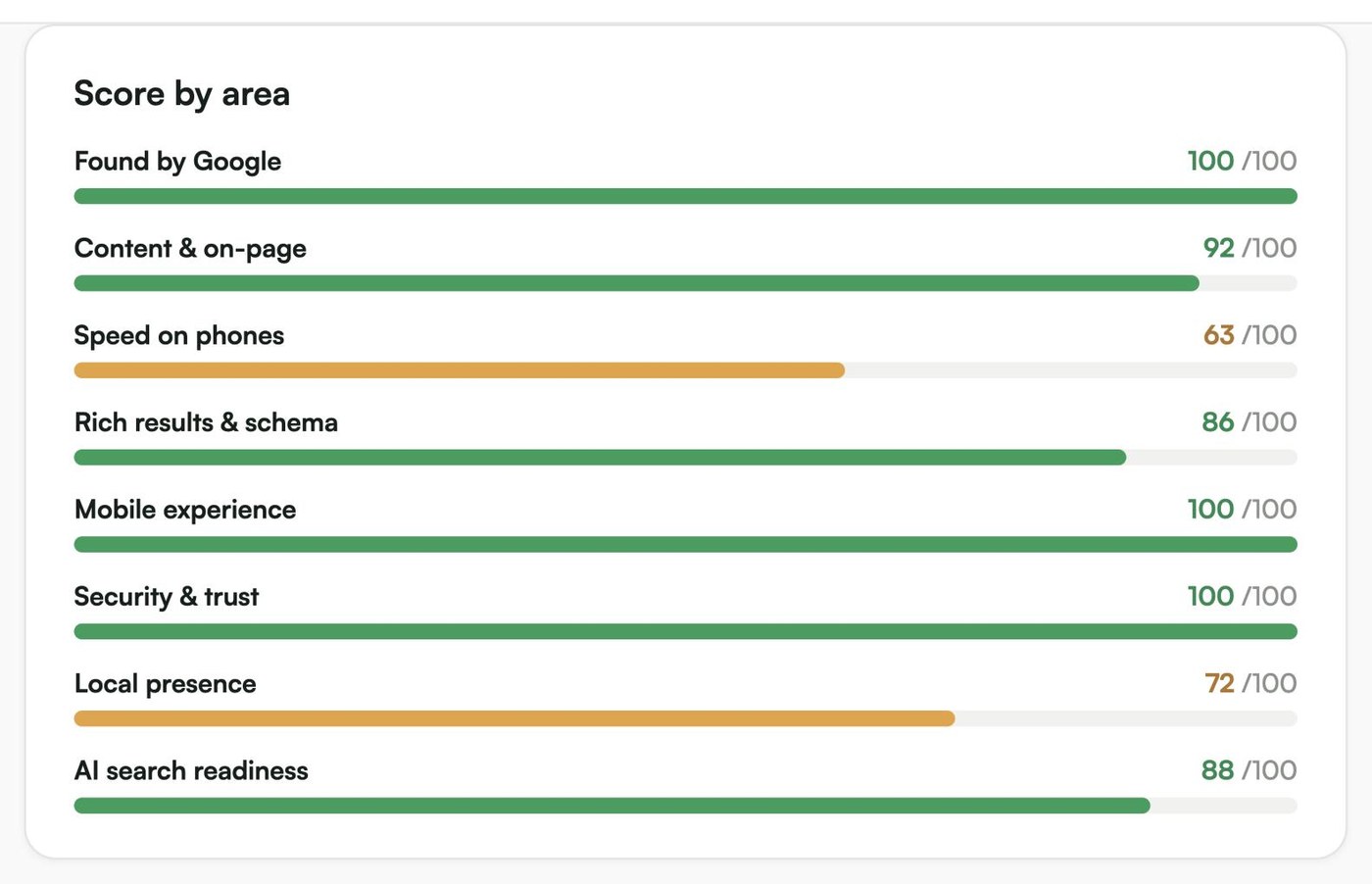
Here's how that looks with example figures. Take a sample business in Kahu, a small business that takes bookings online, with its website on Kahu Sites. Kahu's Search Visibility scores the site 100 out of 100 for being found by Google and for its mobile experience, but its local presence comes in at 72, its lowest area after speed on phones at 63. A site can be technically sound and still have room to grow locally. Kahu Sites builds the LocalBusiness details into the site, and Search Visibility shows where local presence still has room to improve.
What local search looks like in the numbers
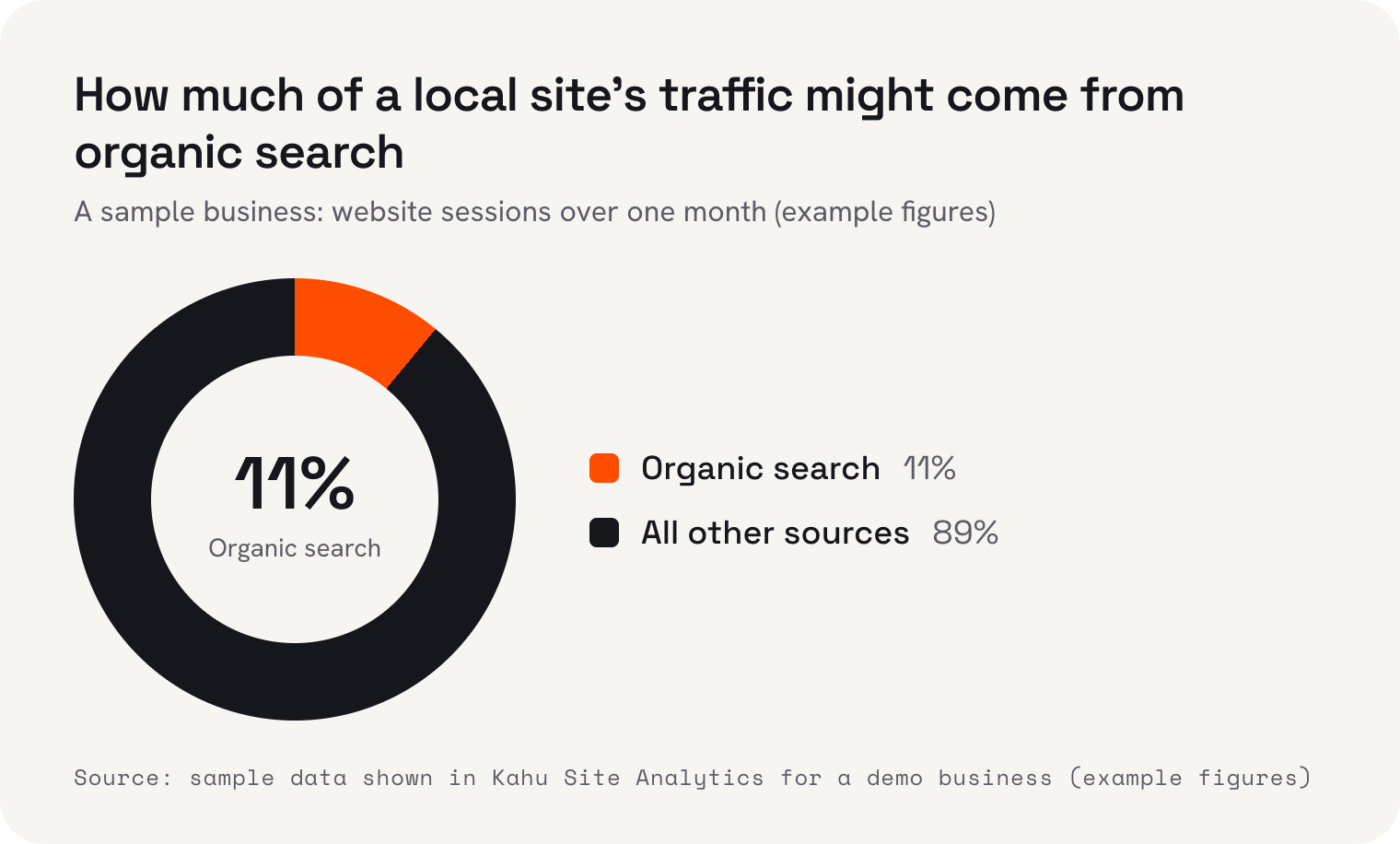
In the same sample account, over 30 days, organic search brought the website 130 sessions, about 11% of its roughly 1,190 visits. Organic means the unpaid results: people who searched, saw the site and clicked. That's a modest share, and on its own it says little. What tells you more is who those searchers are and where they're searching from.
The more interesting part is where the visitors were. In the sample data, London sent the most, with 260 users. Next came Manchester with 150, then Sydney with 48 and Auckland with 44. Further down the list were Toronto, Austin, Dublin and Cape Town, each with around 15 to 22 users.
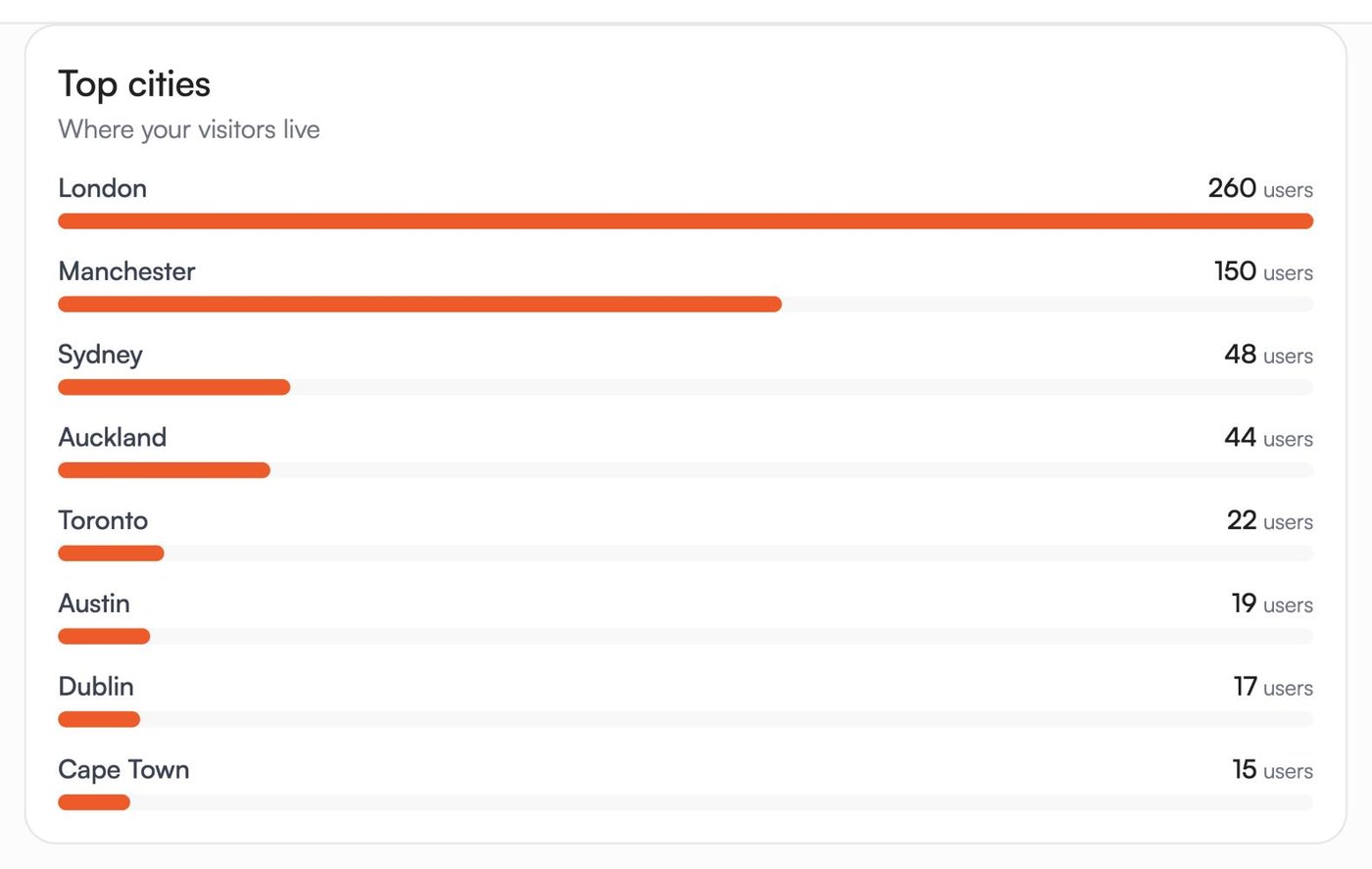
This is the point I'd most like owners to take away. “Local” doesn't always mean “nearby”. A business that takes bookings from visitors, like a motel or a tour operator, serves people who almost by definition come from somewhere else, so many of them search from home while planning a trip. A café or a hairdresser will see the opposite pattern, with nearly everyone a short walk or drive away. Look at where your own visitors are before deciding which places your listings, service areas and location pages should name.
Local directories, country by country
Beyond the map listings, every country has its own directories and review sites, and the right ones depend on where you are and what you do. Some cover every kind of business; others are built for trades and home services. Being listed on the ones people in your area actually use adds to your prominence and catches customers who never start on Google.
 Yelp
 Nextdoor
 Trustpilot
- Yell
- hipages
- Airtasker
- NoCowboys
- Builderscrack
- Justdial
- Yellow Pages Canada
| Where | Examples to look at | What they are |
|---|---|---|
| United States | Yelp, Nextdoor | Yelp says it's free to be listed; Nextdoor runs in 11 countries including the US |
| United Kingdom | Yell, Nextdoor, Trustpilot, Checkatrade | Yell is a UK business directory; Trustpilot hosts customer reviews |
| Australia | hipages, Airtasker (which now includes Oneflare) | hipages is an Australian platform for finding trades |
| New Zealand | NoCowboys, Builderscrack | NoCowboys rates and reviews trades; on Builderscrack people post a job free and are matched with verified trades |
| India | Justdial | A local search service for businesses across India |
| Canada | Yellow Pages Canada, Nextdoor | A Canadian business directory; Nextdoor also runs in Canada |
Don't try to be everywhere. A quick way to choose is to search for your own trade and town, the way a customer would, and note which directories appear on the first page. Those are the ones people near you are seeing. Claim those, use the same name, address and phone number as everywhere else, and keep them up to date. Be wary of anyone selling paid placement on dozens of directories you've never heard of.
 Where Kahu fits


A one-afternoon local SEO checklist
If you do nothing else this month, do these six things, in this order. None of them costs anything.
- 1Claim and check your Google Business ProfileMake sure the name matches your signage, with no taglines or keywords. Choose accurate categories, add real hours and photos, and set service areas if you go to customers.
- 2Set up Apple Business and Bing PlacesClaim your location on Apple Maps through Apple Business, then use Bing Places to import your details from Google.
- 3Make your details match everywhereWrite down your exact name, address and phone number once. Check your website, listings and directories against it and fix every difference.
- 4Fix your page titlesGive each important page a clear title that says what you do and where. Replace anything called “Home” on its own.
- 5Add LocalBusiness structured dataInclude your name and address, plus phone, website, map location, hours and price range, using the most specific business type that fits.
- 6Start asking for reviewsShare your Google review link or a QR code with every customer, without offering anything in return, and reply to every review you get.
What to stop worrying about
You don't need to chase every new tactic or buy a package that promises the top spot on the map. Google has said plainly that you can't pay for a better local ranking. What moves you is accurate details, a business that's well reviewed and well known, and a website that agrees with your listings. That's slower than a shortcut, but it's also the work that keeps paying back.
And check in every few months. Hours change over holidays, phone numbers change, you move or start serving a new area. Each time, update your Google, Apple and Bing listings, your website and your directories together, so a customer never finds out the hard way that a detail was out of date.
I'm Muskaan Sharma, a user researcher at KahuLogic, a New Zealand company with a team across Australia, New Zealand and India. We build and look after websites for small businesses, and this is the advice I'd give whether or not you ever use us.
Frequently asked questions
Can I pay Google to rank higher on the map?
No. Google's Business Profile help says there's no way to request or pay for a better local ranking. Local results are based mainly on relevance, distance and prominence, which includes your reviews and how well known your business is across the web. You can run paid ads, but they're separate from the unpaid map results.
Can I add keywords or my town to my Google Business Profile name?
No. Google's guidelines say your business name should match your real-world name, as it appears on your signage. Taglines, phone numbers, website addresses and keywords about your services or location aren't allowed in the name. Describe what you do in your categories and description instead.
Should I show my address if I work at customers' homes?
If you don't serve customers at your address, Google's guidelines say to hide it and set service areas instead. You can list up to 20 service areas, which should generally be within about two hours' drive of your base, and changes can take up to 48 hours to appear.
Can I offer a discount in exchange for a Google review?
No. Google's policies ban incentivised reviews, and its help pages say offering incentives for reviews is strictly prohibited. Instead, share a direct link to your review form or a QR code with every customer and simply ask.
Do I need Apple Business and Bing Places as well as Google?
They're worth the short time they take. Apple Business, which launched in April 2026 in more than 200 countries and regions, is how you claim your location on Apple Maps, and Apple says its core is free. Bing Places puts you in Bing search and Maps and can import your details from Google.
Does Kahu manage my Google Business Profile?
Not today. Connecting a Google Business Profile to Kahu is in progress and launching soon, so for now you manage your profile directly in Google. Kahu Sites builds your LocalBusiness details into your website, and Kahu's Search Visibility shows how your site scores for local presence.
Sources and further reading
- Google Business Profile Help: how Google determines local rankingsupport.google.com
- Google Business Profile Help: guidelines for representing your businesssupport.google.com
- Google Business Profile Help: service areassupport.google.com
- Google: prohibited and restricted content policy for reviewssupport.google.com
- Google Business Profile Help: ask customers for reviewssupport.google.com
- Google Search Central: LocalBusiness structured datadevelopers.google.com
- Google Search Central: influencing title linksdevelopers.google.com
- Apple Businessbusiness.apple.com
- Apple Newsroom: introducing Apple Business (24 March 2026)apple.com
- Bing Blogs: introducing the new Bing Places for Business (October 2025)blogs.bing.com
- Yelp for Businessbusiness.yelp.com
- Nextdoor for Businessbusiness.nextdoor.com
- Trustpilot for Businessbusiness.trustpilot.com
- Yell for Businessbusiness.yell.com
- hipageshipages.com.au
- NoCowboysnocowboys.co.nz
- Builderscrackbuilderscrack.co.nz
- Justdialjustdial.com
- Yellow Pages Canadayellowpages.ca