Where website traffic comes from, and how a small business gets more of it
Anurag Shukla·Updated 8 Oct 2026·13 min read

Website visits come from six places: search engines, maps and listings, social media, links from other websites, email, and ads. To get more, write a page for each thing customers search for, put your website link on your Google Business Profile and every social profile, earn links from local and industry sites, email past customers with something new on your site, and use ads for quick, measured tests. Set up Google Search Console, Bing Webmaster Tools and Google Analytics, tag your links with UTM parameters, and judge each source by the enquiries it brings, not the visits.
"How do I get more people to my website?" sounds like one question, but it's really six. Visitors arrive through different doors: a search engine, a map listing, a social post, a link on someone else's site, an email, or an ad. Each door opens differently, fills at a different speed and brings a different kind of visitor. Work on the wrong one and you can spend months getting nowhere.
I'm a tech writer, so my job is explaining how tools work in plain English. This guide does that for website traffic: where each kind of visit comes from, what to do about each, and how to tell which visits become customers. First, some numbers.
One disclosure. We build websites for small businesses at KahuLogic, so the analytics screenshots below come from our own product, shown with a sample business and sample figures. Every tool I recommend for measuring traffic is free and works with any website.
The six doors into your website
Here's the whole picture. The second column is the name Google Analytics gives each source, so you can find it later. The last is a rough guide to how quickly each starts bringing visits.
| Where visits come from | What Google Analytics calls it | What brings more | How fast |
|---|---|---|---|
| Search engines | Organic Search | A clear page for each thing customers search for | Slow: weeks to months |
| Maps and listings | Usually Organic Search or Referral | A complete Google Business Profile with your website link | Weeks |
| Social media | Organic Social | Posts that link to a specific, useful page | Days, then fades |
| Other websites | Referral | Listings and mentions on local and industry sites | Slow, but lasts |
| Messages to past customers about something new | Same day | ||
| Ads | Paid Search or Paid Social | A budget, an offer and a matching landing page | Same day, while you pay |
Notice that the fast doors stop when you stop. Ads end when the budget does, and a social post slips down the feed. Search and links from other sites are slow to build but keep working. Most small businesses need a bit of both: something fast while the slow things grow.
First, set up the free meters
Before you try to grow traffic, make sure you can see it. Three free tools do almost everything a small business needs. Google Search Console shows how your site appears in Google: its Performance report lists clicks, impressions (how often you appeared in results), click-through rate and average position, broken down by search query, page, country and device. Google Analytics shows where every visit came from and what people did once they arrived.
Then add Bing Webmaster Tools. It does for Bing what Search Console does for Google, and setting it up takes minutes if you already use Search Console: on the My Sites page, choose Import, sign in to Google and pick your site. Bing says imported sites are verified automatically and your sitemaps come across too.
 Google Search Console
 Google Analytics
- Bing Webmaster Tools
 Google Business Profile
Door 1: search engines
Search is the door most people mean when they say "traffic". Google describes three stages: it crawls the web to find pages, indexes them by working out what each is about, and serves them in results when someone searches. You can't buy your way through any of them. Google's documentation says it "doesn't accept payment to crawl a site more frequently, or rank it higher."
What you can do is give search engines something worth showing. The pages that bring steady visits to a small business site are usually plain answers to real questions. Write down what customers ask before they buy: how much, how long, which option, do you cover my area, what happens on the day. Each common question deserves a clear page or a clear section, written in the words customers use. Google's starter guide puts it simply: think about the words someone might search for to find your content.
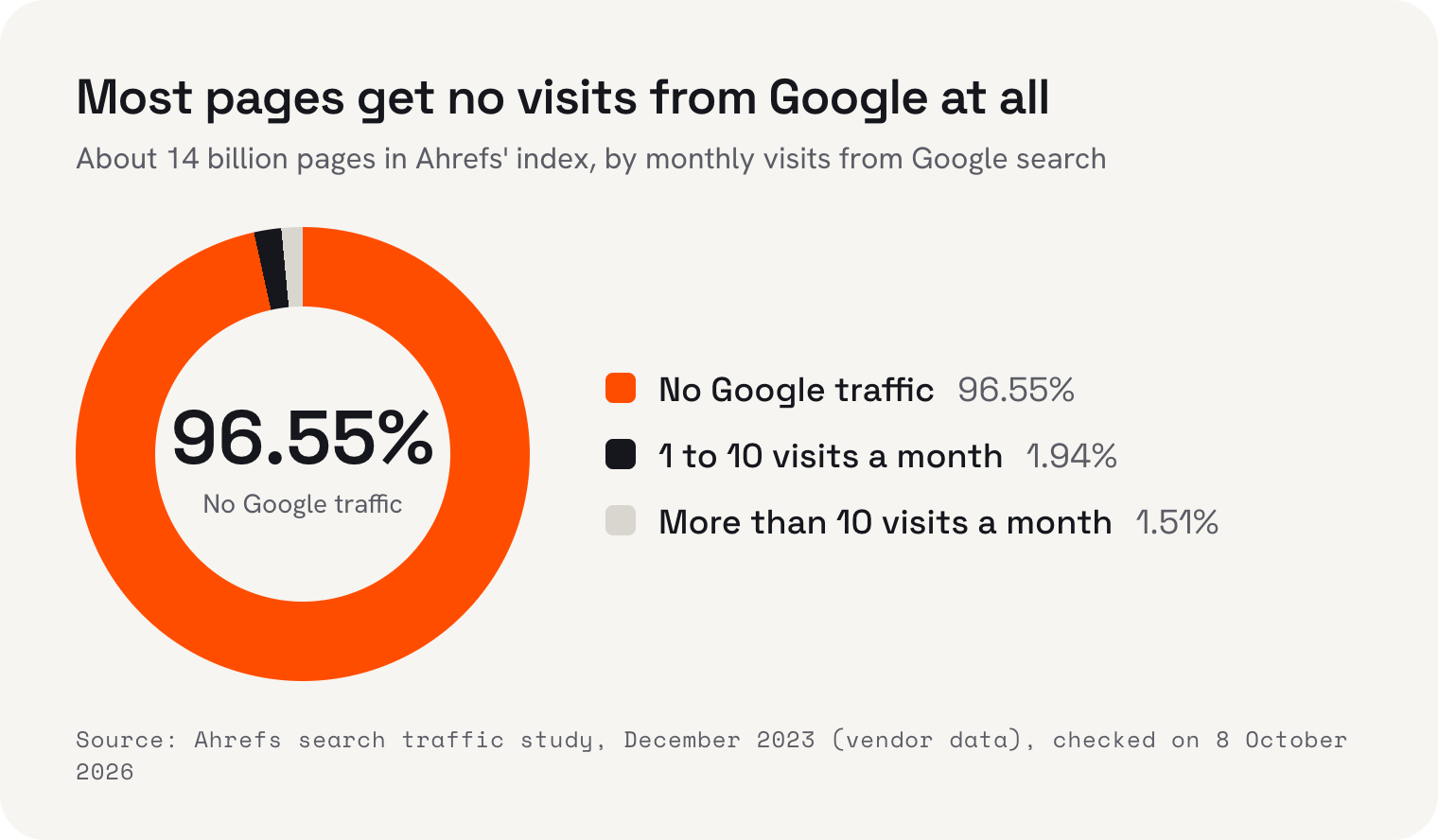
That chart is sobering, and useful. The three reasons Ahrefs gives map neatly onto small business sites: nobody searches for the topic, no other sites link to the page, or the page isn't what searchers want. A page called "Our philosophy" fails the first test. A page called "Gel nails: prices, how long they last and aftercare" passes it.
Be patient with this door. Google's starter guide says some changes take effect in a few hours and others take several months. If your site is new and few other sites link to it, submit a sitemap in Search Console so Google can find all your pages. Google says a sitemap matters less for small sites of about 500 pages or fewer, as long as your pages link to each other.
Remember that line next time an email promises page one. Google advises being wary of SEO firms that contact you out of the blue.
Don't forget Bing
Google dominates, but it isn't the whole market. In StatCounter's figures for September 2026, Bing handled 5.29% of searches worldwide, with Yahoo, Yandex, DuckDuckGo and Baidu sharing most of the rest. Five percent sounds small until you remember it costs almost nothing to cover.
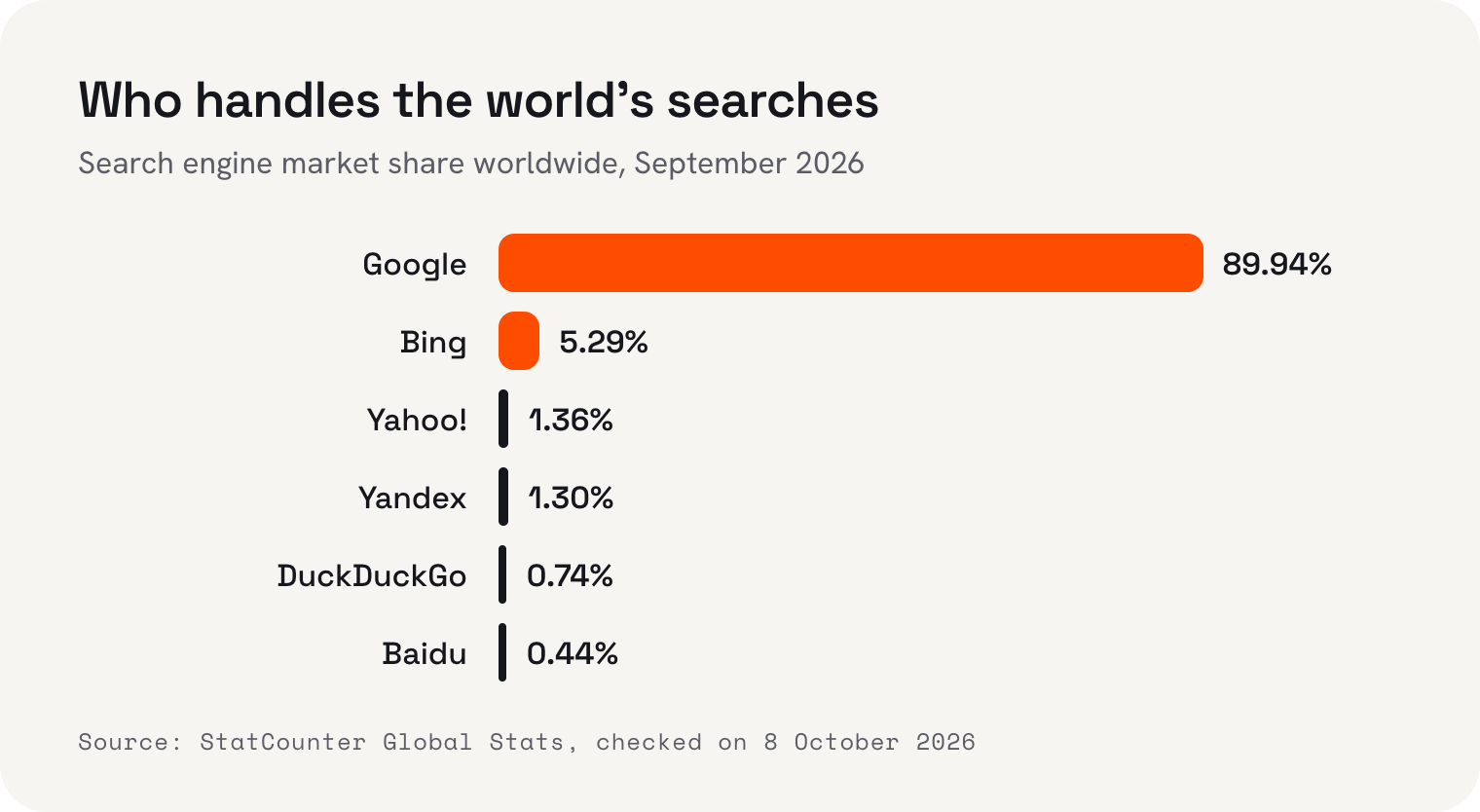
Once your site is in Bing Webmaster Tools, look at IndexNow. It's an open protocol for telling search engines straight away when a page is added, changed or removed, and the IndexNow site lists Microsoft Bing, Naver, Seznam.cz, Yandex and Yep as taking part. Google isn't on that list, so it doesn't replace Search Console.
Door 2: maps and listings
For a local business, the map is often the busiest door of all, and people walk through it to your website when they tap the website link on your Google Business Profile. Getting onto the map and ranking there is a big subject, which we've covered in our guide to local SEO. For traffic, two details matter.
First, make sure the link is there and points to the right page. For a single-location business that's usually the home page; for a booking business it may be better to point at the booking page. Second, check the numbers. Google's Business Profile performance report counts website clicks alongside calls, direction requests, bookings and the searches people used to find you.
Door 3: social media
With 5.66 billion social media user identities worldwide, your customers are almost certainly on Facebook, Instagram, TikTok, YouTube or LinkedIn. The catch is that plenty of posts are read, liked and scrolled past without anyone visiting your site.
So be deliberate about the posts that should send visits. Put your website link in every profile. When a post is meant to drive traffic, point it at one specific page, such as a service, an offer or a booking page, not your home page, and say what people will find there. Keep the rest of your posts for being seen; not every post needs a link.
 Facebook
 Instagram
 TikTok
 YouTube
Door 4: links from other websites
Referral traffic is people clicking a link to you on someone else's site. It's slow to build and easy to overlook, but it does two jobs: it sends visitors, and it shows search engines that other people vouch for you. Having no links from other sites is one of the main reasons Ahrefs gives for pages getting no search traffic. Good places to earn a link include:
- Directories your customers really use in your country and trade, not paid link farms
- Suppliers, brands you stock or partners you work with, many of which list stockists or installers
- Your local business association, chamber of commerce or main street group
- Local news, community sites and event pages when you sponsor, host or take part in something
- Industry or professional bodies you belong to
What not to do: don't pay for links or trade them. Google's spam policies name "buying or selling links for ranking purposes" and excessive link exchanges as link spam. A handful of genuine links from places your customers recognise is worth more than hundreds bought in bulk.
Door 5: email
Email is the one door you own. No social feed decides whether your past customers see it. Mailchimp's own benchmarks, from campaigns sent to at least 1,000 subscribers and last updated in December 2023, are a useful yardstick. That's vendor data, and Mailchimp warns that Apple's privacy features make open rates less reliable, so treat clicks as the number that matters.
To turn email into website visits, give each message one reason to click: a new service page, a seasonal offer, an answer to a question customers keep asking. Then make sure you're allowed to send it. Our guide to getting more customers online covers the consent rules in the UK and US.
Door 6: ads
Ads are the only door that opens on the day you want it to, and the only one that closes when you stop paying. Use them to test an offer quickly, to fill a quiet week, or to cover searches you don't yet rank for. On Google Ads you set an average daily budget; Google says a campaign can spend up to twice that on a single day, but won't charge more than 30.4 times it in a month.
Ad traffic is only as good as the page it lands on, so send each ad to the page about exactly what it offers. For choosing between Google campaign types, see our guide to Performance Max and Search campaigns.
 Google Ads
 Meta
- Microsoft Advertising
Tag your links so you can tell the doors apart
Here's the technical step most small businesses skip, and it's the one that makes all the others measurable. Google Analytics sorts visits into channels using rules: a visit is Email if its source or medium is "email", Paid Social if it comes from a social site with a paid medium, and so on. A visit with no source information counts as Direct, and one whose labels match no rule is Unassigned. Either way, the campaign that sent it disappears from view.
The fix is UTM parameters: a few labels added to the end of a link. Google says you should always set three: utm_source (where, such as newsletter or facebook), utm_medium (what kind, such as email or cpc) and utm_campaign (which push, such as spring_sale). A tagged link to your offers page might end in ?utm_source=newsletter&utm_medium=email&utm_campaign=spring_sale. Google also warns that "Parameter values are case sensitive", so pick lowercase and stick to it, or Facebook and facebook become two sources.
Tag the website link on your Google Business Profile, your social bios, every email and every QR code. Then open the Traffic acquisition report in Google Analytics, which by default groups sessions by channel and shows where both new and returning visitors came from.
Which doors bring customers, not just clicks
This is where traffic stops being a vanity number. Here's what it looks like with example figures. Take a sample business in Kahu that takes bookings online and whose website runs on Kahu Sites. Kahu's Site Analytics reads from the site's Google Analytics and shows the sample business's visits over 30 days by channel.
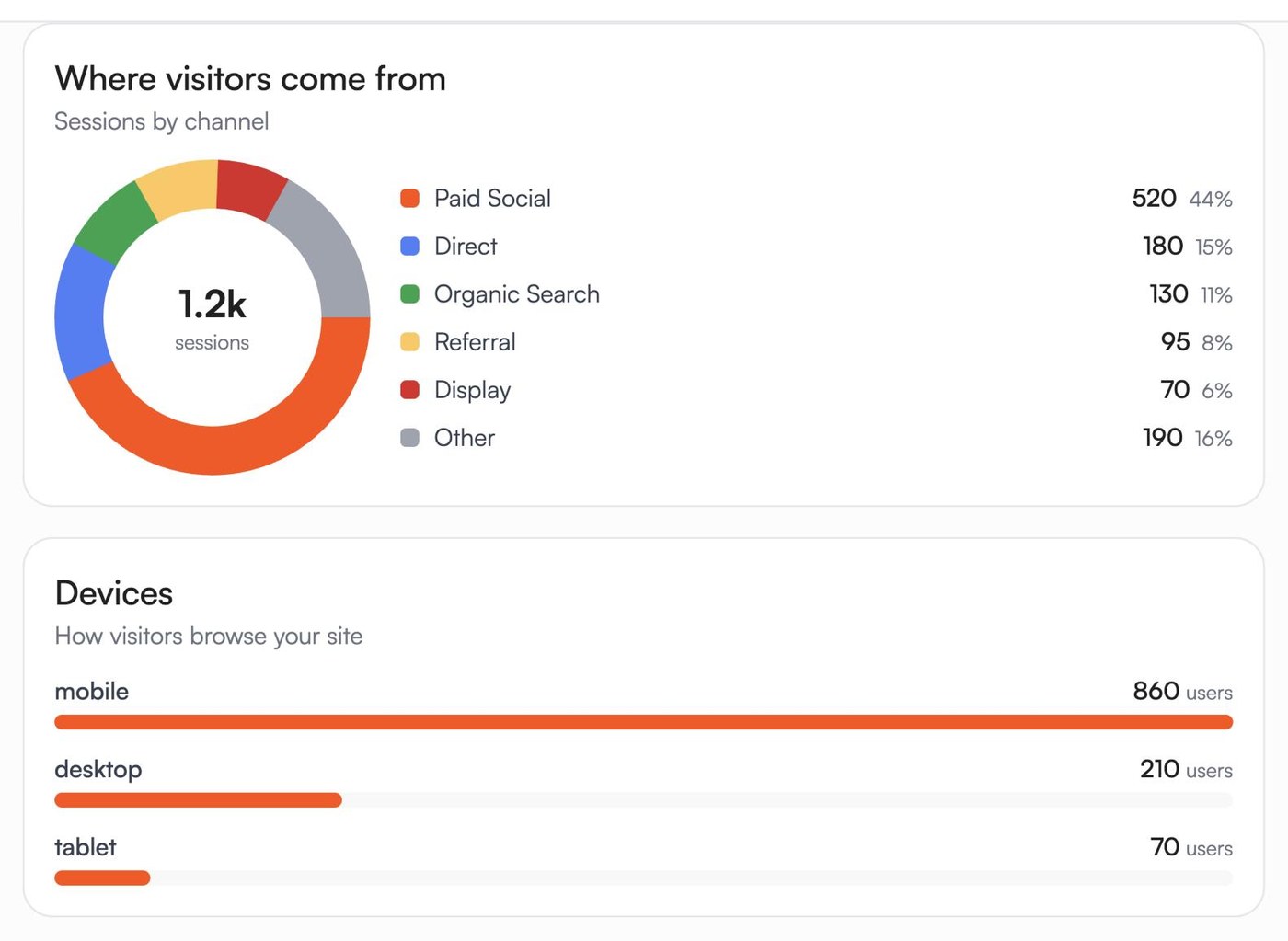
On that screen alone, paid social looks like the star: 520 sessions, 44% of everything. Organic search brought 130, about 11%, and referrals 95. If you judged by traffic, you'd put more money into the social campaign. Now look at the same sample account by key actions, the events the business marked as mattering, which here are bookings.
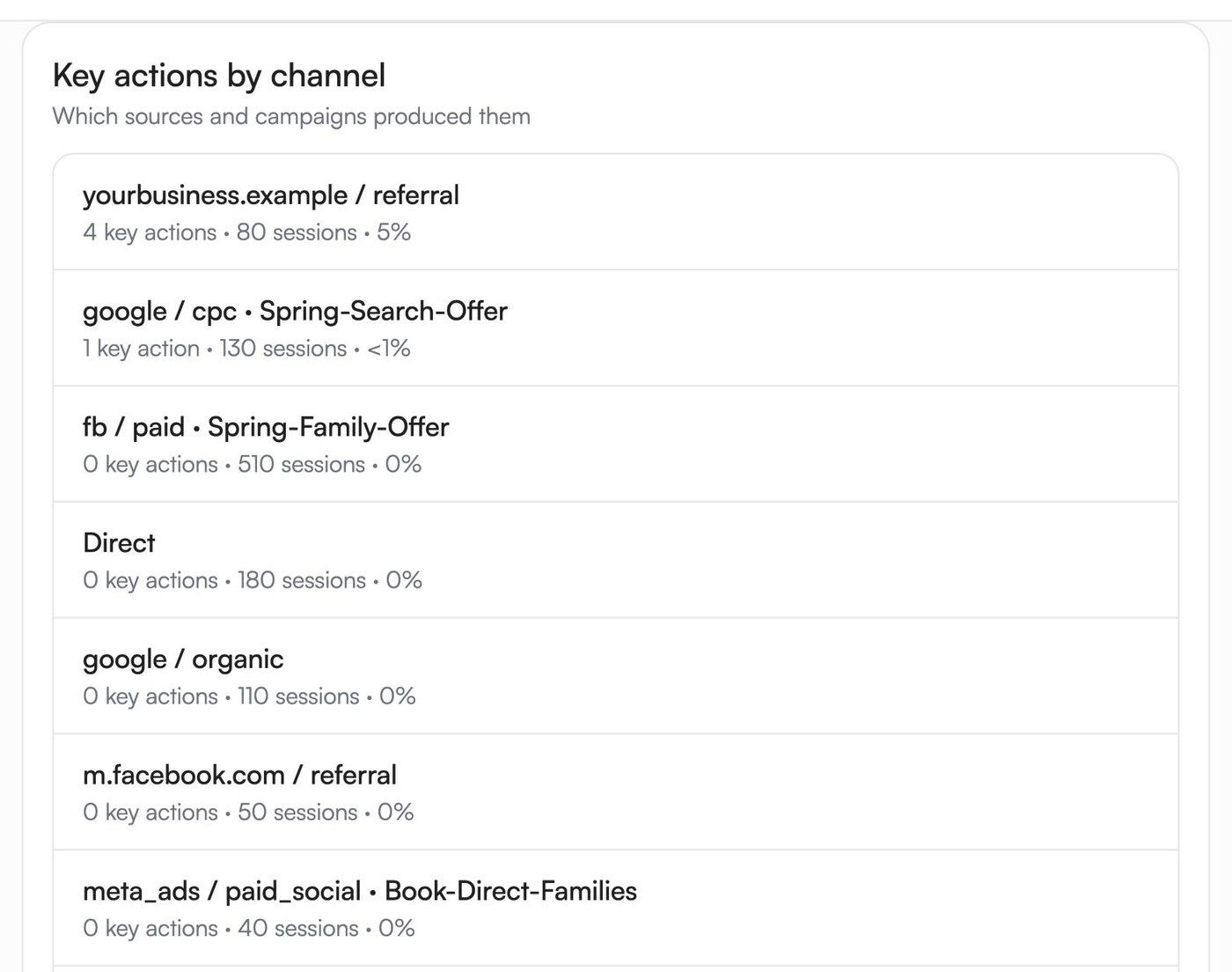
The picture flips. The paid Facebook campaign brought 510 sessions and no bookings. A Google search ad brought 130 sessions and one booking. A small referral row of 80 sessions produced four of the five. The biggest door wasn't the one customers came through. That doesn't mean the social ad was worthless, but it does mean more of the same traffic won't fix anything, and the first job is finding out why that row converts and the big one doesn't. Our guide to why a website isn't getting leads goes through what to check.
To get this view on your own site, mark your important events as key events in Google Analytics: a form sent, a booking made, a phone number tapped. Without them, your reports can show thousands of visits and no idea whether any became customers.
 Where Kahu fits


A 20-minute monthly traffic check
Search traffic moves slowly, so checking daily mostly produces worry. Once a month is enough. Put this in your calendar.
- 1Search Console: last three monthsNote clicks and impressions, then scan the top queries. Are they searches from people who could buy from you? Any surprises are page ideas.
- 2Bing Webmaster ToolsA quick look at Bing's clicks and anything it flags as a problem with your pages.
- 3Business Profile performanceWebsite clicks, calls and direction requests for the month. Compare with the month before, not with yesterday.
- 4Traffic acquisition and key eventsWhich channels brought sessions, and which brought key events. Check for a growing Unassigned row, which usually means untagged links.
- 5Pick one door to work onChoose one source for next month: a new page, a tagged email, a local link, or a small ad test. Then measure the same way.
If you'd rather not build and look after the website yourself, that's what Kahu Sites is for: you pick a design and Kahu writes your site in your own words, hosts it, and changes it whenever you ask, with hosting, SSL and a free web address included. Nothing goes live until you say so.
I'm Anurag Shukla, a tech writer at KahuLogic, a New Zealand company with a team across Australia, New Zealand and India. We build and look after websites and marketing for small businesses, and this is how I'd explain website traffic to any owner, whether or not you ever use us.
Frequently asked questions
How long does it take to get traffic from Google?
Google's own starter guide says some changes take effect in a few hours and others take several months. New pages on a new site with few links from other websites are usually the slowest. Submitting a sitemap in Google Search Console helps Google find the pages, but nobody can guarantee when or where they will rank.
What is the fastest way to get more website traffic?
Paid ads and emails to your existing customers bring visits the same day. Social posts with a link to a specific page bring visits for a day or two. Search and links from other websites take longer but keep bringing visitors after you stop working on them.
Why does Google Analytics show so much Unassigned or Direct traffic?
Google Analytics sorts visits into channels by matching their source and medium against rules. When nothing matches, the visit is Unassigned, and visits with no source information count as Direct. Adding utm_source, utm_medium and utm_campaign to the links you share in emails, social bios, QR codes and your Business Profile tells Analytics where those visits came from.
Do I need Bing Webmaster Tools if I already use Google Search Console?
It's worth the few minutes. Bing handled 5.29% of searches worldwide in September 2026, according to StatCounter, and you can import your sites from Search Console, where Bing verifies them automatically and copies your sitemaps.
Is it worth buying website traffic or backlinks?
Paid ads aimed at real customers can be worth it. Services that sell bulk visits or links are not. Google's spam policies treat buying or selling links for ranking purposes as link spam, and bulk visits rarely include anyone who would buy from you.
Does more website traffic mean more customers?
Not necessarily. Some sources bring plenty of visits and few enquiries. Mark the actions that matter, such as forms, bookings and calls, as key events in Google Analytics, and judge each source by those, not by visits.
Sources and further reading
- Google Search Central: in-depth guide to how Google Search worksdevelopers.google.com
- Google Search Central: SEO starter guidedevelopers.google.com
- Google Search Central: do you need an SEO?developers.google.com
- Google Search Central: learn about sitemapsdevelopers.google.com
- Google Search Central: spam policies for Google web searchdevelopers.google.com
- Google Search Console Help: Performance reportsupport.google.com
- Google Analytics Help: default channel groupsupport.google.com
- Google Analytics Help: Traffic acquisition reportsupport.google.com
- Google Analytics Help: collect campaign data with custom URLssupport.google.com
- Google Business Profile Help: Business Profile performancesupport.google.com
- Bing Webmaster Blog: import sites from Google Search Consoleblogs.bing.com
- IndexNowindexnow.org
- StatCounter: search engine market share worldwidegs.statcounter.com
- Ahrefs: search traffic study (2023)ahrefs.com
- Mailchimp: email marketing benchmarksmailchimp.com
- DataReportal: Digital 2026 Global Overview Reportdatareportal.com
- Google Ads Help: about your average daily budgetsupport.google.com