Performance Max or search: which should a small business run first?
Muskaan Sharma·Updated 8 Oct 2026·13 min read

For most small businesses, start with a Search campaign. You choose the searches you pay for, you can read exactly what people typed, and a small budget isn't spread across YouTube, Display and Gmail before you know what works. Add Performance Max once conversion tracking counts real enquiries or sales, Search is paying for itself, and you have the images, video and copy it needs. Run both by keeping your best searches as exact match keywords in Search, giving Performance Max its own budget, adding brand exclusions and negative keywords, and judging both on real customers.
If you've opened Google Ads recently, you'll have been nudged towards Performance Max. It's Google's campaign type that runs across Search, YouTube, Display, Discover, Gmail and Maps from one budget, and it promises to find customers you'd never have thought to look for. Meanwhile the old-fashioned Search campaign sits there, quietly asking you to pick keywords and write ads. For a café, a physio clinic, a motel or a bookkeeping practice with a few hundred a month to spend, which one should come first?
I'm a user researcher, so my job is understanding what people actually do, and that includes owners trying to make sense of an ad account. My short answer is Search first, Performance Max later, and both together only with a few guard rails. We build websites and ads for small businesses at KahuLogic, so I'll mention our own tool once near the end, but everything here works in any Google Ads account.
The difference in one sentence each
A Search campaign shows text ads to people who type something into Google, and you decide which searches count by choosing keywords. Performance Max is what Google calls a goal-based campaign type: you give it a goal, a budget, your assets (headlines, images, video, a logo) and some hints about your customers, and Google's AI decides where across its whole network to show your ads and to whom.
Google's own help page says Performance Max is designed to complement keyword-based Search campaigns, not replace them, and recommends it when you have specific conversion goals like online sales or leads and want to reach people beyond Search. That word complement matters. Google isn't telling you to pick one forever. It's telling you Performance Max works best layered on top of something that already works.
| Search campaign | Performance Max | |
|---|---|---|
| Where ads show | Google search results (plus search partners if you leave them on) | Search, YouTube, Display, Discover, Gmail and Maps |
| What you choose | Keywords, match types, ads, landing pages | A goal, assets, audience signals and optional search themes |
| What you can read | Every keyword and the search terms report | Channel performance, search terms and asset reports, less detail per click |
| What it needs to work | A clear list of searches that mean someone wants to buy | Accurate conversion tracking, plenty of images, copy and ideally video |
| Suits a small budget when | Demand already exists and people search for what you sell | Search is already profitable and you want more reach |
Why Search usually comes first on a small budget
The best thing about a Search campaign is that the customer has already raised their hand. Someone typing “emergency plumber near me” or “wedding cake order” wants something now, and you only pay when they click. That intent is the most valuable thing Google sells, and Search lets you buy it directly.
The second reason is learning. Every week, the search terms report shows you the exact words people used before clicking. A dog groomer might discover people search “mobile dog wash” far more than “grooming salon”. A guesthouse might learn half its clicks come from people searching for a nearby wedding venue. That knowledge is useful well beyond ads: it tells you what to put on your website, your menu board and your next flyer. Performance Max gives you search terms too, but they're one report among many, and the campaign is busy spending on other channels while you read.
The third reason is control when money is tight. With Search you choose match types, so you can start with exact and phrase match on the handful of searches that clearly mean business and widen later. You can pause one keyword that's burning money without touching anything else. On a budget of a few hundred a month, being able to say “not that search” is worth more than reach.
One thing to know about budgets either way: Google treats your daily budget as an average. On any one day a campaign can spend up to twice its average daily budget, and across a month up to 30.4 times it. A US$10 daily budget can spend US$20 on a busy Tuesday, but no more than US$304 in the month. That's the same for both campaign types, so plan monthly, not daily.
What Performance Max needs before it can work
Performance Max learns from the conversions you report to it. If your tracking counts page views, button clicks or duplicate form submissions, it will cheerfully find you more of those. That's not a flaw in the AI. It's doing exactly what it was told. So the readiness check is mostly about what you're telling it.
- Conversion tracking that counts real enquiries, bookings, calls or sales as primary conversions, and nothing else. Secondary conversions are only for watching; primary ones steer the bidding.
- Enough of those conversions to learn from. Google's Smart Bidding guidance suggests judging results over longer periods with at least 30 conversions, or 50 if you bid for a return on ad spend.
- A way to tell good leads from time-wasters. Google's own Performance Max advice is to optimise for qualified or converted leads, as close to the final sale as possible.
- Creative for every placement: at least 3 headlines (Google recommends 11 or more), a long headline, 2 descriptions, landscape and square images (4 or more of each recommended) and a square logo.
- Your own video, ideally. If you don't add one, Google may build videos from your images and text. To stop that, upload your own in landscape, square and vertical.
- For shops, a Merchant Center account with complete product data, linked to Google Ads before you build the campaign.
The tools behind that list are free. Google Analytics can feed key events into Google Ads once the two accounts are linked and auto-tagging is on. Merchant Center holds your product feed if you sell physical products. And if many of your leads become customers later, on the phone or in person, enhanced conversions for leads uses hashed details from your form (Google uses SHA256 hashing before the data leaves your site) to connect those offline sales back to the ad that started them.
 Google Ads
 Google Analytics
- Google Merchant Center
If you sell products, one detail is worth knowing before you start. Google's help page is plain about it: “You can't change the Merchant Center account after the campaign is created.” If you're planning to move your shop or merge accounts, do that first.
Where Performance Max genuinely earns a place
I don't want to make Performance Max sound like a trap. It's a good fit for some businesses, and Google says it's used by over one million advertisers. These are the situations where I'd consider it early rather than late.
A shop with a product feed. A homewares store, a bike shop or a bakery selling hampers online can feed its products through Merchant Center, and Performance Max can show them with prices and photos across Search, YouTube and the rest. That's something a text-only Search campaign can't do. A business where the visual sells. A guesthouse with lovely rooms, a florist or a tattoo studio has images that do more work than a headline, and Performance Max puts them in front of people on YouTube, Gmail and Discover. A business with steady conversions already. If your Search campaign brings a few enquiries a week and you're tracking them properly, Performance Max has something real to learn from.
Google's own figure is that advertisers who adopt Performance Max see an average of 27% more conversions or conversion value at a similar cost, even when they already use broad match and Smart Bidding in Search. That's vendor data from Google's own accounts in October and November 2023, and averages hide a lot of small accounts. I'd read it as “worth testing once you're ready”, not as a promise.
Do they bid against each other?
This is the question owners ask most once both are running. Google's rule is clear on paper. If someone's search is identical to an exact match keyword in your Search campaign, Google prioritises the Search campaign over Performance Max. Phrase and broad match keywords sit on the same level as Performance Max search themes, and then Google picks the most relevant option and the ad with the highest Ad Rank. Google also says Performance Max may occasionally serve on exact match terms if your Search campaign is limited by budget.
In practice, overlap happens more than the rule suggests. Optmyzr, a company that sells PPC management software, looked at 503 accounts it manages during February 2025. This is vendor data. It found search terms in Performance Max that exactly matched Search keywords in 91.45% of accounts, 56.29% of Search campaigns and 27.86% of ad groups. The interesting part is what happened next.
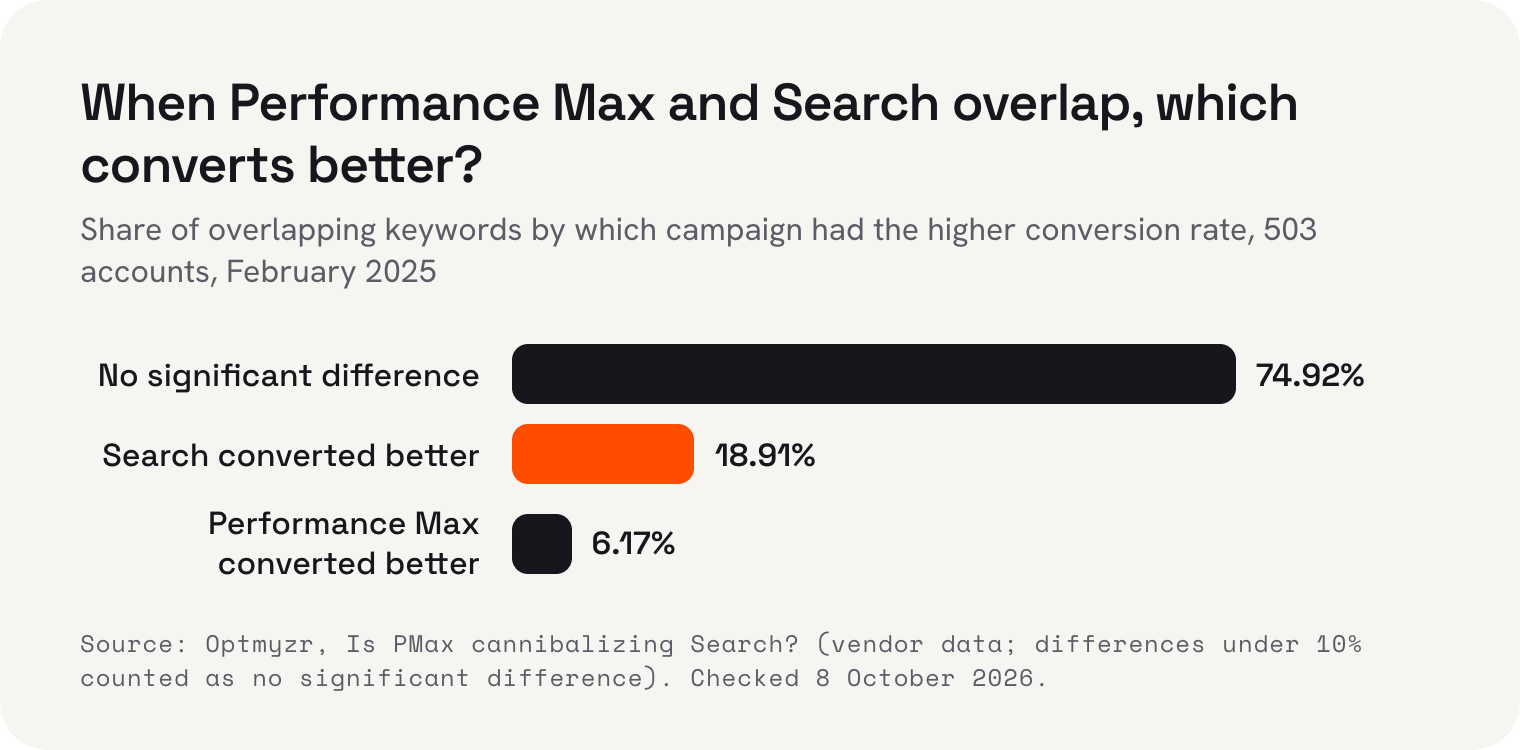
In 74.92% of overlapping cases there was no meaningful difference in conversion rate. When there was a difference, Search won 18.91% of the time against 6.17% for Performance Max. Optmyzr's own suggestion is that overlap often happens when the Search campaign isn't eligible for the auction at that moment, for example because its budget has run out or its schedule or location settings exclude that person. It didn't test that directly, so treat it as a sensible guess.
My reading for a small business: overlap is real, but it mostly costs you clarity rather than money. The fix isn't to panic. It's to make sure your best searches are protected in Search, and that Search has the budget to show up when they happen.
How to run both without them fighting
If you've reached the point where both make sense, these are the guard rails I'd put up, in this order.
- 1Keep your money searches as exact matchPut the five to twenty searches that clearly mean someone wants to buy into Search as exact match keywords. Those are the ones Google prioritises over Performance Max.
- 2Don't starve SearchIf your Search campaign is limited by budget, Performance Max may pick up searches you meant for Search. Fund Search properly first.
- 3Give Performance Max its own budgetStart it with a separate amount you can afford to test, so it doesn't eat into what already works.
- 4Add brand exclusionsIn Performance Max settings, exclude your own brand name so people already searching for you go through your Search campaign, where it's cheaper and easier to read.
- 5Add negative keywordsPerformance Max negatives work on Search and Shopping inventory only. Add the obvious ones: jobs, free, DIY, courses, places you don't serve.
- 6Use the same conversion goalsGoogle recommends Performance Max uses the same goals as your Search campaigns, so both are aiming at the same kind of customer.
Account-level negative keywords apply to every Search and Shopping placement in the account, Performance Max included, so if there's a word you never want to pay for, set it once at account level. Brand exclusions in Performance Max cover Search, Shopping and YouTube search inventory, which is where your brand searches happen. And search themes, up to 50 per asset group, are optional hints about what people search; they don't override exact match keywords in Search.
Test it before you trust it
Google Ads has a built-in way to measure whether Performance Max adds anything: an uplift experiment. It splits traffic between a group that keeps your existing campaigns and a group that adds Performance Max, and the split is 50% by default. You can only test with active campaigns. It's the honest way to answer the question “would those customers have found me anyway through Search?”
Give it time, and don't judge it on the last few days. Google's own advice is to allow for the delay between a click and a conversion: if your conversions usually take seven days, leave the most recent seven days out when you evaluate. For a wedding venue or a renovation business where enquiries take weeks to become bookings, the delay is longer still.
Judge both on customers, not conversions
Both campaign types report conversions, and both will count whatever you've told them to count. So the honest comparison is cost per real customer, worked out outside Google Ads. Each month, note what each campaign spent and how many paying customers you can trace back to it. A Performance Max campaign that reports 40 conversions and two customers is worse than a Search campaign reporting 10 conversions and five customers.
Performance Max reporting is much better than it was. Google added a Channel performance page showing how results split across Search, YouTube, Display and the rest, and full search terms reporting. Use them. If most of the spend goes to Display and YouTube while the conversions come from Search, you've learned something important about where your customers really are.
Where Kahu fits
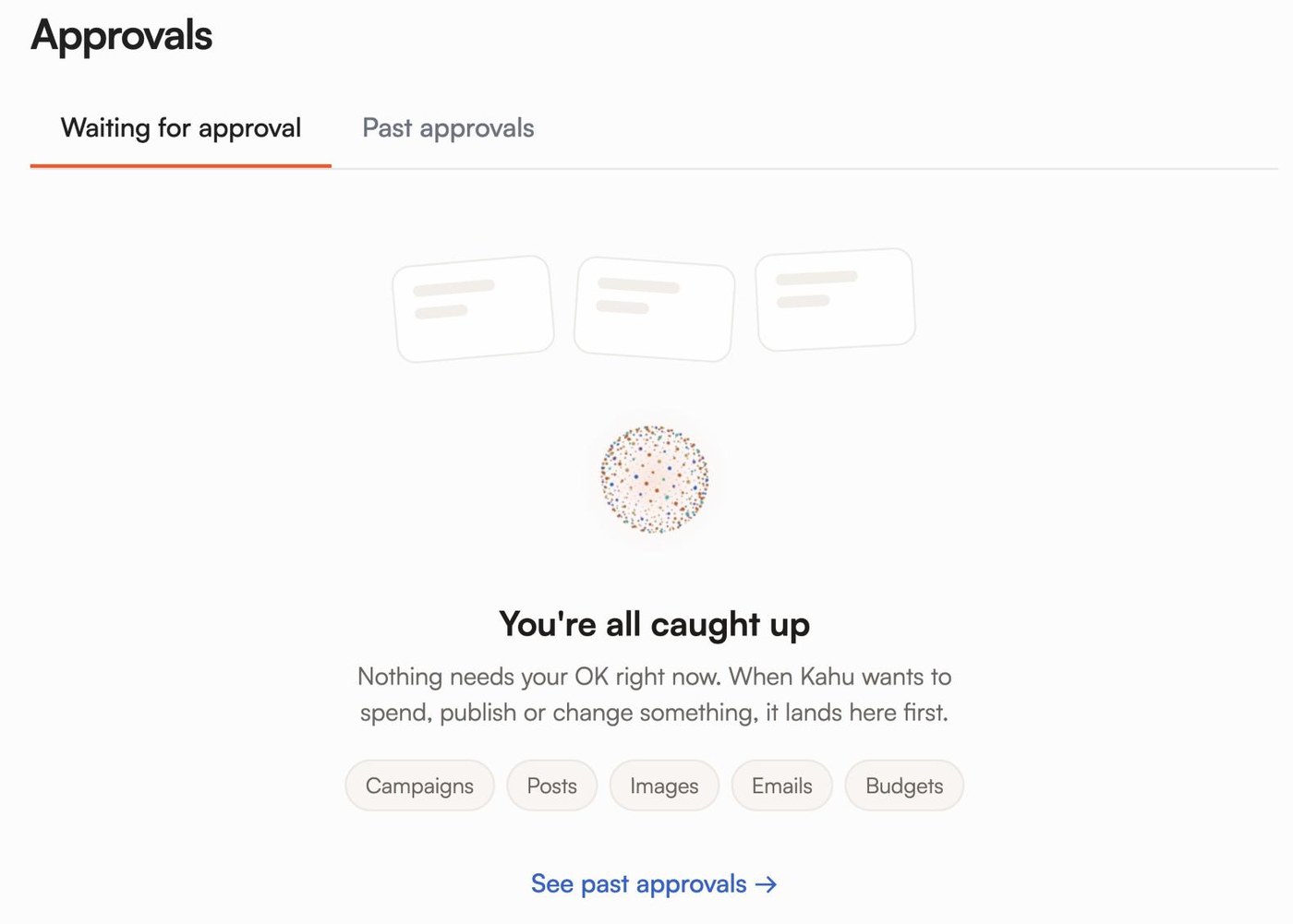
If you'd like help without handing over the keys, here's what our tools do. Kahu Reach drafts Google and Meta ads for your approval, and nothing runs until you approve it. Every enquiry from your website lands in Kahu CRM with where it came from, so you can count customers per campaign rather than clicks. Website, CRM, SEO reports and Google and Meta ads are included from the Growth plan, US$179 a month (US$149 billed yearly), and Starter, Growth and Pro start with a 14-day free trial.
 Where Kahu fits




So, which first? If people search for what you sell, start with Search, track real enquiries, and learn the words your customers use. Add Performance Max when Search pays for itself, you have the creative it needs, and you're ready to test it properly. And if you sell products with a feed or your photos do the selling, try it sooner, with its own budget and your brand excluded.
I'm Muskaan Sharma, User Researcher at KahuLogic, a New Zealand company with a team across Australia, New Zealand and India. We build and look after websites and marketing for small businesses, and this is the order I'd set up Google Ads in, whether or not you ever use us.
Frequently asked questions
Should a small business use Performance Max or Search first?
Most small businesses should start with a Search campaign. It shows ads only to people searching for what you offer, lets you choose and read the exact searches you pay for, and keeps a small budget in one place. Add Performance Max once conversion tracking counts real enquiries or sales and Search is paying for itself.
Does Performance Max replace Search campaigns?
No. Google describes Performance Max as designed to complement keyword-based Search campaigns. Both can run in the same account, and when a search is identical to an exact match keyword in a Search campaign, Google prioritises the Search campaign.
Will Performance Max steal traffic from my Search campaign?
It can. Google prioritises Search for searches identical to exact match keywords, but Performance Max may serve on those terms if the Search campaign is limited by budget. Optmyzr's vendor analysis of 503 accounts in February 2025 found overlap in most accounts, though in about three quarters of overlapping cases conversion rates were similar. Keep key searches as exact match, fund Search properly and add brand exclusions to Performance Max.
What do I need before starting Performance Max?
Conversion tracking that counts real enquiries, bookings, calls or sales as primary conversions; enough conversions to learn from; headlines, descriptions, landscape and square images and a logo; ideally your own video in three orientations; and, for shops, a Merchant Center account with complete product data linked to Google Ads.
Can I add negative keywords to Performance Max?
Yes. You can add negative keywords to a Performance Max campaign from the Negative keywords tab on the Keywords page, or at account level. They apply to Search and Shopping inventory only, not to YouTube, Display or other placements.
How do I test whether Performance Max is worth it?
Use a Performance Max uplift experiment in Google Ads. It compares a group running your existing campaigns with a group that also runs Performance Max, using a 50% traffic split by default. Leave out the most recent days that are still waiting for conversions, and judge the result on paying customers, not just reported conversions.
Sources and further reading
- Google Ads Help: about Performance Max campaignssupport.google.com
- Google Ads Help: about keyword matching optionssupport.google.com
- Google Ads Help: multiply conversions with Performance Maxsupport.google.com
- Google Ads Help: Performance Max asset specificationssupport.google.com
- Google Ads Help: negative keywords in Performance Max campaignssupport.google.com
- Google Ads Help: use search themes with Performance Maxsupport.google.com
- Google Ads Help: apply brand exclusions to Performance Max or Search campaignssupport.google.com
- Google Ads Help: Performance Max with a Merchant Center feedsupport.google.com
- Google Ads Help: set up uplift experiments for Performance Maxsupport.google.com
- Google Ads Help: about Smart Biddingsupport.google.com
- Google Ads Help: about conversion trackingsupport.google.com
- Google Ads Help: average daily budgetsupport.google.com
- Google Ads Help: about enhanced conversions for leadssupport.google.com
- Google Ads Help: import Google Analytics key eventssupport.google.com
- Google: channel performance reporting coming to Performance Max (April 2025)blog.google
- Optmyzr: is Performance Max cannibalizing Search? (vendor data, February 2025)optmyzr.com