How to get more customers online: a 30-day plan for a small business
Rajesh Sharma·Updated 8 Oct 2026·14 min read

Most new customers find a small business through search and maps, reviews, social media, recommendations and ads, and they usually check more than one before they get in touch. Before paying for more attention, make sure people can find you, trust you and contact you easily, and that every enquiry gets a fast reply. Then follow a simple 30-day plan: fix your listings and contact paths in week one, build fresh reviews in week two, run one clear offer on one channel in week three, and contact past customers and test a small ad budget in week four. Keep what brings enquiries and drop what only brings clicks.
Ask most owners how to get more customers online and they'll name a channel: more posts, an ad campaign, a new website. But a new customer rarely arrives through one channel. They search, look at a map, read reviews, glance at your Instagram, check your website, and only then ring, message or book. Each step is a place they can drift off to someone else.
So this guide works in a particular order. First, where online customers actually come from. Then what a lead is, and the leaks that lose them. Then a 30-day plan you can follow alongside the day job, a week at a time, whether you run a café, a clinic, a salon, a shop or a consultancy.
One disclosure first. We build websites and ads for small businesses at KahuLogic, so a couple of sections mention our own product. Almost everything in the plan is free, works whatever you use, and is something you can do yourself this month.
Where online customers really come from
Search is still the front door. DataReportal's Digital 2026 report, which pulls together global survey data, says search engines remain the number one way online adults discover brands, with nearly one in three internet users aged 16 and over learning about new products and services through them. TV ads come second and social media ads third. For a local business, "search" also means the map: the few businesses that appear when someone types what they need and where.
But search is only where people start. BrightLocal, a company that sells review and local search software, surveys consumers every year about how they choose local businesses. Its 2026 survey of 1,002 US adults is the clearest picture I've seen of how much checking happens before anyone gets in touch.
The lesson is plain: people don't take one look and decide. Google is still the biggest place they read reviews, but its share in that survey dipped from 83% to 71%, while Facebook, AI assistants and Apple Maps grew, the last from 14% to 27%. Your customers check you in more places than a year ago, and your details need to agree everywhere they look.
 Google Business Profile
 Facebook
 Instagram
 Yelp
 Apple Maps
- ChatGPT
The detail of getting listed on those maps, from your Google Business Profile to Apple Business and Bing Places, is its own subject, and we've covered it in our guide to local SEO. Here I want to stay with the bigger question: once people can find you, how do you turn that into customers?
What counts as a lead, and how to get more of them
A lead is someone who has shown interest and left you a way to reply: a form, a message, a call, a booking request or an email sign-up. A follower isn't a lead yet, and nor is a website visit. Lead generation is simply the work of turning attention into a name and a way to reach them, then turning that into a conversation.
Very few people fill in a form called "Contact us". Most will take a clear, low-risk first step that helps them decide. Give them one: a quick quote, a booking, a free check or a short consultation, a sample, a trial session, a price list sent by message, or a place on a waitlist for something new. The best offer is the one that answers the question a customer is already asking you on the phone.
Then offer that step wherever people meet you: a short form or booking button on your website's key pages, a call button and website link on your Google listing, a clear link in your social profiles, and a WhatsApp or Messenger option for people who'd rather chat. Ask only for a name, a way to reply and what they need. Every extra field loses some people.
Fix the leaks before you buy more attention
Here's my honest opinion, as someone who runs a company that sells ads: buying attention before the basics work is the most common way small businesses waste marketing money. If people find you and can't tell what you do, or find two different phone numbers, or send an enquiry that waits until Monday, paying for more of them just multiplies the loss.
So before anything else, spend half an hour being your own customer. On your phone, search for what you do in your area, find yourself, and try to get in touch. Then check these:
- Are your hours, phone number and address the same on Google, Facebook, Instagram, Apple Maps and your website?
- Do you have reviews from the last three months, and have you replied to them?
- Can someone see what you do, who it's for and roughly what it costs within a few seconds of landing on your site?
- Is there one obvious next step on every page: book, call, message or ask for a quote?
- When you send yourself an enquiry, how long does it take to reach you, and how long until you reply?
If your site gets visits but no enquiries, our guide to why a website isn't getting leads walks through the six usual leaks and five tests to find yours. If your problem is earlier, people not finding you at all, start with local SEO. Either way, fix the leak first. It's the cheapest marketing you'll ever do.
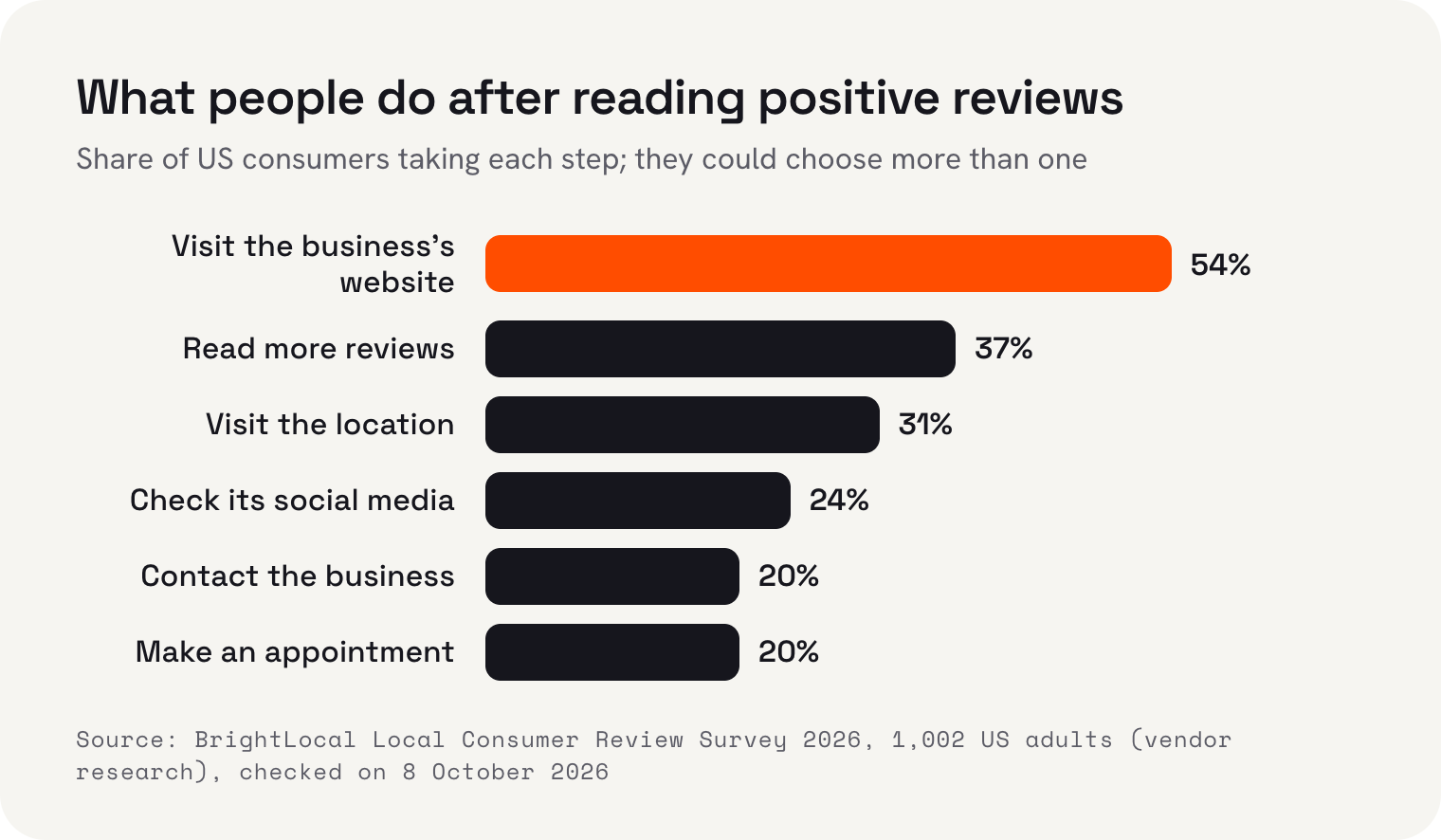
In BrightLocal's survey, two thirds of people did more research after reading good reviews, and about a third were ready to book or buy. The most common next step was the website. If your reviews are good and your website then confuses people, the reviews did their job and the site undid it.
The 30-day plan
One theme a week, a few hours each. Don't skip ahead to the ads in week four: each week makes the next one work better.
Days 1 to 7: be easy to find and easy to contact
Week one is housekeeping, and it's the week with the biggest payoff for the least money. Google's own advice on local ranking is short: verify your business, keep your information accurate, set your hours, including special hours, add photos, and reply to reviews. In its words, "Make sure your business info is as complete as possible in your Business Profile."
- 1Day 1 to 2: your Google listingClaim or check your Google Business Profile. Correct name, category, hours, phone, website link and a few real photos of your work or premises.
- 2Day 3: everywhere elseMake Facebook, Instagram, Apple Maps and any directory you're on say exactly the same thing. Old phone numbers and old hours lose customers quietly.
- 3Day 4 to 5: one next step per pageOn your website, make sure each main page ends with one clear action and that your phone number is a tap-to-call link on mobile.
- 4Day 6 to 7: test the routeSend yourself an enquiry from every place a customer could: the website form, Google, Facebook and Instagram. Note where each one lands and who sees it.
That last step matters more than it looks. Enquiries often arrive in four or five places: email, Facebook messages, Instagram DMs, the phone, a booking system. Write down where each one goes. You can't reply fast to messages you don't know have arrived.
Days 8 to 14: fresh reviews, and replies to all of them
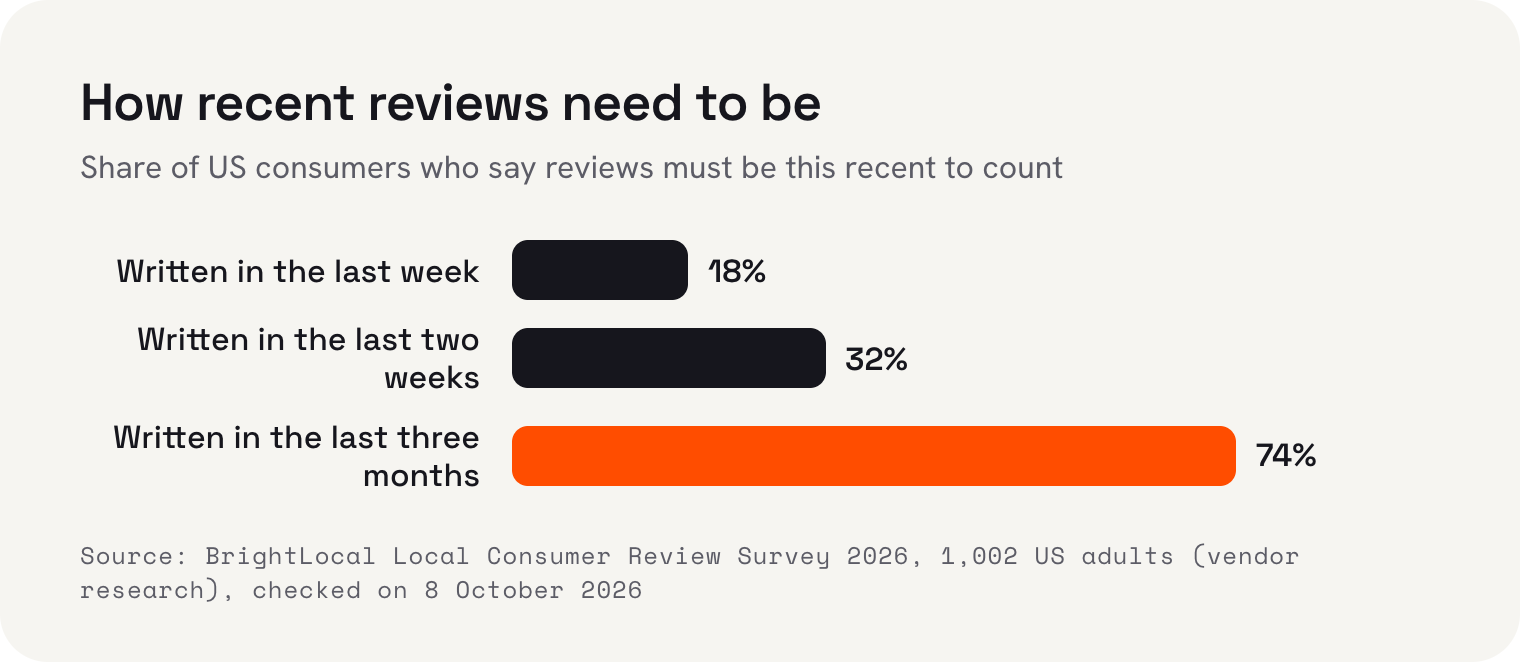
Reviews do two jobs at once. Google says the number and rating of your reviews feed how prominent your business looks in local results, and customers read them before they choose. BrightLocal's 2026 survey shows how much the bar has risen: 47% of consumers said they won't use a business with fewer than 20 reviews, and 74% said they only care about reviews from the last three months.
So this week, ask. Google suggests sending customers a direct link or a QR code to your review form. Put it in your thank-you message, on your receipt or invoice, or on a card at the counter, and ask at the moment people are happiest: when the job is done, the meal is over or the treatment has finished. Ask everyone, not only the customers you expect to be pleased.
Google calls review incentives "strictly prohibited". In the US, the FTC's 2024 rule bans buying fake reviews and offering incentives for reviews of a particular sentiment. And watch Yelp: unlike Google, it asks businesses not to request reviews at all, and says its software may not recommend reviews that look prompted. So ask for Google reviews, and simply let Yelp take care of itself.
Then reply to every review you get, good and bad. In the same survey, 89% of consumers expected owners to respond, and half said templated or generic replies made them less likely to choose a business. A calm, specific reply to a poor review is read by every future customer who sees it, which makes it some of the best advertising you'll write all year.
Days 15 to 21: one offer, one channel
Week three is where it's tempting to be everywhere at once. Don't. Pick one lead offer and one channel where your customers already spend time. Three posts that each show real work and end with the same clear next step will do more than a dozen scattered ones.
- Google Business ProfileBest when people search for what you do nearby. Add your offer to your profile, keep your photos current, and make the booking or call button work.
- FacebookA good home for offers, events and news your regulars can share. Post the offer, answer every comment, and pin it to the top of your Page.
- InstagramSuits visual work: food, hair, beauty, interiors, products. Show the result, say what it costs or how to book, and put the link in your bio.
 Google AdsLeave this for week four. Ads work best once you know which offer people respond to and where enquiries land.
Whichever channel you choose, send people somewhere specific: a post about a spring offer links to the spring offer page, not your home page. And from day 15, ask every new enquiry: "How did you find us?" Write the answer down. It's the cheapest analytics tool there is.
Days 22 to 30: past customers, then a small paid test
The people most likely to buy from you next month are the people who bought from you last year. Send past customers a short, useful message: new availability, a seasonal reminder, a new service, or the offer from week three. Keep it personal and short. You don't need a newsletter design to start.
Do it within the rules. In the UK, the ICO says marketing emails and texts to individuals need specific consent, with a "soft opt-in" for your own customers who bought something similar and were given a clear chance to opt out, then and in every message. In the US, the FTC's CAN-SPAM guide asks for a real postal address and unsubscribes honoured within 10 business days. Check your own country's rules, and never buy a list: the soft opt-in doesn't cover bought-in contacts.
Then, if the first three weeks are working, run a small paid test. On Google Ads you set your own daily budget. Google says a campaign can spend up to twice that on a busy day, but won't charge more than 30.4 times the daily amount in a month. Pick the offer that already brought enquiries, send the ad to the page about that offer, and give it a couple of weeks before judging it.
If you try Meta's lead ads, where people send their details through a form inside Facebook or Instagram, pick the form type with care. The default, "More volume", makes submitting quick. "Higher intent" adds a screen where people confirm their details, which Meta says filters out the only marginally interested. If you call every lead back, fewer and better is the right trade.
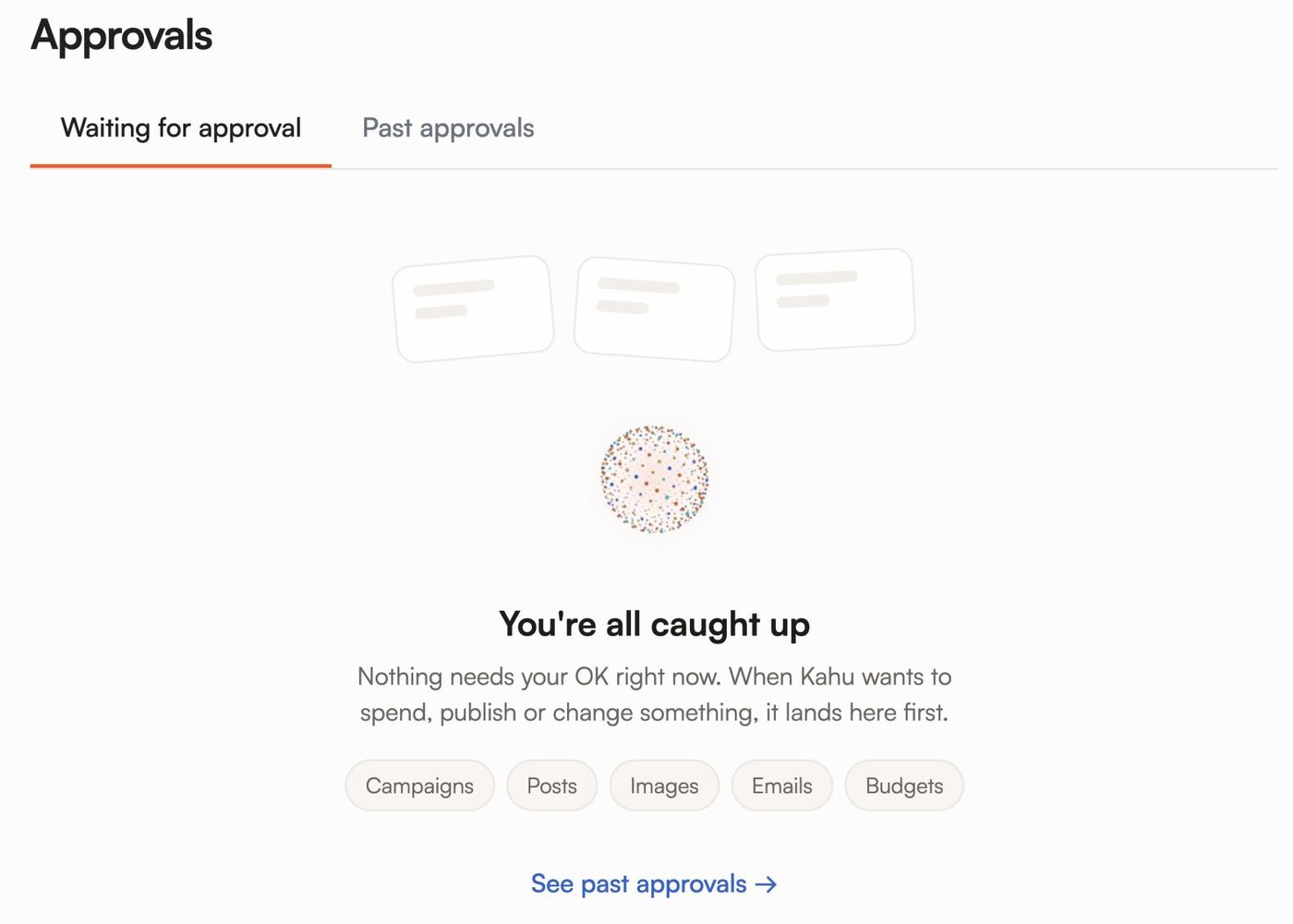
This is the part of the month where our own product fits, if you want help. Kahu Reach drafts Google and Meta ads for your approval, and nothing runs until you approve it.
 Where Kahu fits




Stop new leads going cold
All of this is wasted if an enquiry sits unanswered. Harvard Business Review's well-known study of online sales leads put it bluntly: "most companies are not responding nearly fast enough." Customers asking for a quote usually ask more than one business, and the first helpful reply has a real head start.
Three habits fix most of it. Get every lead into one list, not four inboxes. Reply the same day, even if it's only to say when you'll have an answer. And follow up once or twice if you hear nothing, because people mean to reply and forget. If you run Meta lead ads, download your leads often or connect a CRM: Meta keeps lead form data available to download for only 90 days.
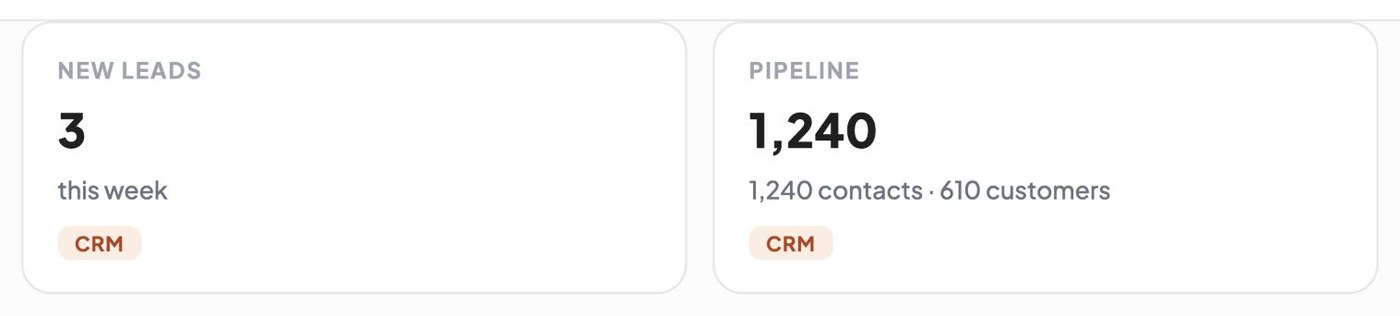
If your website runs on Kahu, every enquiry from your website lands in Kahu CRM with where it came from, which also answers the "how did you find us?" question for web enquiries without you asking. Whatever you use, a spreadsheet is fine to start if every lead goes in and you check it daily. Our guide to automating lead follow-ups goes further.
After day 30: keep what brings customers
At the end of the month, look at your enquiries and where each came from. Put next month's time into the source that brought the best customers, not the most clicks. If a channel brings nothing after three months of steady effort, try another. Keep reviews coming every week, because recency is what people check, and add ad spend only behind an offer that already sells.
None of this is clever: be easy to find, look trustworthy where people check, make the first step small and answer quickly. I'd back that combination over a bigger ad budget every time.
I'm Rajesh Sharma, founder and CEO of KahuLogic, a New Zealand company with a team across Australia, New Zealand and India. We build and look after websites and marketing for small businesses, and this is the plan I'd give any owner who wants more customers online, whether or not you ever use us.
Frequently asked questions
What is the fastest way to get more customers online?
Paid ads bring visits fastest, but they only pay off if your listing, website and replies are ready for the people they send. For most small businesses the quickest gains come from fixing what exists: correct listing details, fresh reviews with replies, one clear next step on your website, and same-day replies.
How do I generate leads online for a small business?
Give people a small, low-risk reason to get in touch, such as a quick quote, a booking, a free check or a trial, and make that step easy wherever they find you. Ask only for a name, a way to reply and what they need, keep every lead in one list, and reply the same day.
Should I buy an email or phone list to find new customers?
No. People who never asked to hear from you rarely buy, and contacting them can break the law. In the UK, the ICO says marketing emails and texts to individuals need specific consent, and the soft opt-in for existing customers doesn't cover bought-in lists. Build your own list from real customers and enquiries instead.
Can I ask customers for reviews?
On Google, yes: Google suggests sending customers a link or QR code to leave a review, but offering anything in return is strictly prohibited. Yelp is different and asks businesses not to request reviews at all. On every platform, never offer discounts, gifts or payment for reviews, and never post fake ones.
How much should a small business spend on online ads to start?
Start with an amount you could lose without worry while you learn. On Google Ads, a campaign can spend up to twice its average daily budget on one day, but Google won't charge more than 30.4 times the daily budget in a month. Run one offer to one matching page for a few weeks before deciding.
Do I need a website to get customers online?
You can get enquiries from a Google Business Profile and social media alone, but many people check a website before they contact a business. In BrightLocal's 2026 survey of US consumers, visiting the business's website was the most common thing people did after reading positive reviews, at 54%.
Sources and further reading
- BrightLocal: Local Consumer Review Survey 2026brightlocal.com
- DataReportal: Digital 2026 Global Overview Reportdatareportal.com
- Google Business Profile Help: tips to improve your local rankingsupport.google.com
- Google Business Profile Help: get reviews from customerssupport.google.com
- Yelp Support: Don't ask for reviewsyelp-support.com
- US Federal Trade Commission: final rule banning fake reviews and testimonials (2024)ftc.gov
- UK ICO: electronic mail marketingico.org.uk
- US Federal Trade Commission: CAN-SPAM Act compliance guide for businessftc.gov
- Google Ads Help: about your average daily budgetsupport.google.com
- Google Ads Help: how costs and bids worksupport.google.com
- Meta Business Help Centre: about lead adsfacebook.com
- Meta Business Help Centre: about instant form typesfacebook.com
- Meta Business Help Centre: about expired leadsfacebook.com
- Harvard Business Review: The Short Life of Online Sales Leads (2011)hbr.org