Why is my website not getting leads? Six leaks and how to find yours
Anirudh Yadav·Updated 8 Oct 2026·12 min read

If people visit your website but don't get in touch, the enquiries are leaking somewhere between the search and your reply. The six usual leaks are: the wrong people arriving, a first screen that doesn't say what you do, no prices or proof, a slow or awkward experience on a phone, a form that asks too much, and enquiries that wait hours for an answer. Check Google Search Console and your analytics to see which one you have, then fix that one first. More traffic won't help a site that leaks.
“We get plenty of visits, but nobody gets in touch.” If that's your website, you're in good company. It's one of the most common things small business owners tell us, whether they run a café, a clinic, a motel or a plumbing business.
I'm a user researcher, so when a site isn't working, I don't start with the design. I start with what people actually do on it: where they arrive, what they look at, where they stop. A website doesn't fail in one big way. It leaks, a little at each step between someone searching and you replying, and the fix depends on where your leak is.
One disclosure first. We build websites and the tools around them at KahuLogic, so some of what follows uses our own product. Everything here works whatever your site is built on, and every test in this guide uses free tools.
First, work out which kind of problem you have
There are two very different problems hiding behind “no leads”. Either not enough of the right people reach your site, or they reach it and leave. They need opposite fixes, so it's worth ten minutes to find out which one you have before you change anything.
Google Search Console, which is free, tells you about the first. Its Performance report shows impressions (how many times your site appeared in Google's results), clicks, click-through rate and your average position. If impressions are low, people aren't finding you. If impressions are healthy but clicks are low, your listing isn't persuading them.
Your analytics tell you about the second. In Google Analytics, the actions that matter to your business, like a form sent, a booking made or a phone number tapped, are called key events, and you mark them yourself with a star in the Events settings. If you've never done that, your analytics can show thousands of visits and no idea whether any of them turned into an enquiry. That's the first fix for a lot of sites.
 Google Search Console
 Google Analytics
 Google PageSpeed Insights
- Microsoft Clarity
A sample site: lots of visits, few bookings
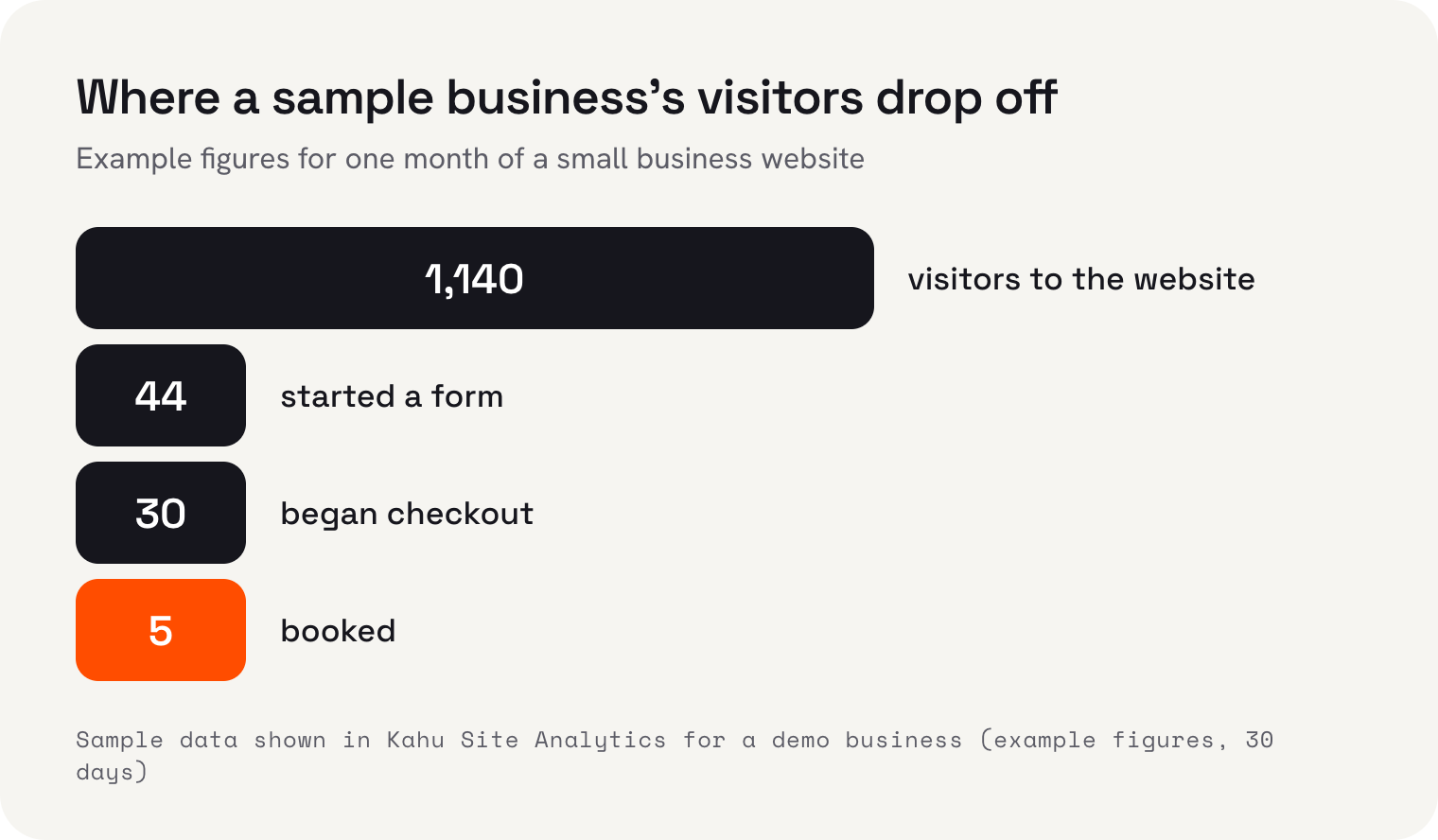
Here's what this looks like with example figures. Take a sample business in Kahu, one that takes bookings online and whose website runs on Kahu Sites. These are its sample numbers for 30 days, as Kahu's Site Analytics would show them, reading from the site's own Google Analytics.
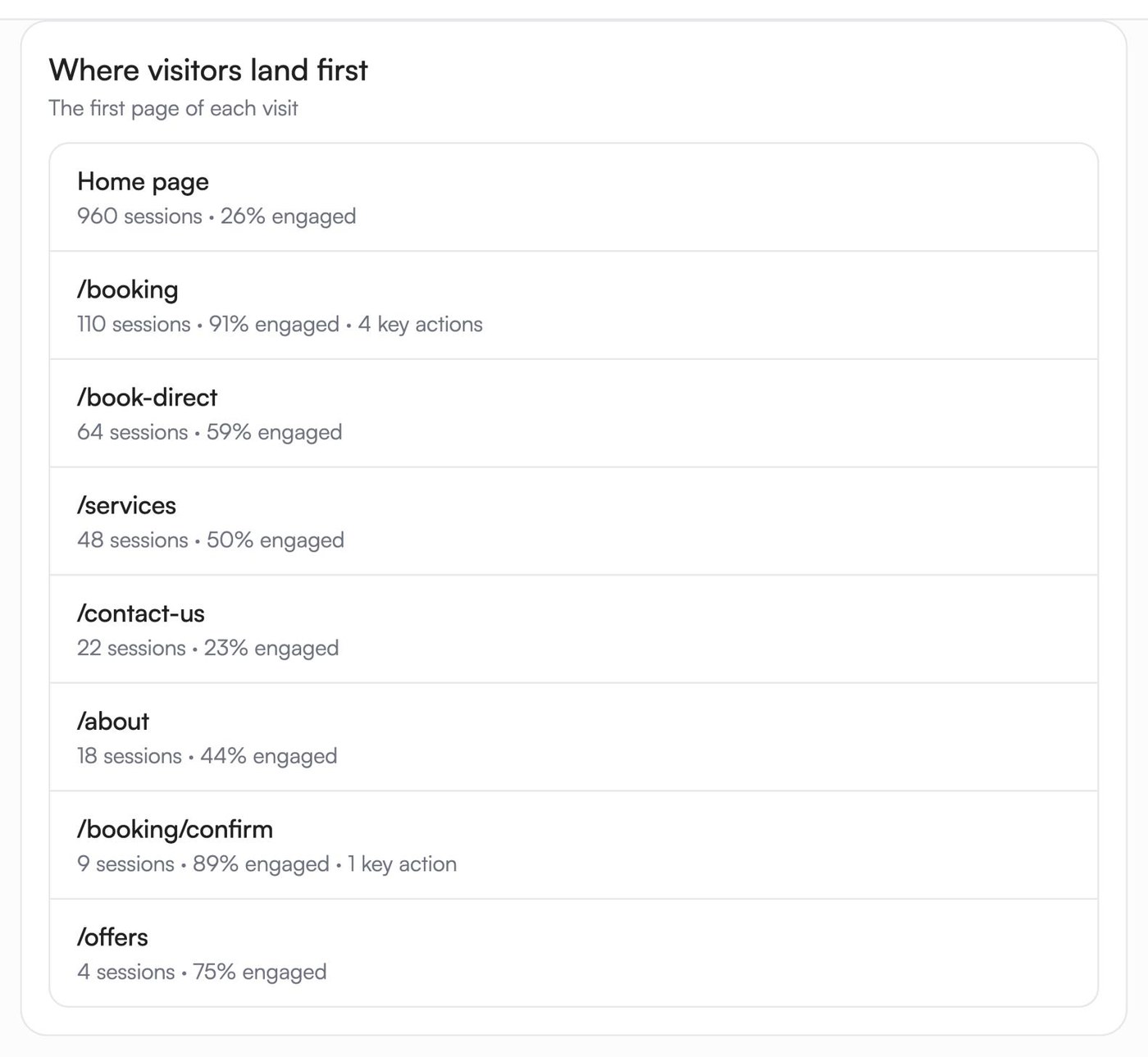
Read those numbers like a researcher and a story comes out. Plenty of people reach the site, so finding it isn't the main problem. The leak is what happens after people arrive. Most visits, 960 of them, landed on the home page, and only 26% of those engaged with it. The 110 visits that landed straight on the booking page behaved completely differently: 91% engaged, and four of the five bookings started there.
The paid Facebook campaign is the clearest case. It brought 510 visits, more than any other source, and none of them booked. That doesn't mean the ad was bad. It means the people it brought weren't ready to book yet, or didn't land somewhere that made booking easy. Those are the first two leaks below, and most sites have at least one of them.
Leak 1: the wrong people are arriving
Not every visit is a potential customer. Someone researching a weekend away six months from now, someone comparing prices for a school project, someone who tapped an ad by accident: they all count as visits. A site can have plenty of traffic and very little of it from people ready to buy.
In Search Console, look at the queries people used to find you. If most of them are for things you don't sell, or for places you don't serve, your pages are attracting the wrong searches. Google builds the blue link and the snippet under it from your page, matched to each search, so the clearest fix is pages that say plainly what you do and where. Google's own advice is to write titles that are descriptive and specific, not “Home”.
For ads, match the landing page to the ad. If the ad is about a spring deal on family rooms, it should land on the page about the spring deal on family rooms, not the home page. That's a big enough topic that we've written a separate guide to landing pages for ad traffic.
 Facebook
 Google Ads
Leak 2: nobody can tell what you do in ten seconds
That finding from Nielsen Norman Group, one of the best-known usability research firms, is old but it holds up in every test I've watched. People decide very quickly whether a page is worth their time, and they don't read to decide. In the same group's research, people read at most 28% of the words on an average page, and 20% is more likely. They scan, usually in an F shape: across the top, across a little lower down, then down the left-hand side.
So the top of your home page has to do the work. In one sentence it should say what you do, who it's for and where, and the main action (book, call, get a quote) should be visible without scrolling. Nielsen Norman Group's homepage research says failing to communicate a site's purpose at a glance makes potential customers leave. “Welcome to our website” tells them nothing; “Family-run dental clinic on the high street, open Saturdays” tells them everything.
Leak 3: no price, no proof, no person
When people can't find a price, they rarely ask for one. Nielsen Norman Group found price is one of the first things people look for, and that when a site hides it, users go to a competitor's site instead. A range or a “from” price is enough. It answers the question and filters out the enquiries that were never going to buy.
Proof matters just as much. The same research group lists four things that make a site trustworthy: design quality (typos and broken links quickly damage credibility), disclosing things like prices and fees up front, content that's complete and current, and a connection to the rest of the web, such as reviews and mentions elsewhere. Real reviews with first names, your own photos and your licence or registration number all count.
And show a person. In Nielsen Norman Group's research on contact pages, companies that hide their contact details come across as evasive, and most participants preferred to call a real person. A form is fine, but put your phone number and email next to it, not instead of it.
Leak 4: the site is slow or awkward on a phone
In September 2026, 59% of web page views worldwide were on phones, according to StatCounter. For local businesses it's often more. In the sample account, 860 of the 1,140 users in those 30 days were on a phone, about three in four.
Google publishes what “fast enough” means, as Core Web Vitals: the main content showing within 2.5 seconds, the page responding to a tap within 200 milliseconds, and the layout not jumping around while it loads. Its case studies show what's at stake. Vodafone found a 31% improvement in loading speed brought 8% more sales, and the BBC found it lost an extra 10% of users for every additional second a page took to load.
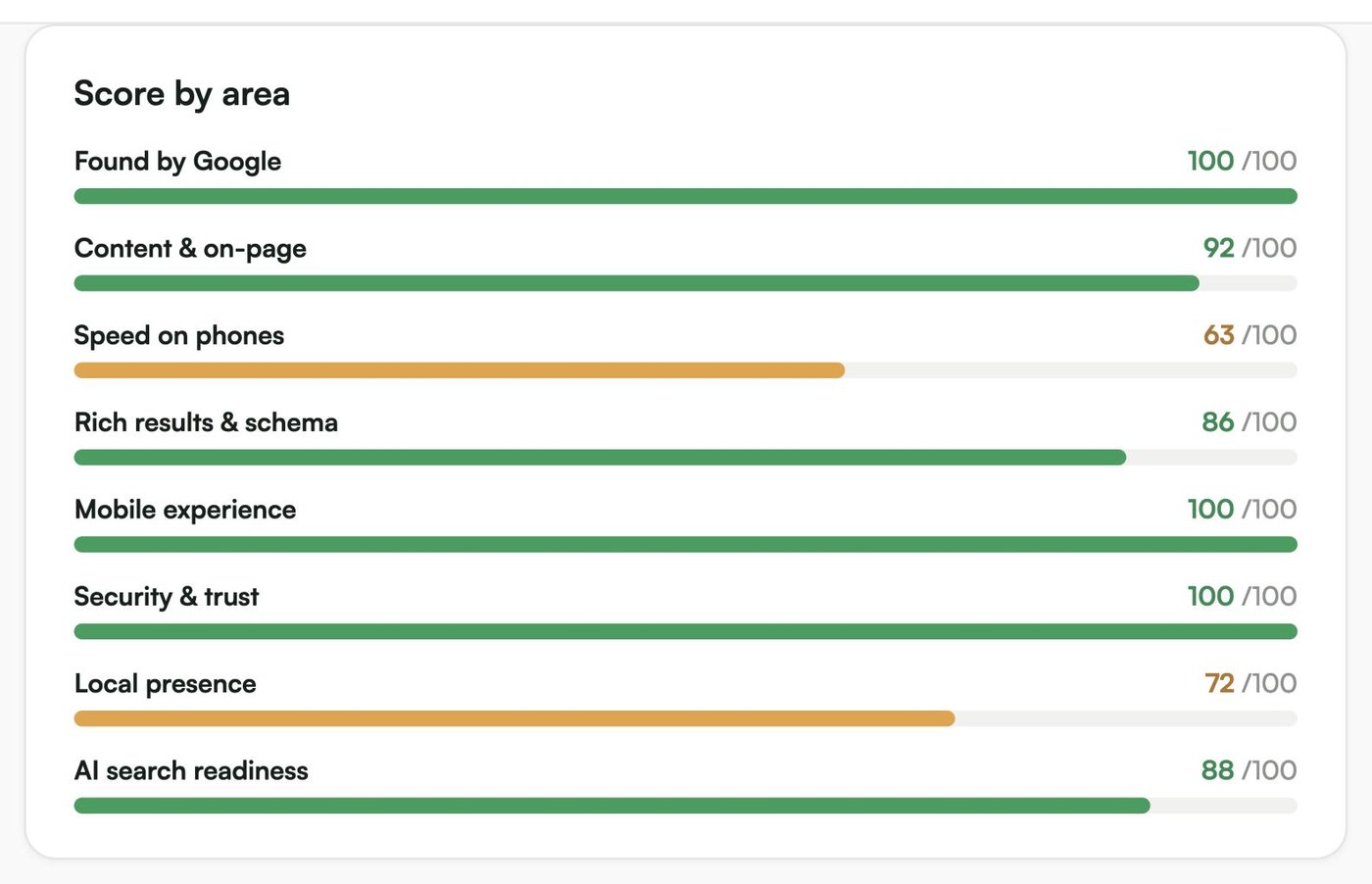
A site can do well on every other check and still be slow on a phone. The sample site scores 100 out of 100 for being found by Google and for mobile experience, yet its weakest score is speed on phones, at 63 out of 100. That's the kind of leak no visitor tells you about. They just leave.
Leak 5: the form asks too much
Every field you add is another reason to give up, especially on a phone. Baymard Institute, which studies online checkouts, found the average checkout had 11.3 form fields in 2024, and that most sites need only eight. An enquiry form needs far fewer: a name, a way to reply, and what they need.
Three small fixes make forms much easier. Mark which fields are required, because Baymard found that marking only the optional ones led 32% of testers to miss a required field. Use the right field types, so a phone shows a number keypad for a phone number, which Google's own guidance on forms recommends. And make your phone number a link, so one tap calls you.
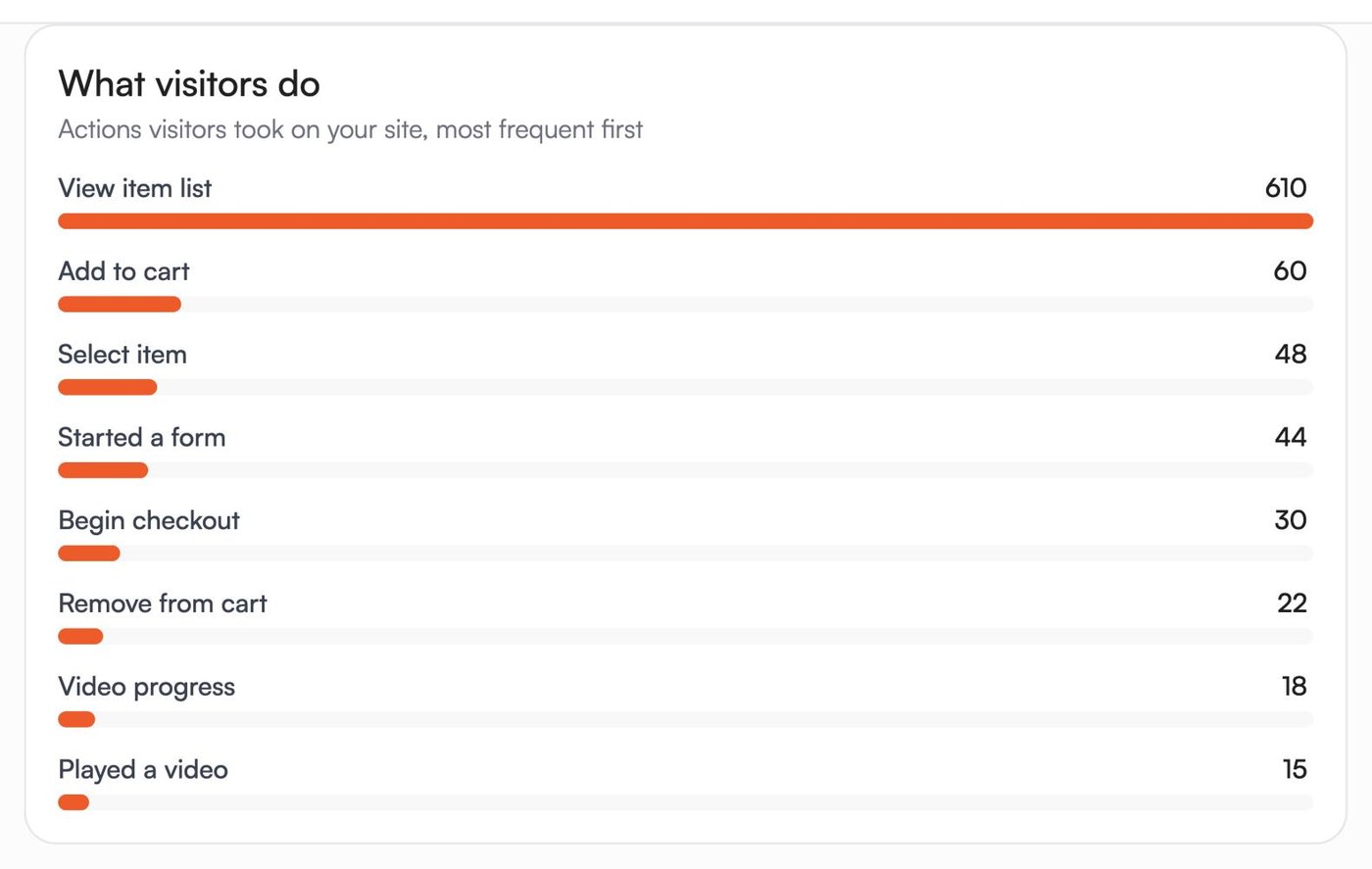
Then fill in your own form, on your phone, and check the message actually arrives. In the sample account, 44 visitors started a form in those 30 days and 30 began checkout, against five bookings. Somewhere between starting and finishing, people stopped. Watching a few of those visits is the fastest way to see where.
Leak 6: enquiries arrive and then wait
This is the leak most owners miss, because it doesn't happen on the website at all. In a Harvard Business Review study of 2,241 US companies, 23% never responded to an online enquiry, and the average response took 42 hours. Firms that tried to contact a lead within an hour were nearly seven times as likely to have a real conversation with the person deciding as firms that waited even an hour longer.
That study was about sales teams in 2011, not motels or salons, but anyone who's asked three businesses for a quote knows the first reply has a head start. Send enquiries to your phone, not just an inbox you check at the weekend. If your site runs on Kahu, every enquiry from your website lands in Kahu CRM with where it came from, so you can see who's still waiting.
 Where Kahu fits


 Website form · asked for a valuation · 2h ago
 Email · quiet 6 days
Five tests to run this week
You don't need a redesign to find your leak. You need an hour or two and these five tests, in this order.
- 1Check where people come fromOpen Search Console's Performance report for the last three months. Note your impressions, clicks and the top ten queries. Are they searches from people who could buy from you?
- 2Run a ten-second testShow your home page to someone who doesn't know your business for ten seconds, on your phone, then take it away. Ask what you do, who it's for and how to book. If they can't say, that's your leak.
- 3Test it on a phone, on mobile dataOpen your site on your own phone with wifi off. Then run it through Google's free PageSpeed Insights and look at the mobile result.
- 4Send yourself an enquiryFill in your own form with one thumb. Count the fields, note anything confusing, and check how long the message takes to reach you.
- 5Time your replyFor one week, write down when each enquiry arrived and when you replied. If the gap is hours, fix that before you touch the website.
If you want to see exactly where people give up, Microsoft Clarity is free, with heatmaps and recordings of real visits, and no limit on traffic. Watch ten recordings of people who left your booking or contact page. It's the closest thing to sitting next to your customers. In the UK, Europe and Switzerland, Clarity needs your visitors' consent before it records, so connect it to your cookie banner.
Fix one leak at a time
It's tempting to change everything at once: new design, new photos, new ads. Don't. Fix the leak your tests point to, wait a few weeks, and look at the same numbers again. If you change five things and enquiries go up, you won't know which one worked, and if they go down, you won't know what to undo.
And resist buying more traffic until the site turns the traffic it has into enquiries. More visits to a site that leaks just means more people leaving.
I'm Anirudh Yadav, a user researcher at KahuLogic, a New Zealand company with a team across Australia, New Zealand and India. We build and look after websites for small businesses, and these are the tests I'd run on any site, whether or not it's one of ours.
Frequently asked questions
How do I know if my website is the problem or my marketing?
Look at two numbers. In Google Search Console, impressions tell you whether people see your site in search. In your analytics, the share of visits that end in an enquiry tells you whether the site turns visitors into leads. Low impressions is a marketing and search problem; healthy visits with few enquiries is a website problem.
What's a good conversion rate for a small business website?
It depends so much on the business and the traffic that a single benchmark misleads more than it helps. Compare your site with itself instead: measure your enquiries per visit now, fix one leak, and measure again a few weeks later.
Why do my ads get clicks but no enquiries?
Usually because the ad sends people to a page that doesn't match what the ad promised, often the home page, or because the people clicking aren't ready to buy yet. Send each ad to the page about exactly what it offers, and check which campaigns produce enquiries, not just clicks.
Should I redesign my website to get more leads?
Rarely. Most lead problems come from an unclear first screen, missing prices, a slow phone experience, a long form or slow replies. None of those needs a redesign, and a redesign can hide the real problem.
How long do fixes take to show results?
Changes to your pages and forms show up in your enquiries within days or weeks, as soon as visitors see them. Changes aimed at search take longer, because Google has to crawl and re-rank your pages first.
Is Microsoft Clarity really free?
Microsoft says Clarity is free with no traffic limits, and that it doesn't sell your data. Recordings are kept for 30 days. In the UK, Europe and Switzerland it needs visitors' consent before recording, so connect it to your cookie banner.
Sources and further reading
- Google Search Console Help: Performance reportsupport.google.com
- Google Analytics Help: about key eventssupport.google.com
- Google Analytics Help: mark events as key eventssupport.google.com
- Google Search Central: influencing title linksdevelopers.google.com
- Google Search Central: snippetsdevelopers.google.com
- Google Search Central: creating helpful, people-first contentdevelopers.google.com
- Nielsen Norman Group: how long do users stay on web pages?nngroup.com
- Nielsen Norman Group: how little do users read?nngroup.com
- Nielsen Norman Group: F-shaped pattern of reading on the webnngroup.com
- Nielsen Norman Group: homepage design principlesnngroup.com
- Nielsen Norman Group: show the pricenngroup.com
- Nielsen Norman Group: trustworthy designnngroup.com
- Nielsen Norman Group: contact us pagesnngroup.com
- StatCounter: desktop vs mobile vs tablet market share, worldwidegs.statcounter.com
- web.dev: Core Web Vitalsweb.dev
- web.dev: why speed mattersweb.dev
- Baymard Institute: checkout flow average form fieldsbaymard.com
- Baymard Institute: required and optional form fieldsbaymard.com
- web.dev: sign-up form best practicesweb.dev
- Harvard Business Review: The Short Life of Online Sales Leads (2011)hbr.org
- Microsoft Clarityclarity.microsoft.com
- Microsoft Learn: Clarity FAQlearn.microsoft.com
- Microsoft Learn: Clarity consent modelearn.microsoft.com
- Google PageSpeed Insightspagespeed.web.dev