Facebook ads getting no leads? What to check, from goal to reply
Muskaan Sharma·Updated 8 Oct 2026·13 min read

When Facebook ads spend but bring no enquiries, check in order. First, make sure leads aren't sitting unread in Meta, where instant form leads expire after 90 days. Then check the campaign goal is Leads or Sales, not Traffic or Engagement, and that each ad set can reach about 50 results a week to finish learning. After that, look at who sees the ad, whether the offer is clear, whether the form or page loses people, and how fast you reply.
Your Facebook ads are running. Money leaves your account every day. Ads Manager shows reach, clicks, maybe a few likes. And yet the phone doesn't ring and the inbox stays quiet. It's one of the most common and most frustrating places for a small business owner to end up, whether you run a dental clinic, a cleaning company, a yoga studio or a guest house.
The good news is that a lead can only get lost in a handful of places, and they come in a fixed order. Someone has to be shown the ad, care about it, act on it, and hear back from you. Find the stage where people drop out and you've found the fix. Change everything at once and you'll never know which change worked.
I'm a user researcher, so my habit is to follow the person, not the dashboard: what did they see, what did they tap, where did they stop? That's how this checklist is built. One disclosure first. We build websites and draft ads for small businesses at KahuLogic, so I have a view on this. Every check below uses Meta's own tools and help pages, checked on 8 October 2026, and works whether or not you ever use us.
Check 0: are the leads already there, unread?
Before changing a single setting, make sure the leads don't exist. It sounds silly, but it happens. If your ads use instant forms (the forms that open inside Facebook or Instagram), submissions don't arrive in your email by default. They sit in Meta until someone downloads them or a connected CRM pulls them out.
Meta lets you download leads as a CSV or XLS file from Ads Manager (click On-Facebook leads in the results column on the Ads tab), from the instant forms page in Meta Business Suite, or from the Leads Centre in Business Suite. Check who has access, too. Meta's help page says that, before permissions are customised, only people with full control of the Page or messaging permissions can download leads. A business partner or freelancer may simply not see them.
That's Meta's rule, not mine: lead information is only available on Meta for 90 days, so older leads can't be downloaded. If you haven't looked in a while, look today. Then set a habit, or connect a tool, so leads leave Meta the day they arrive.
Check 1: the campaign goal decides who Meta looks for
Meta's Ads Manager has six objectives: Awareness, Traffic, Engagement, Leads, App promotion and Sales. Each one tells the system what kind of person to find. Traffic finds people likely to click. Engagement finds people likely to react, comment or message. Leads finds people likely to give you their details through a form, a message or a call. If your campaign is set to Traffic, Meta is doing exactly what you asked: finding clickers. Clickers and enquirers are often different people.
So open the campaign and look at the objective. If you want enquiries, it should be Leads, or Sales if you sell online. Then check the performance goal and conversion location underneath it. A Leads campaign can collect enquiries through an instant form, your website, Messenger or a phone call, and Meta optimises for whichever you pick. If you pick your website, Meta needs a way to see the enquiry happen there, which is what the Meta Pixel and Conversions API are for (more on that in check 4).
To judge whether your numbers are unusual, it helps to know what typical looks like. The best public yardstick I found is WordStream by LocaliQ's 2026 Facebook ads benchmarks. It's a vendor's study of US campaigns, and its figures are medians, so treat it as a rough guide, not a target.
Read those together and a pattern appears: in a typical Leads campaign, fewer than 1 in 10 clicks becomes a lead. If you've had 40 clicks and no leads, that may just be bad luck. If you've had 400 clicks and no leads, something is broken further down the path.
Check 2: has the campaign had a fair chance to learn?
Every new ad set starts in what Meta calls the learning phase, when the system is still working out who responds. Meta says ad sets usually leave it after about 50 results in the week after the last significant edit. Until then, delivery is less stable and costs are usually higher.
If an ad set can't get near 50 results a week, Ads Manager marks it Learning limited. Meta is clear this “isn't a penalty”, but it does mean the system can't optimise well with your setup. The usual causes are a small audience, a low budget, a low bid or cost control, too many ad sets competing with each other, or a goal that happens too rarely.
That figure is just the benchmark median multiplied by 50, and your own cost per lead may be far higher or lower. The point is the scale. Many small businesses spend a fraction of that, so their lead campaigns may sit in learning for weeks. That doesn't mean Meta ads can't work for you. It means you should combine ad sets rather than split a small budget five ways, and judge results over weeks, not days.
The other trap is tinkering. Meta counts pausing an ad set, or changing its optimisation event, audience or creative, as a significant edit, and bigger budget or bid changes can count too. Each one can send the ad set back into learning. Owners who change something every two days, because nothing's happening, keep the campaign permanently at the start.
Check 3: who is actually seeing the ad?
Location is the first thing to check, because you can't serve customers outside your area. Meta's location targeting can reach people who live in, have recently been in, or often visit a place. Meta also says plainly that “complete accuracy cannot be guaranteed”, and you may get some leads from outside your chosen area. A plumber covering one city shouldn't panic about one stray lead from 300 km away, but a steady stream of them is worth a look at the location settings.
Some businesses also have fewer targeting options than they think. If your ads are about employment, housing, or financial products and services, Meta requires you to choose a Special Ad Category. For advertisers in or reaching the US, Canada and certain European countries, that limits options such as age, gender, postcode, exclusions and lookalike audiences. City and pin-drop targets get a wider radius. A mortgage broker or recruiter with very tight targeting may find it simply isn't allowed.
The opposite problem is an audience that's too narrow. Stacking interests until the audience is tiny feels precise, but it's one of Meta's listed causes of Learning limited. For most local businesses, I'd start with the service area and a sensible age range, and let the creative do the filtering.
Check 4: does the ad make a clear offer to the right person?
Read your ad as a stranger scrolling on a bus. Is it obvious what you sell, who it's for, and what happens if they tap? “Get in touch today” is not an offer. “Fixed-price end-of-lease clean, quoted within the hour” is. So is “First physio session, 45 minutes, booked online”. The more specific the promise, the more the right people respond and the wrong people scroll past.
Meta gives you three diagnostics for this, once an ad has 500 impressions: quality ranking, engagement rate ranking and conversion rate ranking. Each compares your ad with others competing for the same audience. A low quality or engagement ranking points at the creative. A decent engagement ranking with a low conversion rate ranking points past the ad, at the form or page. One expert in the WordStream report puts it neatly: “You have great creative, but you're not delivering on the promise.”
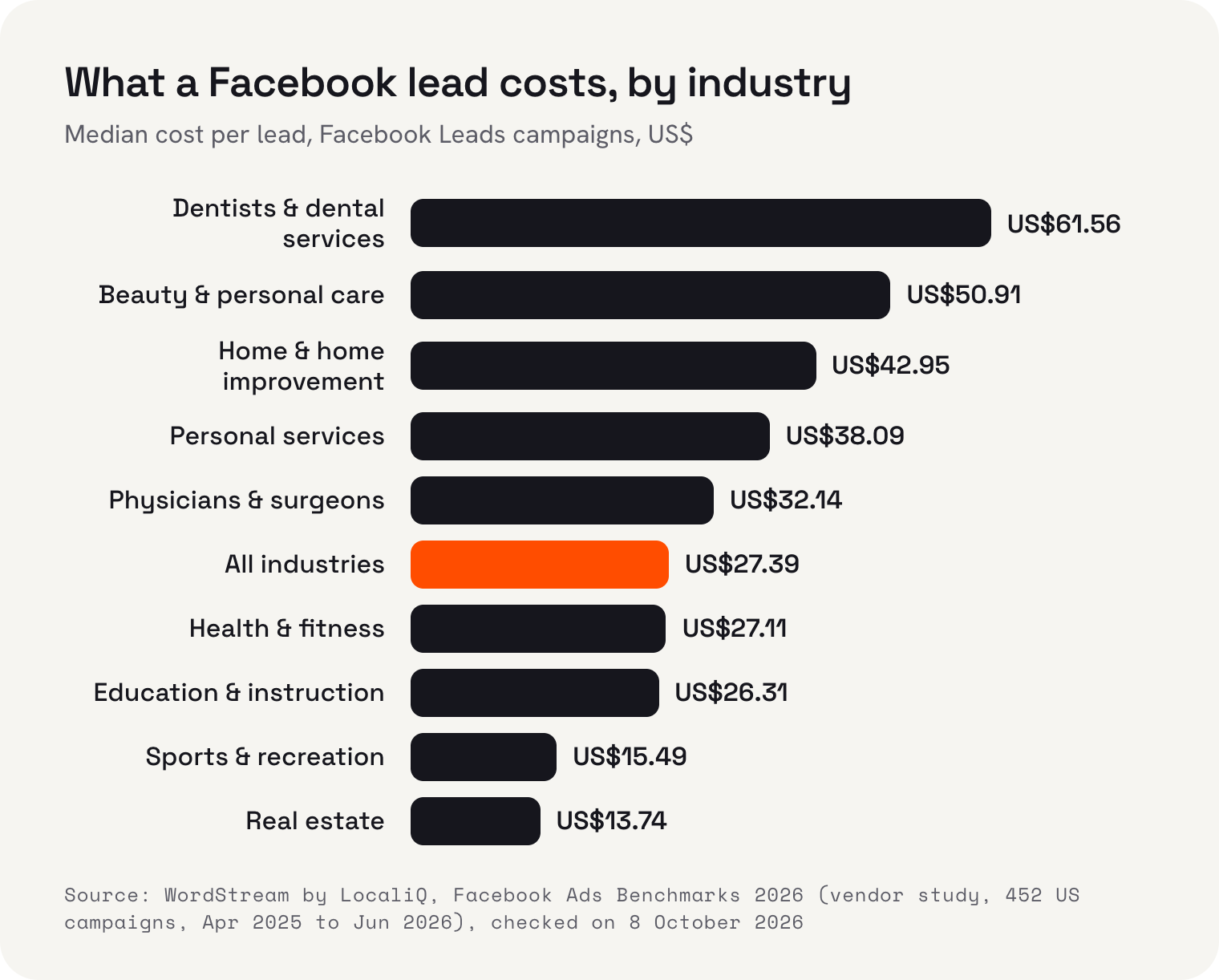
The chart is a reminder that “no leads” means different things in different trades. In that study, the median beauty business paid over US$50 per lead and the median dental practice over US$60, while real estate paid under US$14. If you run a salon and spent US$40 last week, zero leads may be normal variance, not a broken campaign. If you've spent several hundred, it isn't.
Check 5: the form or page where people give up
If people click and then vanish, the problem is usually the thing they land on. With an instant form, that's the form itself. Meta offers three types. More volume is the default and is built to make submitting quick. Higher intent adds a line under the contact fields saying the business may follow up, plus a review screen before sending. Rich creative lets you add images, colours and more text.
- 1Count the questionsMeta's own advice: fewer multiple-choice questions bring more submissions, more bring better-quality leads. Choose on purpose.
- 2Swap typing for tappingMeta recommends limiting short-answer questions. Turn “What do you need?” into four tappable options.
- 3Use the intro and endingSay what happens next and when. Use the completion screen to set expectations or offer a next step.
- 4Check the privacy policyMeta requires one for instant forms. Make sure the link works and the page exists.
- 5Fill it in yourselfOpen the ad on your own phone and submit a test. Note every point where you hesitate.
Meta also suggests creating an engagement custom audience of people who opened your form but didn't submit it, so you can show them the ad again. For a deeper look at form types, qualifying questions and phone verification, our guide to Meta's AI ad creative and lead quality covers each setting in detail.
If your ads send people to your website instead, the page has to load fast and repeat the ad's promise. Google's guidance for a good experience is that the main content should appear within 2.5 seconds. And Meta can only optimise for website enquiries it can see, which means the Meta Pixel on your site, ideally backed by the Conversions API. Meta says the Conversions API is less affected than the pixel by browser loading errors, connectivity issues and ad blockers.
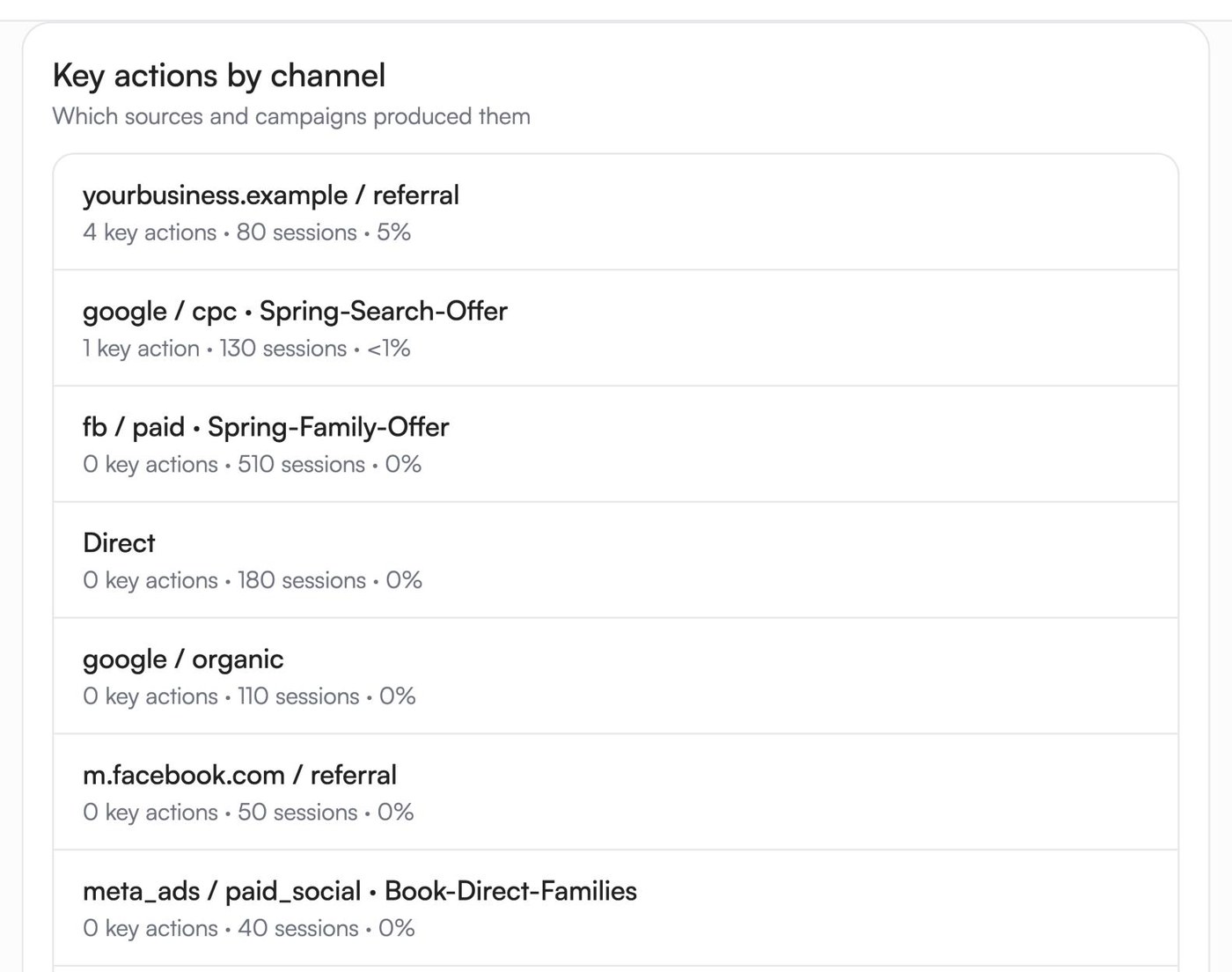
That sample report shows the shape of the problem better than any rule. The Facebook campaign was by far the biggest source of visits, and none of them did anything. On a report that counts clicks, it's the star channel. On a report that counts enquiries, it hasn't started yet. Whatever tool you use, make sure you can see enquiries by campaign, not just visits.
Check 6: the reply, where most leads really go cold
This is the check owners skip, because it isn't in Ads Manager. A lead is someone who raised a hand an hour ago, probably while also asking two of your competitors. Research published in Harvard Business Review back in 2011 looked at how quickly companies answered online enquiries and found that “most companies are not responding nearly fast enough”. I see no reason to think a busy café owner or a solo electrician is faster today.
Meta's own lead ads advice points the same way. It suggests using ad scheduling so your team is ready to respond to leads as they arrive. If it's just you, that means running lead ads when you can actually reply, not at 11pm on a Saturday.
- Reply in the channel they used: a form lead gets a call or message, a WhatsApp lead gets a WhatsApp reply.
- Use their name and repeat what they asked for, so they know it's a real reply and not a bulk email.
- Give one clear next step, such as two time slots, a price range or a booking link.
- Follow up once more the next day if they don't answer. Many people mean to reply and simply forget.
- Record what happened to every lead: contacted, booked, not interested, no answer.
That last point matters more than it looks. When you know which leads booked, you can tell Meta. Its qualified leads goal works by connecting your CRM and sending lead status updates back, so the system learns which kind of person becomes a customer, not just who fills in forms. Even without that, a simple record tells you whether your problem is no leads or no customers, and those need different fixes.
Match the symptom to the check
If you only have ten minutes, start with what Ads Manager is telling you and work from there. This table maps the common patterns to where I'd look first.
| What you see | Where to look | First thing to try |
|---|---|---|
| Reach and clicks, zero form leads | Check 0, then check 5 | Look in Leads Centre; test the form on your phone |
| Lots of likes and comments, no enquiries | Check 1 | Change the objective from Engagement to Leads |
| “Learning limited” for weeks | Check 2 | Combine ad sets; stop editing for a week |
| Leads from places you don't serve | Check 3 | Review location settings and exclusions |
| Low quality or engagement ranking | Check 4 | Rewrite the offer; use your own photos |
| Leads arrive but nobody books | Check 6 | Time your replies; record every outcome |
Work down one row at a time and give each change a week. Meta reviews most ads within 24 hours, and every edit to targeting, creative or optimisation starts a new review, so a change made on Monday may not really be tested until the following week.
 Where Kahu fits




If you'd like help with the ads themselves, Kahu Reach, our ads tool, drafts Google and Meta ads for your approval, and nothing runs until you approve it. If your ads send people to a website built with Kahu, every enquiry from your website lands in Kahu CRM with where it came from, so you can see which campaign produced enquiries and which only produced visits. Website, CRM, SEO reports and Google & Meta ads are included from the Growth plan, US$179 a month (US$149 billed yearly), and Starter, Growth and Pro start with a 14-day free trial.
I'm Muskaan Sharma, a user researcher at KahuLogic, a New Zealand company with a team across Australia, New Zealand and India. We build and look after websites and marketing for small businesses, and this is how I'd work through Facebook ads that bring no leads, whether or not you ever use us.
Frequently asked questions
Why are my Facebook ads getting clicks but no leads?
Usually because the campaign goal is Traffic or Engagement, which tells Meta to find people who click or react rather than people who enquire, or because the form or landing page loses people after the click. Check the objective is Leads or Sales, then fill in your own form or page on a phone. In WordStream's 2026 benchmarks, a typical Facebook Leads campaign converted about 8.5% of clicks into leads.
Where do Facebook lead form leads go?
Instant form leads stay inside Meta until you download them or connect a CRM. You can download them as CSV or XLS from Ads Manager, from the instant forms page in Meta Business Suite, or from the Leads Centre. Meta keeps them for 90 days only, so download them regularly.
How long should I leave a Facebook lead campaign before changing it?
Give it at least a week without significant edits. Meta says ad sets usually leave the learning phase after about 50 results in the week after the last significant edit, and pausing or changing the audience, creative or optimisation event can restart learning.
What does Learning limited mean in Meta Ads Manager?
It means the ad set is unlikely to get about 50 optimisation events in the week after its last significant edit, so Meta can't optimise delivery well. Meta says it isn't a penalty. Common fixes are combining ad sets, widening the audience, raising the budget or choosing a goal that happens more often.
Are instant forms or a landing page better for leads?
Instant forms are quicker for people to fill in, because contact details may be prefilled, while a landing page gives you more room to explain and qualify. If instant form leads are poor, try Meta's Higher intent form type and a few multiple-choice questions. If you use a landing page, make sure it loads fast and the Meta Pixel can see the enquiry.
How much should a Facebook lead cost?
It depends heavily on your industry and area. WordStream by LocaliQ's 2026 benchmarks of 452 US Leads campaigns found a median cost per lead of US$27.39, ranging from about US$12 in career and employment to over US$61 for dentists. Use these as a rough guide and track your own cost per booked customer.
Sources and further reading
- Meta Business Help Centre: choosing Ads Manager advertising objectivesfacebook.com
- Meta Business Help Centre: download or retrieve your leads datafacebook.com
- Meta Business Help Centre: about the learning phasefacebook.com
- Meta Business Help Centre: about learning limitedfacebook.com
- Meta Business Help Centre: last significant editfacebook.com
- Meta Business Help Centre: about location targetingfacebook.com
- Meta Business Help Centre: how to choose a Special Ad Categoryfacebook.com
- Meta Business Help Centre: about ad relevance diagnosticsfacebook.com
- Meta Business Help Centre: about instant form typesfacebook.com
- Meta Business Help Centre: about lead ads with instant formfacebook.com
- Meta Business Help Centre: best practices to create lead adsfacebook.com
- Meta Business Help Centre: set up your CRM for qualified leadsfacebook.com
- Meta Business Help Centre: learn about Meta Pixelfacebook.com
- Meta Business Help Centre: about Conversions APIfacebook.com
- Meta Business Help Centre: about ads in reviewfacebook.com
- WordStream by LocaliQ: Facebook ads benchmarks 2026 (vendor study)wordstream.com
- Harvard Business Review: The Short Life of Online Sales Leads (March 2011)hbr.org
- web.dev: Web Vitalsweb.dev