Meta's AI ad creative and lead quality: what to switch on and check
Pooja Sharma·Updated 8 Oct 2026·15 min read
Meta's Advantage+ creative can change your ad's images, video and text automatically, and some of those enhancements are on by default. You can turn each one off in the ad's Enhancements settings, or stop new ones at account level. AI help is fine for drafts, but lead quality comes from the form, not the creative: use a Higher intent form, ask a few multiple-choice qualifying questions, consider phone verification, and judge your ads by enquiries and bookings, not clicks or form fills.
Meta now offers to write your ad copy, expand your photos, add music to your videos and pick your audience for you. Some of that is genuinely useful when you run a small business and write your own ads between customers. Some of it can quietly change what your ad says, and none of it guarantees that the people who respond will ever buy anything.
I write ads and website copy for a living, so I care about two things here: whether the ad still sounds like the business, and whether the people it brings in are real prospects. This guide covers both. First, what Meta's AI tools change and how to control them. Then, how to stop paying for leads that go nowhere.
Those are example figures from a sample business in Kahu Site Analytics, over 30 days. I'll come back to them, because they make the main point of this article better than I can: volume is not quality. One disclosure before we start. We build websites and draft Google and Meta ads for small businesses at KahuLogic, so I have a view on this. Everything below works whether or not you ever use us, and every setting I mention is in Meta's own tools.
What Advantage+ creative actually changes
Advantage+ creative is Meta's name for a set of automatic enhancements to your ad. According to Meta's help centre, your media and text “may be adjusted” to suit each person and placement, while keeping your core message. In plain terms: the ad you upload may not be exactly the ad people see.
Some of these enhancements are switched on by default, which is the part most owners miss. Meta says “you can turn them off at any time”, and that's true, but you have to know they're there first. The AI-driven ones include generating new text, expanding your images, generating backgrounds and images, adding animation and music, and translating your ad.
 Meta
 Facebook
 Instagram
Here are the main AI enhancements Meta lists, and what each one does to your ad. Not every advertiser gets every one, and Meta says businesses in some sectors, including financial services, health, housing, employment, credit and politics, may not get the generative AI features at all.
| Enhancement | What it does to your ad |
|---|---|
| Text generation | Writes up to five extra versions of your primary text and headline |
| Text improvements | Adjusts the wording you wrote |
| Enhance CTA | Changes or adds to your call to action |
| Visual touch-ups | Expands your image to fit more placements |
| Video touch-ups | Reshapes video to 9:16 or 4:5 |
| Image generation | Generates new image variations for your ad |
| Background generation | Makes new backgrounds for catalogue product images |
| Add animation, music, overlays | Adds movement, a soundtrack or text on top of your media |
| Translations and video subtitles | Shows your ad in other languages and captions your video |
As a copywriter, the one I'd look at first is text generation. It can produce up to five variations of your primary text and headline, and Meta reports results for the ad as a whole, not for each variation. So if one AI version promises something you don't offer, or uses a tone you'd never use, you can't easily see whether that version was the one people responded to.
That isn't a reason to ban it. A café trying three ways to describe a new breakfast menu may be glad of the help. But for anything where the wording carries a promise, like a price, a guarantee, a cancellation policy or a health claim, I'd write the text myself and keep it fixed.
How to switch enhancements off, one by one
You don't have to accept the whole bundle. Meta lets you turn off each enhancement separately, at the ad level, and there's an account-wide setting for new creative features too. Here's where to find them.
- 1Open the ad, then Ad creativeIn Ads Manager, edit the ad and scroll to the Ad creative section.
- 2Find EnhancementsOpen the Enhancements list. Each enhancement has its own switch, so turn off the ones you don't want.
- 3Check Advanced previewSome enhancements only appear in Advanced preview, under the Advantage+ creative tab. Check there too, or you'll miss them.
- 4Preview every placementLook at the ad in Feed, Stories and Reels before you publish. Expanded images and reshaped videos show up here.
- 5Set the account defaultIf your account is eligible, untick “Test new creative features” in the account-level settings so new features aren't tried on your ads automatically.
My rule of thumb: keep the enhancements that only change shape, like fitting an image to a Story, and look hard at the ones that change words or invent visuals. A salon's ad with a slightly wider photo is still the salon's ad. A salon's ad with a generated background that doesn't look like the salon is a small lie that the customer finds out about the moment they walk in.
Check again before every new campaign, because some enhancements are on by default and Meta keeps testing new creative features. A two-minute look at the Enhancements list before you publish is cheaper than a week of ads that say something you didn't write.
When Meta labels your ad as made with AI
Meta adds an “AI info” label automatically when certain tools create or significantly edit your ad: Background Generation, Image Generation and Add Animation. People can see it by tapping the three-dot menu on the ad and choosing About this ad.
That second rule comes from Meta's newsroom post on generative AI in ads, first published in February 2025 and updated in June 2026. If an ad shows a photorealistic person made with AI, the label sits next to the word Sponsored, where everyone sees it.
I don't think the label itself puts most people off. What matters more is why you'd want a made-up person in your ad. A clinic, a physio or a guest house sells trust, and real photos of your real rooms, staff and work do that better than anything generated. Use AI for the parts that are about format and fit. Use your own camera for the parts that are about you.
Give the AI your brand before it writes anything
The biggest problem I see with AI-written ads isn't that they're wrong. It's that they're generic. They could be for any motel, any bakery, any plumber. AI writes from what it's given, and if all it's given is a headline and a photo, it fills the gaps with the average of every ad it has seen.
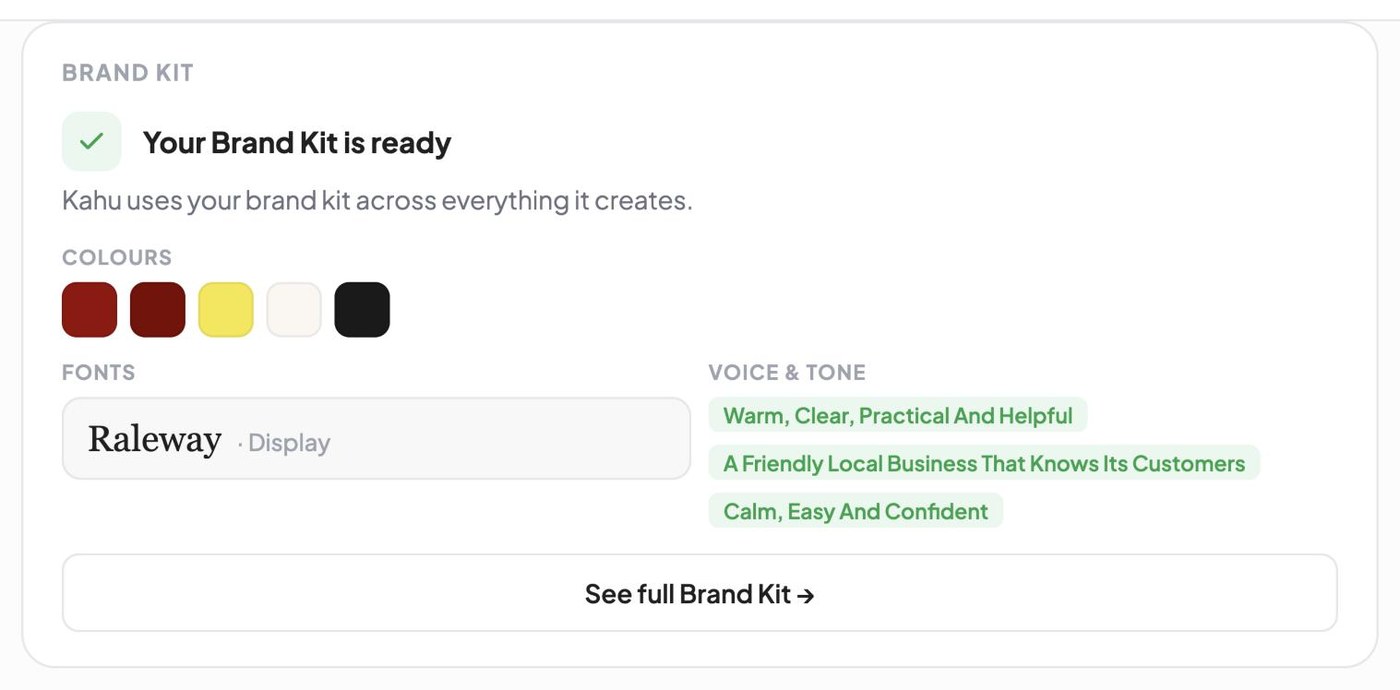
The sample Brand Kit describes the voice as warm, clear, practical and helpful, written like a friendly local business that knows its customers, aiming to sound calm, easy and confident. That's a few lines of text, and it changes everything a tool writes afterwards. Whatever you use, write down three or four words for how you sound, the things you never say, and the facts that must be right (prices, opening hours, where you are). Then check every AI draft against that list.
This is how we approach it at KahuLogic. Kahu Reach drafts Google and Meta ads using the business's Brand Kit, and Kahu Creative makes images and video in the business's brand, using credits. Nothing runs until the owner approves it. That last part matters more than any AI feature: a person who knows the business reads every ad before it goes out.
Advantage+ audience and campaigns: Meta's numbers, Meta's word
Meta has also automated targeting. Advantage+ audience finds people for you, using your past conversions, your Meta Pixel data and how people have interacted with your ads. Meta recommends testing it for most campaigns, except retargeting, where you're trying to reach people who already know you. For the leads objective, Advantage+ is switched on by default.
Meta publishes figures for how much these settings lower costs. These are Meta's own claims, about its own products, and its pages don't say when they were measured or for which businesses. Treat them as Meta's marketing, not as a forecast for your café or clinic.
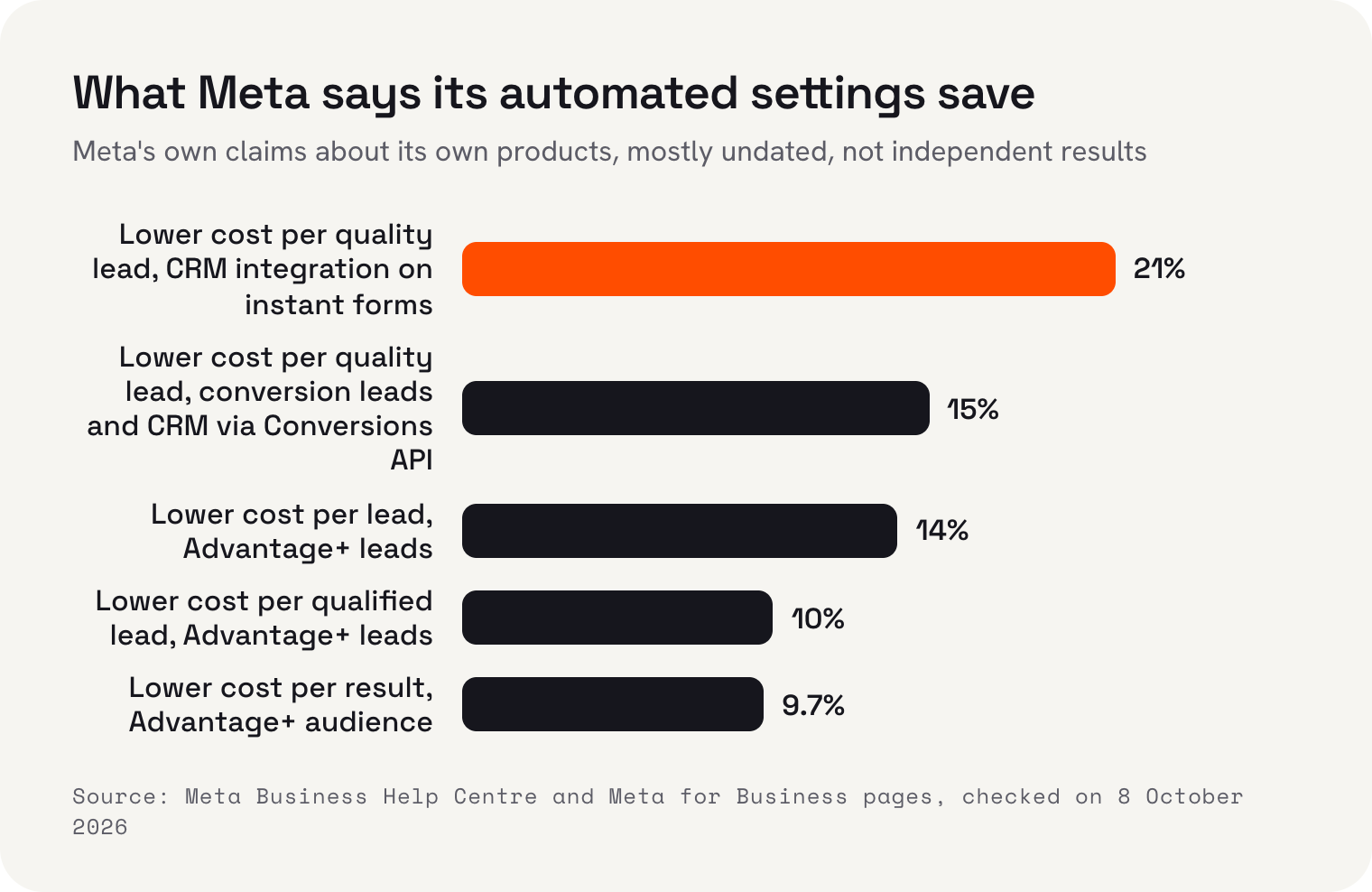
Notice what's being measured. Cost per lead is not the same as cost per customer. A cheaper lead that never answers the phone is more expensive than a dearer one who books. Meta seems to know this too, which is why its biggest claimed savings are for qualified and quality leads, and why those depend on you telling Meta which leads turned into business.
Volume is not quality: what a sample account shows
Back to the sample business. Over its 30 days of example data, paid social was the biggest source of visits to its website by a distance: 520 visits, 44% of the total. Direct visits came next at 180, then organic search at 130.
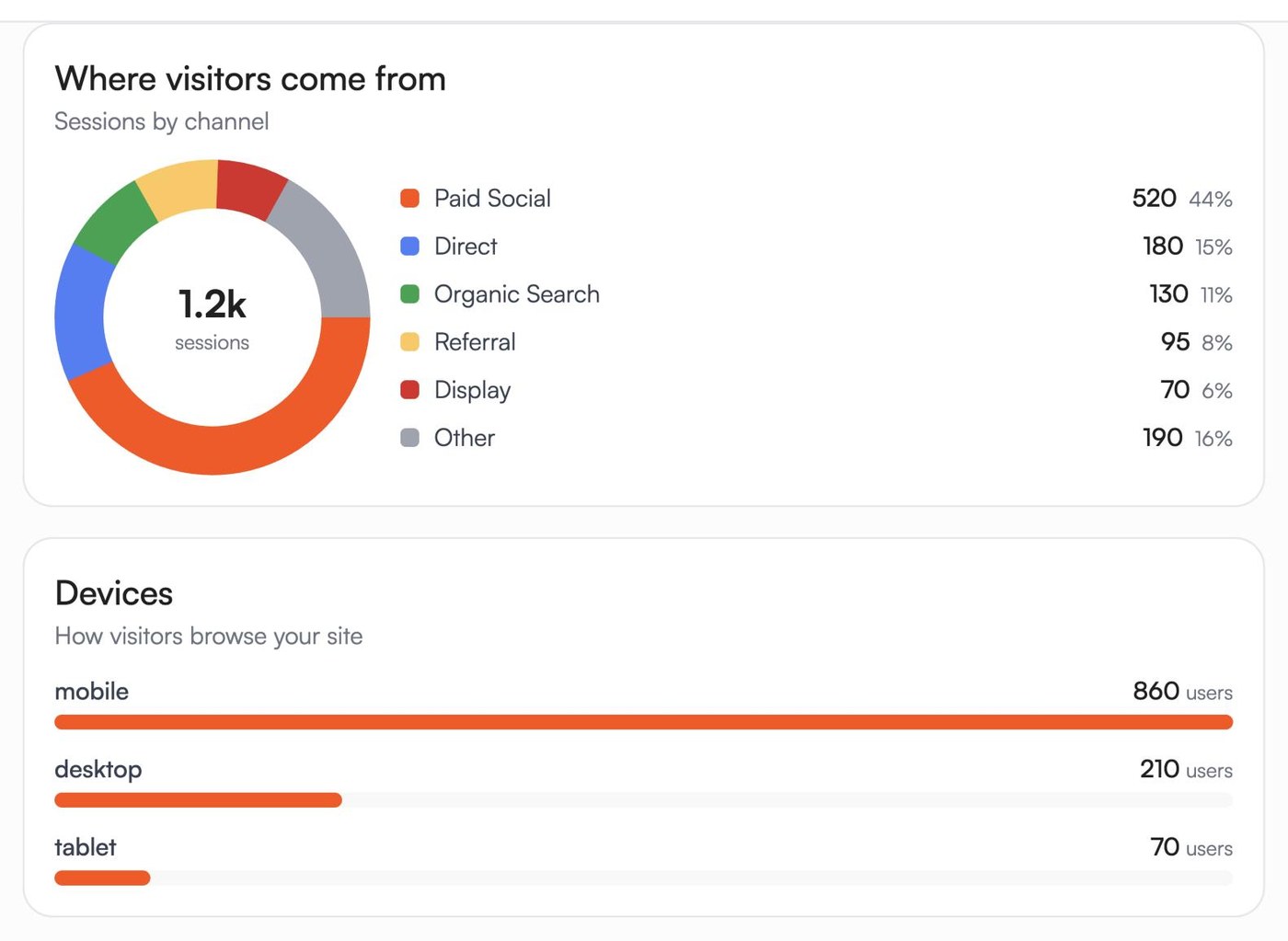
Here's the uncomfortable part. One paid Facebook campaign alone brought 510 visits, and none of them booked. Another Meta campaign, called “Book-Direct-Families”, brought 40 visits, and none of those booked either. On a report that only counts clicks, paid social looks like the business's star channel. On a report that counts bookings, it hasn't yet earned its place.
That doesn't mean the ads were bad, or that the money was wasted. It might mean the people clicking were planning months ahead, or that the page they landed on didn't make booking easy. But you can only ask those questions if you measure the thing you actually want. Clicks, reach and even form fills are steps along the way. Enquiries and bookings are the result.
Pick the instant form that filters, not the one that floods
If you run lead ads, where people fill in a form inside Facebook or Instagram without visiting your website, the form type is the biggest lever you have on quality. Meta offers three: More volume, Higher intent and Rich creative. More volume is the default, and as the name says, it aims for as many submissions as possible. Higher intent adds a review screen, so people confirm their details before sending, and lets you add a follow-up note.
For most small businesses, I'd start with Higher intent. A review screen is one extra tap, and it weeds out the people who opened a form by accident and sent it with details filled in automatically. Meta notes that Higher intent forms show on mobile feeds only, so check your placements. Rich creative is the third type, and Meta's help pages don't present it as a lead-quality setting.
Ask the questions that qualify, not just the ones that collect
Meta lets you add up to 15 custom questions to an instant form. You won't want anywhere near that many, but a few good ones make a big difference. The question types include multiple choice, short answer, conditional questions (where the options depend on an earlier answer), a store locator and an appointment request.
Meta's own best-practice advice is a trade-off you can choose deliberately: more multiple-choice questions bring higher-quality leads, fewer questions bring more submissions. Multiple choice is the sweet spot because it's quick to tap on a phone, and the answers are easy to sort. A gardener can ask which suburb and what size of job. A salon can ask which service and which week. A motel can ask the dates and how many people are staying.
- Ask where they are, if you only serve certain areas, so you don't pay for leads you can't help.
- Ask when they need you, so you can tell this week's customer from next year's.
- Ask what they want, with options that match what you actually sell.
- Ask about budget or size of job only if it changes your answer, and use ranges.
- Keep free-text questions to one at most, because typing on a phone is where people give up.
The same best-practice page makes one more point that's easy to skip: schedule your lead ads for when someone can actually respond. A form filled in on Saturday night that waits until Tuesday is a lead that has already asked someone else. If it's just you, run the ads when you can reply.
Phone verification: fewer leads, more real ones
Meta can ask people to confirm their phone number with a one-time code sent by SMS before the form submits. It's designed to filter out fake leads. Meta is upfront that it may reduce the number of leads you get. For a business that calls every lead back, like a builder pricing a job or a clinic booking a first appointment, that's usually a trade worth making. If you mostly reply by email, it matters less.
Tell Meta which leads turned into customers
The last step is the one that makes the biggest difference, and it's the most technical. Meta's ads learn from whatever you tell them counts as success. If the only signal is “someone filled in a form”, Meta will find more people who fill in forms. If you send back which leads became customers, it can look for more of those.
Meta's campaign goal for this is called “Maximize number of qualified leads”. From April 2026, it isn't available for new campaigns unless you've set up the Conversions API, which is Meta's way of receiving data straight from your systems rather than only from the Meta Pixel on your website. You can connect a CRM to Meta for this, and Meta claims, again with no date, a 15% lower cost per quality lead when conversion leads are combined with CRM data through the Conversions API.
Be realistic about whether this fits you. Meta's developer guide for the conversion leads integration says it needs at least 200 leads a month, daily uploads of your lead results, and three to four weeks before it starts to show value. Plenty of small businesses don't get 200 leads a month from Meta. If you're one of them, you get most of the benefit from the earlier steps: the right form, good questions, phone verification and honest measurement.
What I'd switch on, and what I'd check
Putting it together, here's the order I'd work in for a small business starting or fixing Meta ads. None of it needs an agency, and most of it takes an afternoon.
- 1Write your brand downThree or four words for your voice, the claims you never make, and the facts that must be right. Check every AI draft against it.
- 2Review the enhancementsKeep the ones that only change format. Turn off the ones that rewrite your words or invent visuals you wouldn't stand behind.
- 3Choose Higher intentSwap the default More volume form for Higher intent, and add two or three multiple-choice questions that sort real prospects.
- 4Decide on phone verificationSwitch it on if you call leads back. Expect fewer, better leads.
- 5Measure bookings, not clicksTrack which campaign each enquiry or booking came from, and judge every campaign on that number.
If your Meta ads send people to your website rather than to an instant form, the last step is easier than it sounds. If your site runs on Kahu, every enquiry from your website lands in Kahu CRM with where it came from, so you can see which campaign produced enquiries and which only produced visits.
 Where Kahu fits




Kahu Reach, our ads tool, drafts Google and Meta ads for your approval in your own brand voice, and nothing runs until you approve it. Website, CRM, SEO reports and Google and Meta ads are included from the Growth plan, US$179 a month (US$149 billed yearly), and Starter, Growth and Pro start with a 14-day free trial.
I'm Pooja Sharma, a content writer at KahuLogic, a New Zealand company with a team across Australia, New Zealand and India. We build and look after websites and marketing for small businesses, and this is how I'd set up Meta's AI tools for any business, whether or not you ever use us.
Frequently asked questions
Does Meta change my ads automatically?
It can. Meta's Advantage+ creative may adjust your images, video and text to suit each person and placement, and some of these enhancements are on by default. You can turn each enhancement off in the ad's Enhancements settings, and some appear only in Advanced preview under the Advantage+ creative tab.
How do I stop Meta adding AI-generated text to my ads?
Edit the ad in Ads Manager, go to Ad creative, open Enhancements and switch off text generation and text improvements. If your account is eligible, you can also untick Test new creative features at account level so new creative features aren't tried on your ads automatically.
Will people see that my Meta ad was made with AI?
Meta adds an AI info label automatically when Background Generation, Image Generation or Add Animation creates or significantly edits an ad. People find it through the three-dot menu under About this ad. If the ad shows a photorealistic AI-generated person, the label appears next to Sponsored.
Which instant form type gives better quality leads?
Higher intent is built for quality. It adds a review screen so people confirm their details before submitting, and it shows on mobile feeds only. The default, More volume, is built to get as many submissions as possible. Adding a few multiple-choice qualifying questions and phone verification also improves quality, though it may mean fewer leads.
Do I need the Conversions API for qualified leads?
For new campaigns, yes. From April 2026, Meta's Maximize number of qualified leads goal isn't available for new campaigns without the Conversions API. Meta's conversion leads integration also needs at least 200 leads a month and daily uploads, and takes three to four weeks to show value.
Are Meta's cost-saving figures for Advantage+ reliable?
They're Meta's own claims about its own products, and Meta doesn't date them or say which advertisers they come from. They may be true on average, but they aren't a forecast for any one small business. Measure your own cost per enquiry or booking before and after any change.
Sources and further reading
- Meta Business Help Centre: about Advantage+ creativefacebook.com
- Meta Business Help Centre: opt out of Advantage+ creative enhancementsfacebook.com
- Meta Business Help Centre: account-level creative settingsfacebook.com
- Meta Business Help Centre: text generationfacebook.com
- Meta Business Help Centre: AI info labels on adsfacebook.com
- Meta Newsroom: generative AI transparency in Meta's ads products (Feb 2025, updated Jun 2026)about.fb.com
- Meta Business Help Centre: about Meta Advantage+facebook.com
- Meta Business Help Centre: about Advantage+ audiencefacebook.com
- Meta for Business: Advantage+ leads campaignsfacebook.com
- Meta Business Help Centre: instant form typesfacebook.com
- Meta Business Help Centre: custom questions on instant formsfacebook.com
- Meta Business Help Centre: phone number verification on instant formsfacebook.com
- Meta Business Help Centre: maximise number of qualified leadsfacebook.com
- Meta Business Help Centre: connect your CRM to Metafacebook.com
- Meta for Developers: conversion leads integrationdevelopers.facebook.com
- Meta Business Help Centre: lead ads best practicesfacebook.com
- Meta Business Help Centre: about Meta Pixelfacebook.com
- Meta Business Help Centre: about Conversions APIfacebook.com