SEO vs GEO vs AEO, in plain words: what a small business needs to do
Anurag Shukla·Updated 8 Oct 2026·14 min read
SEO, GEO and AEO are three names for mostly one job: making your website easy for search engines and AI tools to find, read, trust and link to. SEO is about ranking in search results, GEO is about being used in answers written by AI tools like ChatGPT, and AEO is about being the answer to a question. Google says there are no extra requirements to appear in its AI Overviews or AI Mode beyond being indexed and eligible for a snippet. So do the basics well, let the right crawlers in, write clear pages that answer real questions, and measure enquiries rather than chasing a new acronym.
Every few months a new acronym arrives in my inbox. First it was SEO, then GEO, now AEO, and each one comes with someone selling a service to fix it. If you run a café, a salon, a clinic or a small consultancy, you could be forgiven for wondering whether you now need three different strategies just to be found online.
You don't. I'm a tech writer, so my job is to explain terms like these without the fog. Here's the short version: these are three names for mostly one job. Search engines and AI tools all need to find your pages, read them, trust them and link to them. The work that helps one helps the others. There are a few real differences, and I'll go through them, but most of what you need to do is the same.
One disclosure before we start. We build websites for small businesses at KahuLogic, so the example figures above come from a sample business set up in our own product, and our tools appear later in this guide. Everything in the checklist works whatever your website is built on.
Three names, mostly one job
Let's define each term plainly. SEO, search engine optimisation, is making your pages easy for search engines to find and rank, so they show up as links when someone searches. GEO, generative engine optimisation, is making your pages more likely to be used and cited when an AI tool writes an answer. AEO, answer engine optimisation, is shaping your pages so they give a direct answer to a question someone asks, whether the answer is shown by a search engine, a voice assistant or a chatbot.
Put side by side, the overlap is obvious. Each one rewards the same things: a site that crawlers can reach, pages that are indexed, content that says something clearly and accurately, and a business people can trust. The differences are mostly about where your page ends up and how you measure it.
| SEO | GEO | AEO | |
|---|---|---|---|
| What it stands for | Search engine optimisation | Generative engine optimisation | Answer engine optimisation |
| Where you show up | Links in search results | Sources cited in AI-written answers | Direct answers to a question |
| Examples of where | Google Search, Bing | ChatGPT search, Perplexity, Copilot, AI Overviews | AI Overviews, AI Mode, chat assistants |
| What it rewards | Crawlable, indexed, helpful pages | The same, plus clear facts worth citing | The same, plus plain answers to real questions |
| How to measure it | Search Console impressions and clicks | AI referrals in analytics, Bing AI Performance | Visits and enquiries from answer pages |
| Needs special files or markup? | No | No, according to Google | No, according to Google |
SEO: being found in search results
SEO is the oldest of the three and still the foundation. When someone types “dentist near me” or “cake shop open Sunday” into a search engine, the results page lists links, and SEO is the work of making your page one of the links they see and choose.
The basics haven't changed much. Search engines need to be able to crawl your pages, the pages need to load and return a normal response, and they need to be indexed. After that, what matters is whether the page is genuinely useful to the person searching. Google's guidance on helpful content asks you to write for people first, not for search engines, and it's blunt about what counts most. Of all the signals it describes, it says “trust is most important”.
For a small business, trust looks very ordinary: your real name, address and phone number, prices or price ranges, real photos, honest descriptions of what you do and where you do it. None of that is a trick.
GEO: where the name came from
GEO isn't a marketing invention, or at least it didn't start as one. The term comes from a research paper called “GEO: Generative Engine Optimization” by Aggarwal and colleagues, submitted in November 2023 and accepted at the KDD 2024 conference. The researchers looked at how content could be made more visible in the answers that generative engines write.
In their experiments, they reported visibility gains of up to 40% in generative engine responses. That's a research result under test conditions, not a promise for your website, and I'd be wary of anyone who quotes the number as if it were. What the paper did do was give a name to a real shift: more people now get an answer written by an AI tool, with a few sources cited, instead of a list of ten links.
For you, GEO comes down to a simple question. When an AI tool writes an answer about the kind of thing you sell, in the place you sell it, is your website one of the sources it can read and is happy to cite? That depends on whether its crawler can reach you and whether your pages say clearly what you do.
AEO: answers instead of links
AEO is the vaguest of the three terms, and people use it in slightly different ways. The idea is that more and more searches end with an answer rather than a click: a summary at the top of the results, a reply from a chat assistant, a spoken answer. AEO is about making your page the clear, accurate answer to the questions your customers ask.
In practice, that means writing pages the way people ask questions. If customers always ask whether you're open on public holidays, whether you take walk-ins, or how much a standard service costs, answer those questions on your site, in plain sentences, near the top of the relevant page. An AI tool can only repeat what it can find, and a vague page gives it nothing to repeat.
What Google says about AI Overviews and AI Mode
This is the part that should calm most people down. Google's own documentation on AI features in Search is direct: “There are no additional requirements to appear in AI Overviews or AI Mode”. To be shown as a supporting link, a page needs to be indexed and eligible to show a snippet in normal search. You don't need a special AI file or special markup.
Both AI Overviews and AI Mode show links to the pages they draw on. If you'd rather a page wasn't used, the same controls you already know apply: nosnippet, data-nosnippet, max-snippet and noindex.
In May 2025 Google published advice on succeeding in AI search, and it reads like a list of SEO basics. Make unique, non-commodity content, meaning something more than what every other page already says. Give people a good page experience. Get the technical basics right: don't block crawlers, make sure pages return a normal 200 response, and keep them indexable. Use structured data that matches what's visible on the page. Keep your Business Profile and Merchant Center information up to date. And measure conversions, not just clicks.
How ChatGPT search, Perplexity and Copilot find your site
 Google Search and AI Overviews
 Perplexity
- ChatGPT (OpenAI)
- Microsoft Bing
- Copilot
Google isn't the only door. ChatGPT search, Perplexity and Microsoft's Copilot all send their own crawlers to read websites, and each one checks your robots.txt file, the small file at the root of your site that tells crawlers what they may visit. If your robots.txt blocks a crawler, that tool can't read your pages, and it's unlikely to cite them.
OpenAI is clear that it runs different crawlers for different jobs. Its documentation says “OAI-SearchBot is for search.” That's the one that decides whether your pages can appear in ChatGPT search results, so allow it in robots.txt if you want to be found there. OpenAI says changes to robots.txt can take about 24 hours to take effect. GPTBot is a separate crawler used for training, and blocking it opts your content out of training without affecting search. ChatGPT-User is used when a person asks ChatGPT to fetch a page.
- OAI-SearchBot (OpenAI): finds pages for ChatGPT search. Allow it if you want to appear there.
- GPTBot (OpenAI): collects content for training. Blocking it opts you out of training only.
- ChatGPT-User (OpenAI): fetches a page when a person asks ChatGPT to.
- PerplexityBot (Perplexity): surfaces and links sites in Perplexity's answers, and Perplexity says it isn't used to train foundation models.
Perplexity works in a similar way. PerplexityBot is the crawler that surfaces and links websites in its answers, and Perplexity says it doesn't use it to train foundation models. If you want to appear in Perplexity, don't block it.
Microsoft has gone a step further and given site owners a way to measure this. In February 2026 it introduced an AI Performance report in Bing Webmaster Tools, as a public preview, which shows how often your content is cited in Copilot and in Bing's AI answers. It's free, and it's one of the few places you can see GEO as a number rather than a guess.
What changed: fewer clicks, and fewer FAQ snippets
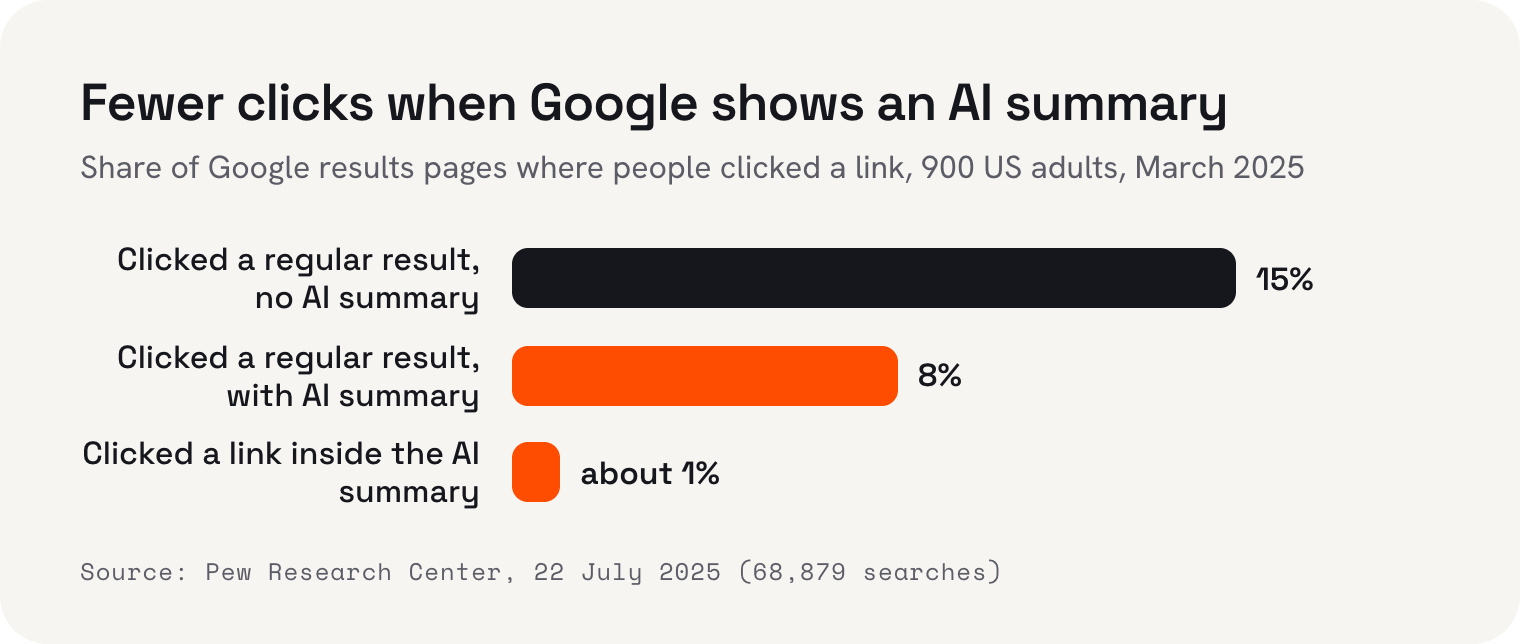
Two changes are worth knowing about, because they affect how you judge your own numbers. The first is that AI summaries take some clicks away. Pew Research Center looked at the browsing of 900 adults in the US in March 2025, covering 68,879 searches. When a Google results page showed an AI summary, people clicked a regular result on 8% of visits. When there was no summary, they clicked on 15%. They clicked a link inside the summary itself on only about 1% of visits.
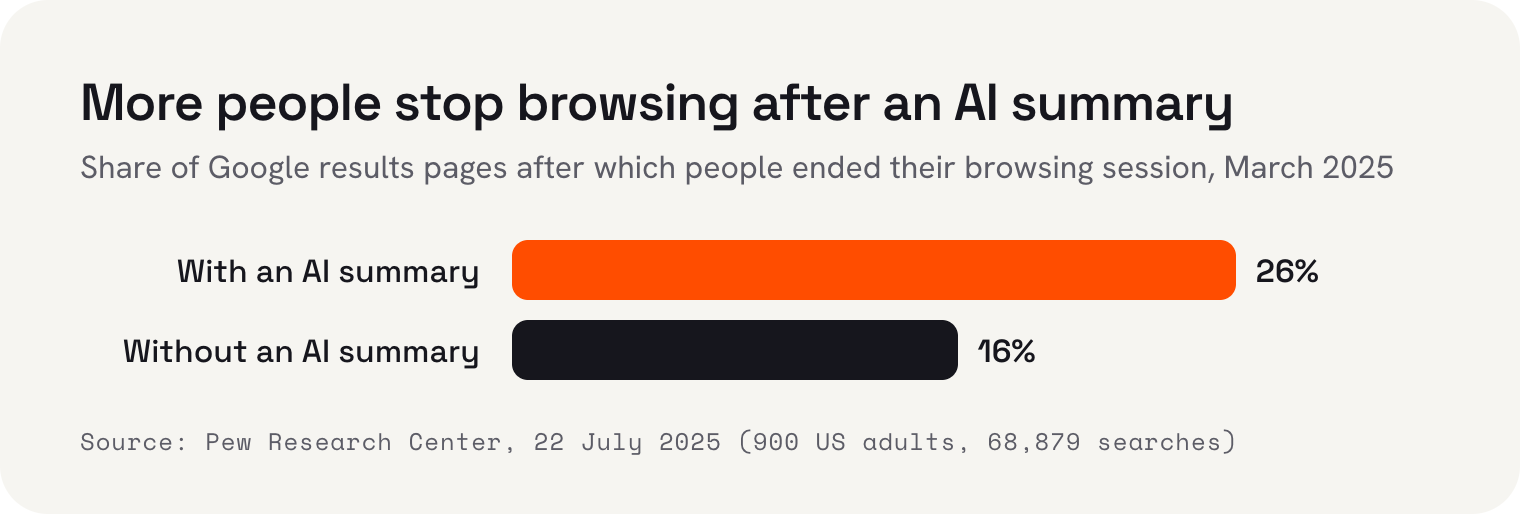
People were also more likely to stop browsing altogether after seeing a summary. They ended their session on 26% of results pages with an AI summary, against 16% without one. In plain terms, some questions now get answered on the results page, and the person never reaches a website. For a small business, that's a reason to make sure the pages that do get clicked are the ones that lead to an enquiry.
The second change is about FAQ snippets. Google announced changes to FAQ and HowTo rich results in August 2023, and its Search updates page records that from 7 May 2026, FAQ rich results no longer appear in Google Search. If someone sold you FAQ markup as a way to take up more space in the results, that benefit has gone. A good FAQ is still worth having on your site, because it answers real questions for real people, and AI tools can read those answers too. Just write it for your customers, not for a snippet.
An example: what AI visits look like in analytics
Here's what this looks like with example figures. Take a sample business in Kahu, a small business that takes bookings online, with its website on Kahu Sites. Over 30 days, the sample account in Kahu's Site Analytics shows organic search sending 130 visits. ChatGPT, tagged as an AI assistant, sent 15 more, and chatgpt.com sent another 4 counted as ordinary referrals. Gemini sent 2.
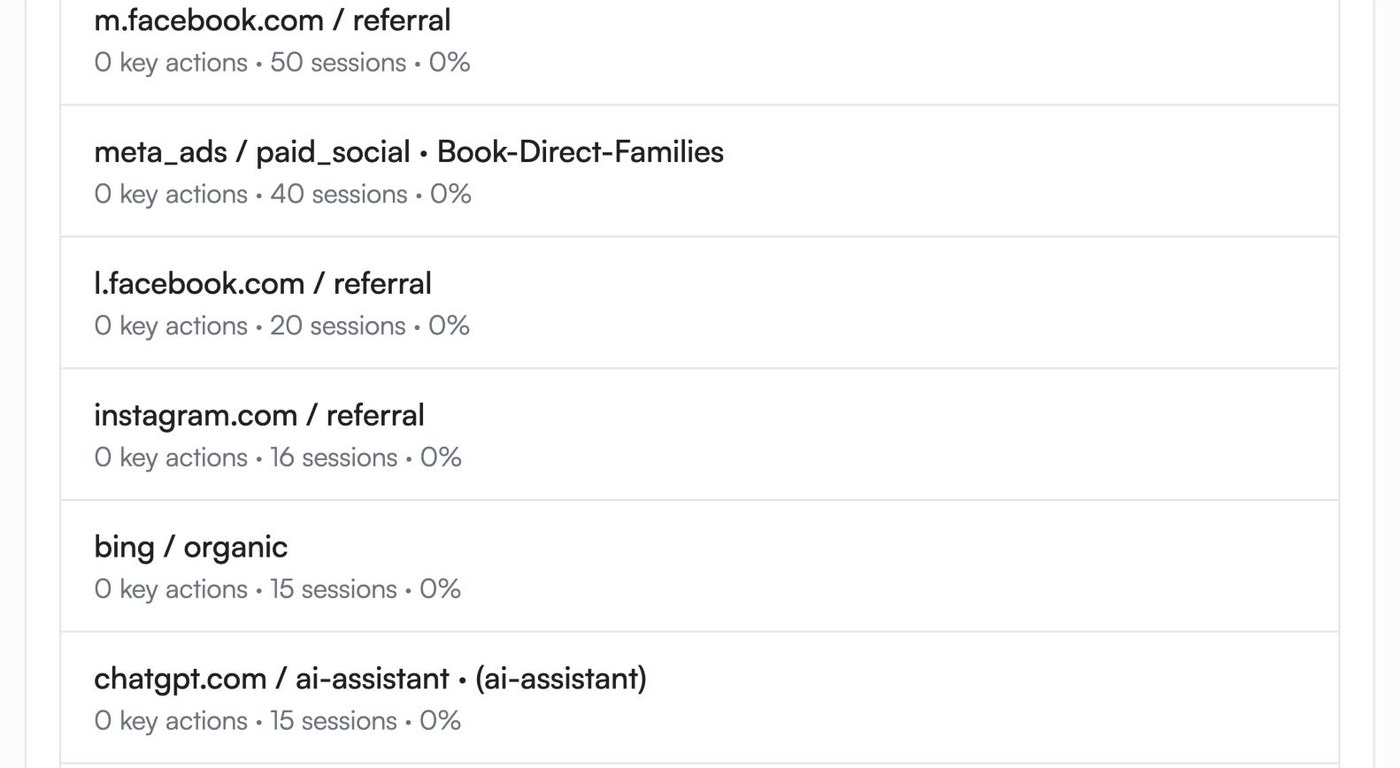
Those are small numbers, and I'd rather be honest about that than dress them up. In the example, none of the 15 ChatGPT visits ends in a key action, such as a booking. But it shows what to look for in your own analytics: AI tools can send people to a small business website without the owner doing anything special for GEO. All it takes is a site that crawlers can read, and a report that labels where visitors came from.
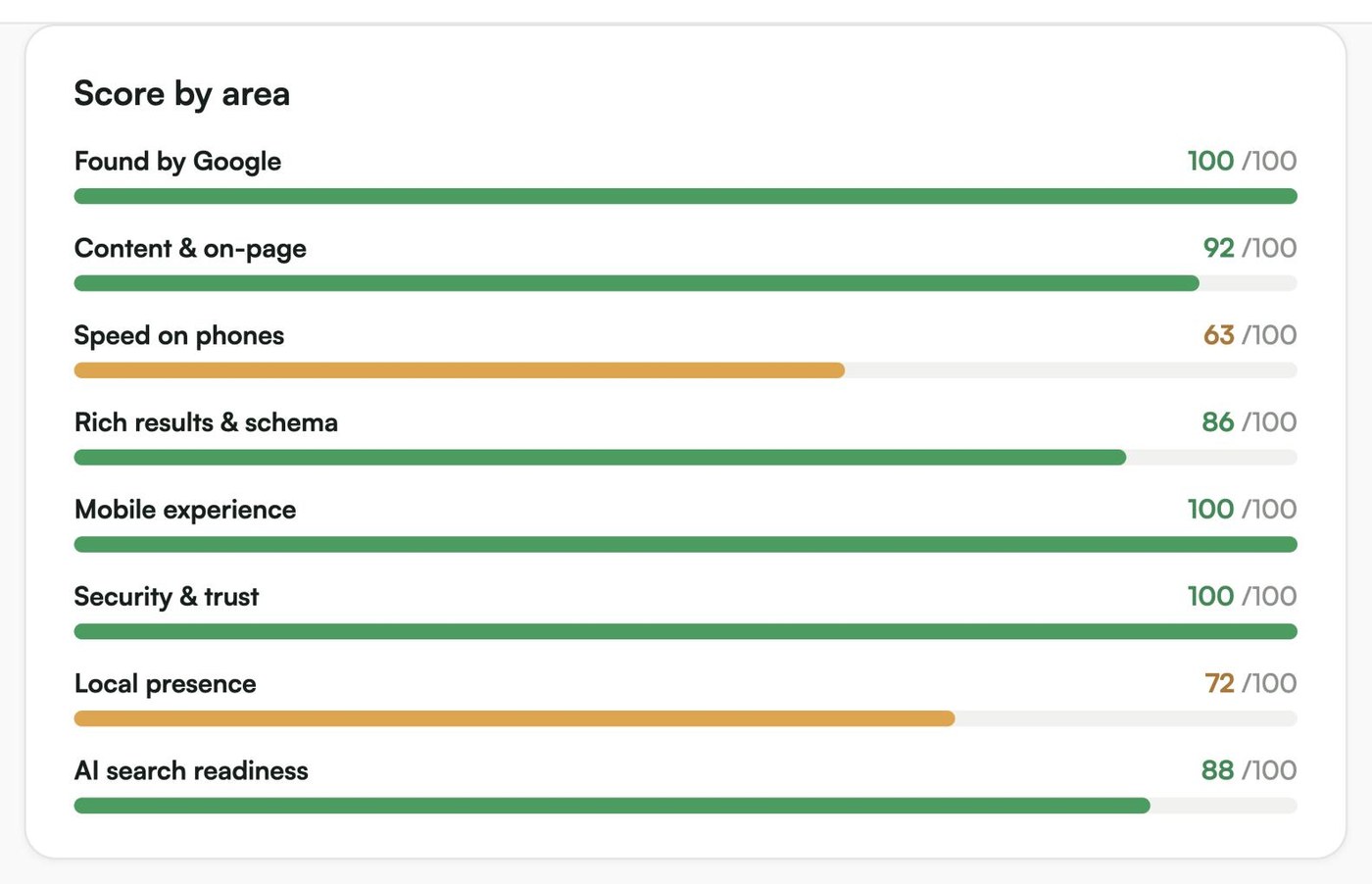
In the same sample account, Kahu's Search Visibility gives the site an AI search readiness score of 88 out of 100. Its other areas tell the same story as Google's advice: it scores 100 for being found by Google, 92 for content and on-page basics, and 86 for rich results and structured data. The work that makes a site readable for search makes it readable for AI too.
 Where Kahu fits


A practical checklist for all three
If you only do one thing after reading this, work through these six steps in order. They cover SEO, GEO and AEO at the same time, and none of them needs a specialist.
- 1Check you can be crawledOpen your robots.txt file (your web address followed by /robots.txt). Make sure it doesn't block Googlebot, Bingbot, OAI-SearchBot or PerplexityBot. Block GPTBot only if you'd rather your content wasn't used for training.
- 2Check you're indexedAdd your site to Google Search Console and Bing Webmaster Tools, both free. Look for pages that aren't indexed or return errors, and fix those first.
- 3Answer real questions plainlyList the ten questions customers ask you most. Answer each one on the right page, in plain sentences, near the top: prices, hours, areas you serve, what's included.
- 4Say something only you can sayGoogle asks for unique, non-commodity content. Your own photos, your actual process, your real prices and your local knowledge are things no other page has.
- 5Keep your details consistentUse the same business name, address and phone number everywhere. Keep your Google Business Profile up to date, and make sure any structured data matches what's visible on the page.
- 6Measure enquiries, not mentionsMark enquiries and bookings as key events in your analytics. Then check which sources, including AI assistants, bring people who get in touch.
That last step matters most. Google itself says to measure conversions, not just clicks. A mention in an AI answer is nice. An enquiry from someone who read it is the thing you're actually after, and only your own analytics can tell you whether that's happening.
What I'd ignore
I'd ignore anyone who says you need a separate GEO strategy, a special AI file or new markup to appear in AI answers. Google says you don't. I'd ignore promises of a specific number of AI mentions, because no AI tool publishes rules that would let anyone guarantee that. And I'd be careful with old advice to stuff pages with FAQ markup for the snippet, since FAQ rich results no longer appear in Google Search.
What's left is less exciting and more useful. Keep your site fast, crawlable and indexed. Write pages that answer what your customers ask, with your real details. Let the crawlers in that you want to be found by. Then watch your enquiries, and check Bing's AI Performance report now and then to see whether you're being cited. If you do that, you've covered SEO, GEO and AEO, whatever they're called next year.
I'm Anurag Shukla, tech writer at KahuLogic, a New Zealand company with a team across Australia, New Zealand and India. We build and look after websites and marketing for small businesses, and this is how I'd explain SEO, GEO and AEO to a friend whether or not you ever use us.
Frequently asked questions
What is the difference between SEO, GEO and AEO?
SEO, search engine optimisation, is about appearing as a link in search results. GEO, generative engine optimisation, is about being used and cited when AI tools such as ChatGPT search or Perplexity write an answer. AEO, answer engine optimisation, is about your page giving a direct answer to a question. All three reward the same basics: crawlable, indexed pages with clear, trustworthy content.
Do I need special files or markup to appear in Google's AI Overviews?
No. Google's documentation says there are no additional requirements to appear in AI Overviews or AI Mode. A page needs to be indexed and eligible to show a snippet in normal Google Search, and no AI-specific files or schema are needed.
How do I get my website into ChatGPT search?
Make sure your robots.txt file allows OAI-SearchBot, the crawler OpenAI uses for ChatGPT search. OpenAI says changes to robots.txt can take about 24 hours to take effect. Blocking GPTBot, a separate crawler, only opts your content out of training and doesn't stop you appearing in ChatGPT search.
Does Perplexity use my website to train its AI?
Perplexity says PerplexityBot, its crawler, is used to surface and link websites in its answers and is not used to train foundation models. If you want to appear in Perplexity, allow PerplexityBot in your robots.txt file.
Can I see whether AI tools are citing my website?
Partly. Bing Webmaster Tools has an AI Performance report, introduced as a public preview in February 2026, that shows how often your content is cited in Copilot and Bing AI answers. Your analytics can also show visits from AI assistants such as chatgpt.com, so you can see whether those visitors get in touch.
Are FAQ rich results still worth adding?
Not for the snippet. Google's Search updates page records that FAQ rich results no longer appear in Google Search from 7 May 2026. An FAQ section on your page is still useful, because it answers real customer questions in plain words that people and AI tools can read.
Sources and further reading
- Google Search Central: AI features and your websitedevelopers.google.com
- Google Search Central Blog: top ways to ensure your content performs well in Google's AI experiences on Search (21 May 2025)developers.google.com
- Aggarwal et al.: GEO: Generative Engine Optimization (arXiv, 2023; KDD 2024)arxiv.org
- OpenAI: overview of OpenAI crawlersdevelopers.openai.com
- Perplexity: Perplexity crawlersdocs.perplexity.ai
- Bing Webmaster Blog: introducing AI Performance in Bing Webmaster Tools, public preview (10 Feb 2026)blogs.bing.com
- Google Search Central Blog: changes to HowTo and FAQ rich results (8 Aug 2023)developers.google.com
- Google Search Central: Search updatesdevelopers.google.com
- Pew Research Center: Google users are less likely to click on links when an AI summary appears in the results (22 Jul 2025)pewresearch.org
- Google Search Central: creating helpful, reliable, people-first contentdevelopers.google.com