How to create Instagram content for a small business: formats, ideas and a weekly plan
Muskaan Sharma·Updated 3 Nov 2026·12 min read

Post what customers want to see from you: your real work, the people behind it, answers to questions you're asked every week, and proof from happy customers, with their permission. Use reels to reach new people, carousels for detail and how-tos, and stories for day-to-day updates. Instagram says it ranks reels on how likely people are to share, watch through and like them, and favours original content, so film your own. Plan a simple weekly mix, batch it in one sitting from your own photos and clips, and judge it on shares, saves and messages.
Instagram can feel like it was built for influencers with ring lights and endless time. If you run a florist, a salon, a café or a plumbing business, the pressure to post something clever every day is real, and so is the feeling that nobody's watching when you do.
I'm a user researcher at KahuLogic, where we build websites and marketing tools for small businesses. I'll mention our own tool once, near the end; everything else works whichever tools you use. Below: what to post, which format does which job, what Instagram says it rewards, and a 30-day calendar you can copy.
What should a small business post on Instagram?
Post the things customers want to see before they choose you: your work, your place, your people, and answers to their questions. The best small-business accounts aren't polished magazines. They show the real work often enough that people remember you when they need you.
- Your work: finished jobs, products, a bouquet before it leaves, a before-and-after.
- Behind the scenes: setting up, preparing, making, the van loaded at 6 am.
- Answers: the questions you're asked every week. “How often should I get my gutters cleaned?” is a post.
- Proof: reviews, thank-you messages and repeat customers, shared with their permission.
- People: you and your team, so customers know who'll turn up or serve them.
- News and offers: new services, seasonal changes, availability, kept short and clear.
If I had to pick one, it would be answers. Posts that solve a small problem are the ones people save and send to a friend, and those are exactly the actions Instagram's ranking pays attention to.
Which Instagram format should you use?
Each format does a different job, so use them together rather than picking one. Reels are your best chance of reaching people who don't follow you yet, carousels hold detail and get saved, single photos are quick proof, and stories keep existing followers up to date.
| Format | Best job | Good small-business example | Worth knowing |
|---|---|---|---|
| Reel | Reaching new people | A 20-second time-lapse of a garden makeover | Instagram shows reels to a small group of non-followers first, then wider if they do well |
| Carousel | Detail, how-tos, saves | “Five signs your hot water cylinder needs replacing” | Up to 20 photos and videos in one post |
| Single photo | Quick proof of your work | Today's wedding flowers | Portrait 4:5 at 1080 pixels wide fills most of a phone screen |
| Story | Day-to-day updates for followers | “Two cancellations this afternoon, DM to book” | Short-lived; save the best ones as profile highlights |
What does Instagram say it rewards?
In its ranking explainer, it says that for reels the most important predictions are how likely you are to reshare a reel, watch it all the way through, like it and visit the audio page. Its creator FAQ says distribution depends mainly on engagement per viewer, including watch time, shares, follows, likes, comments and profile visits.
Instagram also says it prioritises original content created by the account that posts it. Its creator guidance says it's less likely to recommend reposts of reels that are already on Instagram, content with noticeable watermarks from other apps, and accounts that mostly reshare other people's content. Simply stitching clips together or adding a watermark doesn't count as making something original.
- Film your own work. Your phone is enough.
- Hook people in the first second or two: show the finished result, then how you got there.
- Make it worth sending to someone: a tip, a surprising before-and-after, a local answer.
- Add captions or text to spoken video, since many people watch with the sound off.
- Don't repost a reel with another app's watermark on it. Export clean files.
How do you make reels without a film crew?
With your phone, a steady hand and a free editing app. Edits is Instagram's own video app. Instagram says it can generate captions from spoken audio, includes green screen and other effects, and lets you export without a watermark, so you can post the same clip elsewhere too.
Length is less important than holding attention. Instagram said in 2025 that reels up to three minutes long could now be recommended to people who don't follow you, up from 90 seconds before. That doesn't mean you should make three-minute reels. For most small businesses, a clip that shows one thing clearly in 10 to 30 seconds is easier to watch to the end, and watching to the end is one of the signals Instagram says it uses.
- 1Pick one thing to showOne job, one product, one tip. A reel trying to show everything shows nothing.
- 2Film the end firstCapture the finished result, then a few clips of the process. Open the reel with the result.
- 3Keep clips shortTwo to four seconds each, filmed upright in 9:16.
- 4Add captionsGenerate them in Edits or Instagram, then fix any misheard words, especially names and suburbs.
- 5Write a caption with a next stepSay what it is, where, and how to book or ask. One clear call to action.
Should you try trial reels?
Yes, if you're nervous about posting something new to your followers. Trial reels are shown to people who don't follow you first. Instagram's help centre says professional accounts need at least 200 followers to use them, that trial reels don't affect how your standard reels perform, and Meta's launch post says that if a trial does well you can share it to your followers with one tap, or set it to share automatically.
I like trial reels for testing a format you're unsure of, such as talking to camera for the first time, or a lighter, funnier take on your work. If the trial lands, share it. If it doesn't, you've learned something without filling your followers' feeds.
A worked example: a florist's week
Here's a worked example. The business and every number in it are made up, so swap in your own. Picture a florist who wants to post four times a week and has about an hour on Sunday evenings to plan it.
- Monday, carousel: “How to make supermarket flowers last a week”, six slides of tips, photographed in the shop on Saturday.
- Wednesday, reel: 15 seconds of a wedding bouquet coming together, opening on the finished bouquet.
- Friday, single photo: this weekend's arrangements, with a caption saying how to order by Thursday.
- Sunday, reel as a trial: talking to camera for the first time about why she buys locally grown stems.
- Most days, stories: a quick clip of the morning delivery, a poll on next week's colours, a reminder of cut-off times.
In this made-up example, after four weeks the carousels get the most saves, the bouquet reels get the most shares, and the talking-to-camera trial reaches fewer people but brings three direct messages asking about workshops. That last result is the interesting one. Say two of those three people book a workshop seat at a made-up NZ$85: that's 2 × NZ$85 = NZ$170 from one reel that took about 20 minutes to film. If one talking-to-camera reel a month does the same, that's 12 × NZ$170 = NZ$2,040 a year in workshop seats, which is worth far more to her than the reach number.
Copy this: a 30-day Instagram content calendar
Here's a four-week plan at four posts a week, plus stories when you have a spare minute. Each cell is a template: swap the square-bracket parts for your own business and it's ready to film or photograph. Week 1 is about your work, week 2 about answers, week 3 about people and proof, week 4 about trying something new.
| Days | Monday: carousel | Wednesday: reel | Friday: photo | Weekend: reel or stories |
|---|---|---|---|---|
| Days 1–7 | “[Number] things to know before you book a [service]”, one point per slide | The finished [job/product] first, then 4 to 6 short clips of how you made it | Today’s [job/product], caption: what it is, where, how to order by [day] | Stories: a poll, “Which would you pick, [option A] or [option B]?” |
| Days 8–14 | “The question we get asked most: [question]”, answered in 5 slides | You answering [question] in 20 seconds, showing it rather than telling it | Close-up of [a detail customers don’t notice], with one line on why it matters | Trial reel: [a format you’ve never tried, e.g. talking to camera] |
| Days 15–21 | “What happens at your first [appointment/visit]”, step by step | A day-in-the-life: [opening up / loading the van / first job] in 15 seconds | A customer’s words, first name only, shared with their permission | Stories: meet [team member], one photo and one fun fact |
| Days 22–28 | “[Common mistake] and what to do instead” | Before and after: [the problem] to [the result], opening on the after | [Your place/team] at work, with how to book in the caption | Stories: “Ask me anything about [topic]” question sticker |
| Days 29–30 | Look back: which posts got the most shares, saves and messages? | Remake your best reel from the month with a new hook | Pick next month’s four carousel topics from questions you were asked | Save the best stories to highlights: prices, booking, reviews |
To fill it in fast, paste this into an AI assistant: “I run a [business] in [town]. Customers often ask [question 1], [question 2] and [question 3]. Fill in this 30-day Instagram calendar for me, keeping each idea something I can photograph or film myself this week: [paste the table].” Then cross out anything you can't film for real. Two tips: shoot the photos for the whole week on one busy day, and don't skip day 29. The look-back is what makes month two better than month one.
How do you batch a week of content in an hour?
Collect as you go, then plan and write in one sitting. The hour only works if the photos and clips already exist, so the real habit is taking them while you work.
AI is useful at the writing step. Give an assistant the photo, a line of context and your real details, such as the job, the place and the price, and ask for three caption options. Then read the one you like out loud. If it doesn't sound like you, change it. Once the captions are written, you can schedule the week from the Instagram app or Meta Business Suite.
Design for the phone in your customer's hand
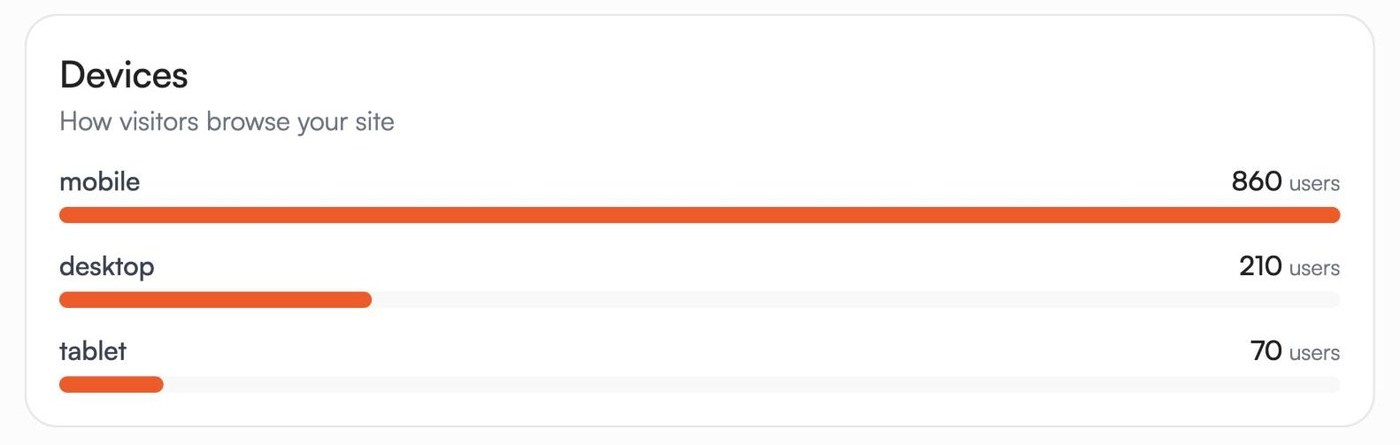
Instagram is built as a phone app, so most people see your posts on a small screen, and many of them will tap through to your website from your profile or a post. So think small screen first: big, clear photos, text large enough to read without zooming, and a link that leads to a page that works on a phone.
How do you know if your Instagram content is working?
Look at what people do, not only how many saw it. Each month, open your insights and note which posts got the most shares, saves and messages, and whether people visited your profile or tapped your link. Then make more of what worked and less of what didn't. Follower count is the least useful number for a local business; ten new followers who live nearby are worth more than a thousand who never will.
If you only do three things this week
- Write down five questions customers asked you this month; they are your next five carousels.
- Copy the 30-day calendar above into your notes app and fill in week 1 with your own jobs and products.
- Film one reel that opens on a finished result, and add captions before you post it.
Where Kahu fits
If you'd like help without handing over the keys, here's what our tools do. Kahu Creative turns the photos you've already taken into drafted posts, reels and story ads in your Brand Kit's colours, fonts and voice, so your weekly batch becomes checking and approving rather than making from scratch. If a post does well, Kahu Reach can draft a Meta ad to promote it, with the ad spend paid to Meta from your own ad account and no cut to KahuLogic. Work Kahu drafts waits in your approvals queue until you approve it, and automations run only when you switch them on. Your website, ads and CRM are included from Growth (US$179 a month, or US$149 billed yearly). Starter (US$69) covers social posting, Creative Studio and chat. Starter, Growth and Pro start with a 14-day free trial.
 Where Kahu fits




So, how do you create Instagram content for a small business? Show your real work, answer real questions, use reels to reach new people and carousels to be useful, film your own clips, and batch a week at a time. Then let shares, saves and messages tell you what to do more of.
I'm Muskaan Sharma, User Researcher at KahuLogic, a New Zealand company with a team across Australia, New Zealand and India. My honest view is that the small businesses that do well on Instagram aren't the most polished; they're the ones that keep showing up with their own work.
Frequently asked questions
How often should a small business post on Instagram?
Consistency matters more than volume. Three or four good posts a week, plus stories when you have time, is a pace most owners can keep. A steady rhythm every week beats a burst followed by a month of silence.
Should I post reels or photos?
Both. Reels give you the best chance of reaching people who don't follow you, because Instagram shows them to a small group of non-followers first. Carousels and photos are better for detail, how-tos and proof of your work.
Do I need professional photos for Instagram?
No. Clear, well-lit phone photos and clips of your real work are enough, and Instagram says it favours original content made by the account that posts it. Clean the lens, use daylight where you can, and shoot upright for reels and stories.
How long should an Instagram reel be?
Instagram said in 2025 that reels up to three minutes can be recommended to non-followers. For most small businesses, 10 to 30 seconds showing one thing clearly is easier to watch to the end, which is one of the signals Instagram says it uses.
What size should Instagram posts be?
Instagram keeps photos at up to 1080 pixels wide and supports shapes from landscape 1.91:1 to portrait 4:5, so 1080 by 1350 pixels is a safe portrait post. Reels and stories are tall 9:16.
Can I use AI to create Instagram content?
Yes, for drafting captions, brainstorming ideas and tidying photos. Give it your real details and edit the result into your own voice. Keep your real work in the photos, because original content is what Instagram says it prioritises and what customers trust.
Sources, checked 3 November 2026
- Instagram Help Center: share a post with multiple photos or videoshelp.instagram.com
- Instagram Help Center: image resolution of photos you sharehelp.instagram.com
- Instagram: Instagram ranking explainedabout.instagram.com
- Instagram for Creators: frequently asked questionscreators.instagram.com
- Instagram for Creators: finding success on reels in 2025creators.instagram.com
- Instagram Help Center: about original content on Instagramhelp.instagram.com
- Instagram for Creators: tips for improving your reachcreators.instagram.com
- Instagram Help Center: about trial reelshelp.instagram.com
- Meta: test content with non-followers using trial reelsabout.fb.com
- Instagram: Edits by Instagramcreators.instagram.com
- Pew Research Center: Americans’ social media use 2025pewresearch.org
- Neowin: Instagram joins the 3 billion monthly active club (news report, September 2025)neowin.net