What AI can actually do for a small business today
Rajesh Sharma·Updated 8 Oct 2026·12 min read

AI can help a small business most with writing and admin: drafting emails and replies, summarising long documents, coming up with ideas, writing social posts and helping with bookkeeping. About a quarter of US firms and over a third of UK firms with ten or more staff now use it, so it's real but still early. Most workers who use it save a few hours a week. Keep a person in charge of anything that spends money, publishes or goes to a customer, and start with one repetitive writing job for a week.
Every owner I talk to has the same two feelings about AI. One is that they're missing out on something everyone else has worked out. The other is a quiet suspicion that most of it is hype. Both are partly right, and the numbers show why.
I'm the founder of KahuLogic, so I spend a lot of my week deciding which AI ideas are worth building and which aren't. We build AI tools for small businesses at KahuLogic, so I'm not neutral, and our product appears later in this guide. But most of what follows uses tools you probably already pay for, and the advice holds whichever ones you use.
AI use is real, but it's early
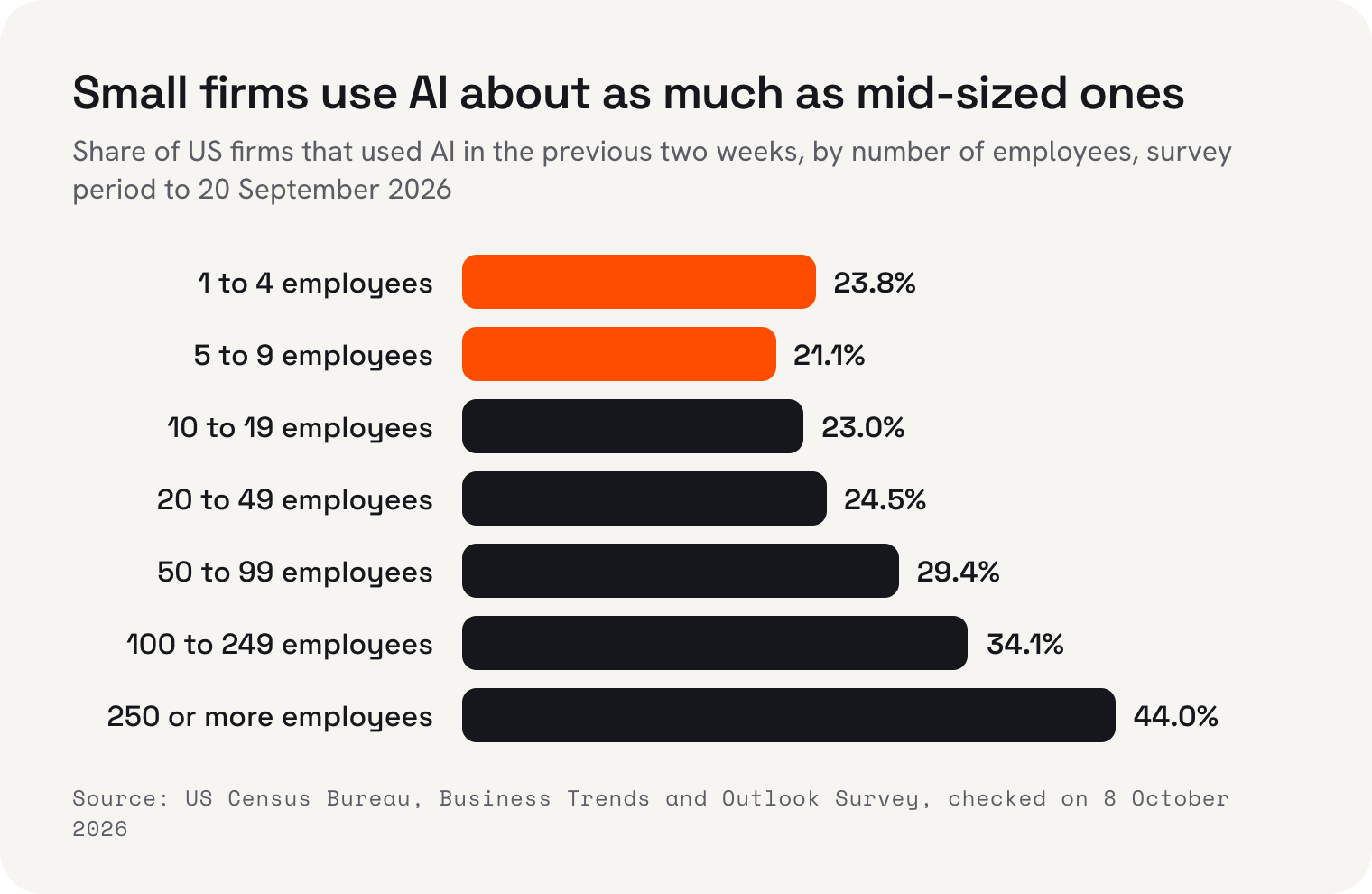
The US Census Bureau regularly asks businesses whether they've used AI in the previous two weeks. In late November 2025, 17.3% said yes. By early January 2026 it was 17.7%, by early May 19.8%, and in the survey period to 20 September 2026 it reached 23.8%. A further 27.6% said they expect to use it in the next six months.
In May the Census Bureau summed up the previous stretch plainly: “overall AI usage hovered between 17% and 20%”. That's the important part. Use is rising, but it rose slowly for months, and most businesses still aren't using AI at all. If you haven't started, you're in the majority, not behind.
The UK looks similar. The Office for National Statistics found that firms with ten or more employees using AI rose from about 12% in September 2023 to about 35% in June 2026, and 28% of firms with up to nine employees used it. But only 10% of the firms using it described their use as extensive. Across OECD countries, the share of firms using AI went from 8.7% in 2023 to 14.2% in 2024 and 20.2% in 2025, with small firms at 17.4% against 52.0% for large ones.
Size isn't the whole story, as the chart at the top shows. In the US, firms with one to four employees used AI at 23.8%, about the same as firms with 20 to 49. The bigger gap is between industries. In May 2026, 39.7% of information businesses and 33.9% of finance and insurance firms used AI, against about 14% in retail. So the useful question isn't “is my business big enough?” It's “do I do a lot of the kind of work AI is good at?”
The jobs AI does well right now
The clearest picture of what AI is good at comes from what people actually use it for. In March 2026 the Census Bureau asked US workers about eleven tasks, and 56% had used AI for at least one of them. The top five are mostly reading and writing.
| Task | US workers using AI for it | Where a small business might use it |
|---|---|---|
| Searching for information or technical help | 37% | Working out a tax form, a software setting or a supplier's terms |
| Writing communications | 32% | Email replies, quotes, follow-ups, notices to customers |
| Generating ideas | 32% | Promotions, menu names, social post ideas, event themes |
| Summarising or translating | 31% | Long contracts, supplier emails, messages in another language |
| Administrative tasks | 27% | Rosters, checklists, meeting notes, filing |
Notice what's not on the list: running the business. AI is good at producing a first draft of almost anything made of words, and at turning a lot of words into a few. It's much less reliable at knowing your customers, your prices or what you promised someone last Tuesday, unless you tell it. That's why I think of it as a fast junior assistant, not a manager.
 Gmail
 Google
- Microsoft Copilot
- ChatGPT
- Canva
- QuickBooks
Replies and emails
This is where most owners should start, because it's where most of the hours go. Gmail's Help me write drafts an email from a short instruction, refines a draft you've written and changes its tone, for example from blunt to friendly. Copilot in Outlook does a similar job for Outlook users, drafting a message from a prompt that you then edit.
The trick is to give it the facts and let it do the wording. “Reply to this guest: yes we have a family room on the 14th, $180 a night, breakfast not included, check-in from 2 pm” gets a better draft than “reply nicely”. Then read it before you send it. AI writes confidently even when it's guessing, and a wrong price in a friendly tone is still a wrong price.
Once a draft comes out right, keep it. Most small businesses answer the same ten questions over and over: are you open on the public holiday, do you take walk-ins, how much is a call-out, can I change my booking. Save your best AI-assisted answer to each one as a template, and next time you only need to change the details. That's a small habit, but it's where the hours really add up.
Ideas, summaries and recurring jobs
Chat assistants like ChatGPT are good thinking partners for the jobs you put off: ten ideas for a winter promotion, a plain-English summary of a 20-page lease, a first draft of a job advert. They're also starting to do jobs on a schedule. OpenAI's help pages say “ChatGPT can run one-time or recurring tasks, monitor for changes”, which is handy for something like a weekly reminder or a summary of news in your industry.
For social posts and images, Canva has put AI tools into its design app, which is where many small businesses already make their posts. Some of those features are marked “Coming Soon” on Canva's own page, so check what's actually live on your plan before you rely on one.
Bookkeeping help, with a vendor's claim attached
Bookkeeping is the job most owners would happily hand over, and the accounting software companies know it. Intuit's QuickBooks has an AI accounting agent that it says categorises transactions and reconciles them against your bank statements. These are exactly the repetitive matching jobs that eat an evening a month.
I'd read that number for what it is: a vendor describing its own product. It may well be true for many of its customers, but it isn't an independent measurement, and it says nothing about the other 55%. The sensible approach is the same as with a new bookkeeper: let it do the categorising, check its work for the first few months, and keep the final sign-off yourself.
How much time does AI actually save?
Here the independent numbers are more modest than the marketing. Among US workers who used AI, the Census Bureau asked how much time it had saved them in the previous week. The most common answer was one to two hours.
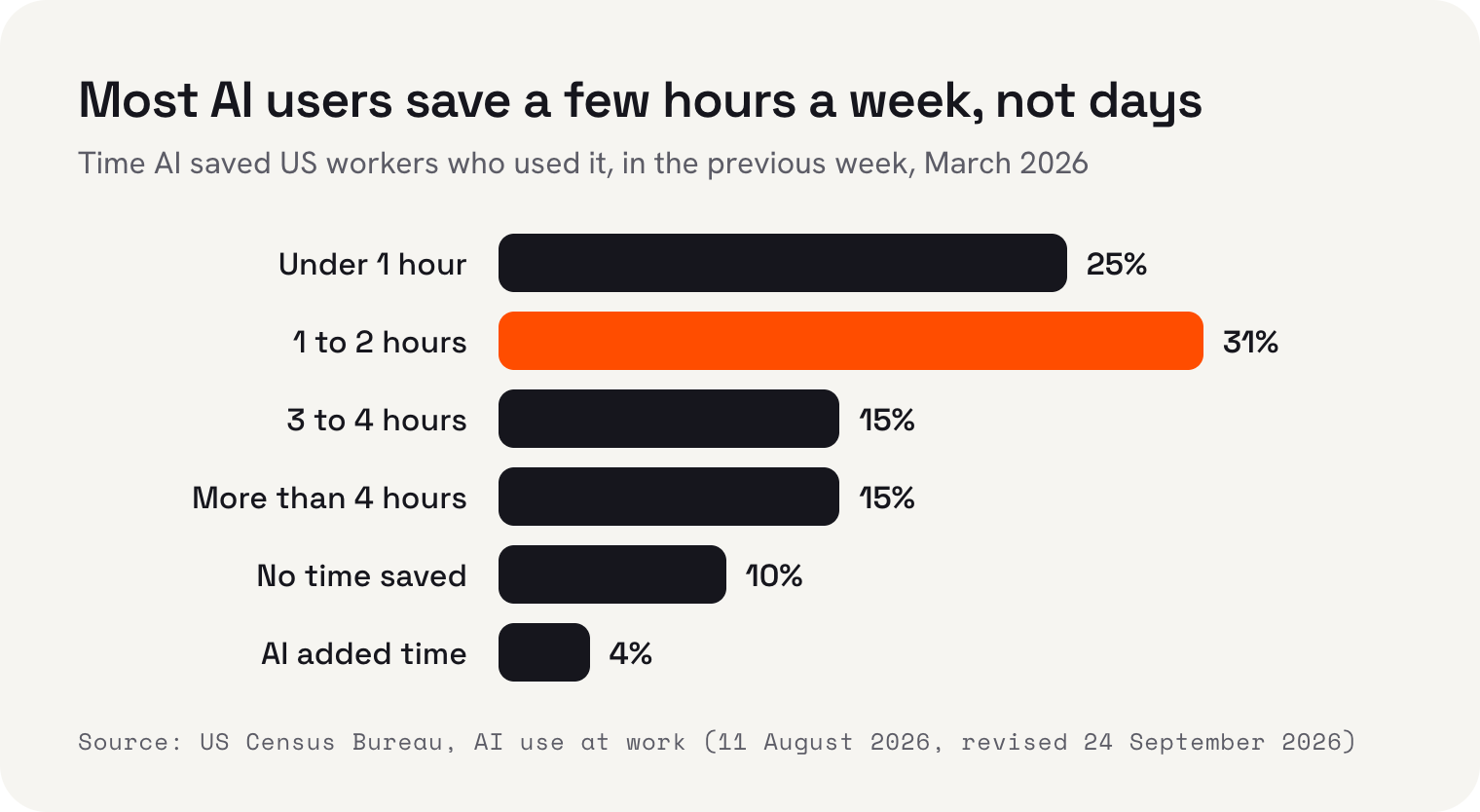
Add it up: 25% saved under an hour, 31% saved one to two hours, 15% saved three to four, and 15% saved more than four. But 10% saved no time at all, and 4% said AI added time. That last group is worth remembering. If you spend twenty minutes fixing a draft that would have taken you ten to write, AI is costing you time, not saving it.
For a small business owner, two hours a week is still a lot. It's an evening back, or two hours spent with customers instead of an inbox. But it comes from many small jobs done a bit faster, not one big job taken off your plate. Anyone promising to replace a whole role is selling something the evidence doesn't yet show.
What AI still gets wrong
AI doesn't know your business unless you tell it. Ask a chat assistant for your opening hours and it may invent some. Ask it to reply to a complaint and it may promise a refund you don't offer. It isn't lying; it's filling a gap with something that sounds plausible. The fix is the one I come back to throughout this guide: give it your facts, and read what it writes.
It also flattens your voice. Ask three businesses to let AI write their website and you'll get three pages that sound the same. Your customers chose you partly because of how you talk to them, so edit drafts until they sound like you, and keep a few examples of your own writing to paste in as a guide. A café that writes like a bank loses something, even if every word is correct.
Where to keep a human in charge
The biggest risk with AI isn't that it does nothing. It's that it does something, confidently, on your behalf, and you find out afterwards. So my rule is simple: AI drafts, a person decides. The more a mistake would cost, the more firmly a person should be in the loop.
- Anything that spends money, like ad budgets, orders or refunds
- Anything published in your name, like posts, website changes and ads
- Anything sent to a customer that includes a price, a date or a promise
- Anything involving someone's personal details or health
- Anything you'd be embarrassed to see screenshotted
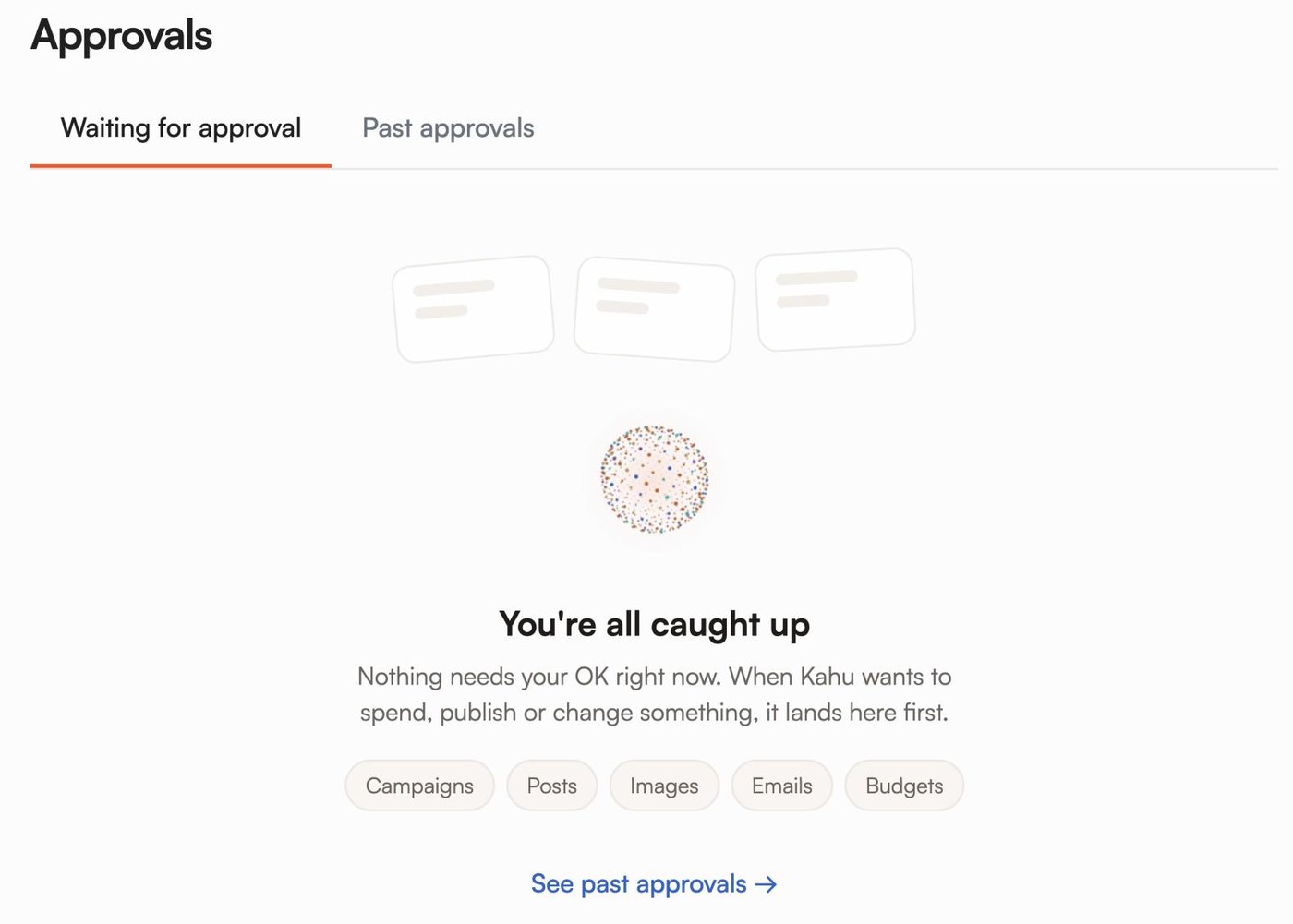
That loop is how we built Kahu. When you ask Kahu for something, a site change, an ad, a post or a reply, it drafts the work and the draft waits in Approvals until you say yes. Kahu Reach drafts Google and Meta ads for your approval, and nothing runs until you approve it. Automations run only when you switch them on.
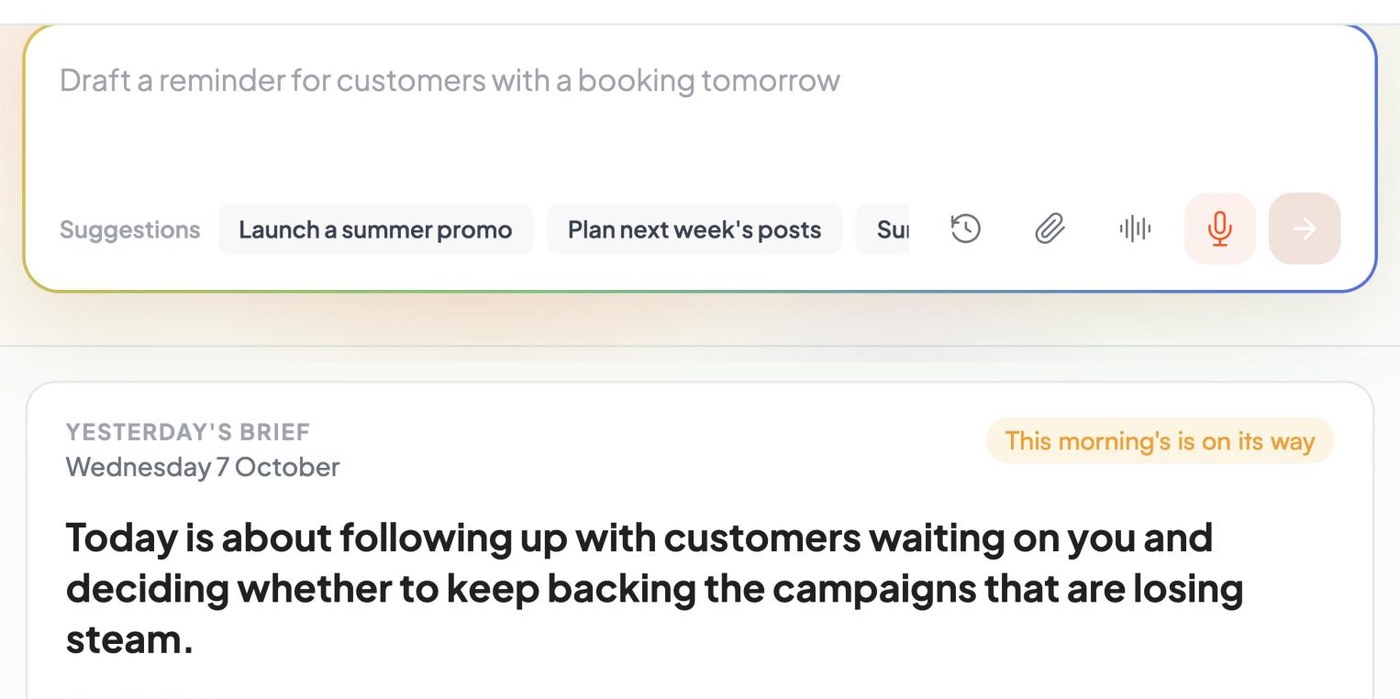
The other half is knowing what needs your attention. Kahu's Overview opens with a short daily brief written by AI and a box where you can ask for work in plain words. In a sample account it reads: “Today is about following up with customers waiting on you and deciding whether to keep backing the campaigns that are losing steam.” That's the kind of summary AI is good at, and the decision it points to is still yours.
To be straight about cost: asking Kahu for changes in chat uses credits. The Growth plan, US$179 a month or US$149 billed yearly, includes 1,500 credits a month, with top-ups at US$10 per 100. Starter is US$69 a month and includes social posting, Creative Studio and chat. Every plan starts with a free 7-day trial, no card needed.
 Where Kahu fits

 Two Thursday gaps at 11:00 and 14:30. Drafted texts to 6 regulars who asked about Thursdays.
 New hours drafted for your site: Sat and Sun, 8am to 2pm.
 One post about the new hours, using your Sunday counter photo.
How to start in a week
You don't need a strategy document. You need one job, a week and a notebook. This is the plan I'd give a friend who runs a café, a salon or a small practice and wants to find out whether AI is worth it for them.
- 1Day 1: pick one jobChoose a writing job you do at least five times a week, like answering enquiries, chasing invoices or writing posts. Time how long it takes you now.
- 2Day 2: use what you haveTry the AI built into tools you already pay for, such as Gmail's Help me write or Copilot in Outlook, before buying anything new.
- 3Day 3: write your facts downMake a short note of your prices, hours, policies and tone. Paste it in with every request so the drafts start from the truth.
- 4Day 4: draft, check, sendLet AI draft every instance of that job. Read each one before it goes out, and note what you had to fix.
- 5Day 5: decideCompare the time against Day 1. If it saved time and the fixes were small, keep it and add a second job next week. If not, stop.
That's it. One job, measured honestly. If the drafts need so much fixing that you're slower, you've learned something useful for the price of a week, and you can try a different job. If they're good, you've found your first couple of hours back.
I'm Rajesh Sharma, Founder of KahuLogic, a New Zealand company with a team across Australia, New Zealand and India. We build and look after websites and marketing for small businesses, and this is the advice I'd give whether or not you ever use us.
Frequently asked questions
How many small businesses use AI?
In the US, 23.8% of firms used AI in the two weeks to 20 September 2026, according to the Census Bureau, including 23.8% of firms with one to four employees. In the UK, the Office for National Statistics found 28% of firms with up to nine employees used AI in June 2026. Across OECD countries, 17.4% of small firms used it in 2025.
What is the best first job to give AI in a small business?
A writing job you repeat often, such as replying to enquiries, chasing invoices or drafting social posts. Writing communications is one of the most common uses: 32% of US workers used AI for it in March 2026, according to the Census Bureau. Give it your facts and check every draft.
How much time can AI save a small business owner?
In a Census Bureau survey of US workers in March 2026, the most common answer among those who used AI was one to two hours saved in the previous week (31%). A quarter saved under an hour, 15% saved more than four hours, 10% saved none and 4% said AI added time.
Is it safe to let AI reply to customers on its own?
I wouldn't, at least not at first. AI can write a confident reply with the wrong price or date. Let it draft, read each reply before it goes, and only consider automating a reply once you've checked enough drafts to trust that type of message.
Do I need to pay for new software to use AI?
Often not. Gmail's Help me write and Copilot in Outlook draft and refine emails inside tools many businesses already use, and ChatGPT can summarise documents and suggest ideas. Try what you already have for a week before buying a new tool.
Can AI do my bookkeeping?
It can help. Intuit says the AI agent in QuickBooks categorises transactions and reconciles them against bank statements, and claims 45% of its customers save 12 hours a month on bookkeeping. That's Intuit's own figure, so check the AI's work for the first few months and keep the final sign-off yourself.
Sources and further reading
- US Census Bureau: Business Trends and Outlook Surveycensus.gov
- US Census Bureau: Business Trends and Outlook Survey national data (XLSX)census.gov
- US Census Bureau: AI use by businesses (26 May 2026)census.gov
- US Census Bureau: AI use at work (11 August 2026, revised 24 September 2026)census.gov
- Office for National Statistics: Artificial intelligence in UK businesses, 2023 to 2026 (20 July 2026)ons.gov.uk
- OECD: AI use by individuals surges across the OECD as adoption by firms continues to expand (28 January 2026)oecd.org
- Gmail Help: Help me writesupport.google.com
- Microsoft Support: draft an email message with Copilot in Outlooksupport.microsoft.com
- OpenAI Help Center: scheduled tasks in ChatGPThelp.openai.com
- Canva: Magic Studio AI toolscanva.com
- Intuit QuickBooks: accounting agent (vendor claims)quickbooks.intuit.com