What can AI agents automate? What works now and where you decide
Rajesh Sharma·Updated 8 Oct 2026·12 min read

An AI agent is software that works towards a goal you give it, using tools such as your email, store or records, and taking several steps with some independence. For a small business, agents can realistically draft replies, update records, write product copy and pull together reports today. They are not ready to make your important decisions alone: Gartner expects over 40% of agentic AI projects to be cancelled by the end of 2027. Start with one small, repetitive job, and keep a human approval step before anything goes out.
Every software company now says it sells AI agents. If you run a café, a salon, a clinic or a small shop, it's fair to ask what that word actually means, and whether an agent can take real work off your plate this year or just adds another subscription.
Here's my short answer. An agent can do useful work for a small business today, mostly drafting and tidying: replies, records, product descriptions, weekly reports. Where it should not work alone is anything that spends money, makes a promise to a customer or goes out under your name. For those, the agent drafts and you decide.
One disclosure first. We build AI tools for small businesses at KahuLogic, so I have a view on how agents should behave, and I'll say where our own product fits. Everything else in this guide comes from the companies building agents and the people researching them, and it applies whatever tools you use.
What an AI agent actually is
An AI agent is software that works towards a goal on your behalf, using tools, over several steps, with some independence. Google Cloud describes agents as “software systems that use AI to pursue goals and complete tasks”. AWS puts it as software that interacts with its environment, collects data and performs self-directed tasks towards goals. IBM calls it a system that autonomously performs tasks.
The key words are goal, tools and steps. You don't tell an agent each click. You tell it what you want done, it works out the steps, and it uses the tools it has been given, such as your inbox, your online store or your customer records, to get there.
That is what separates an agent from the chatbot most people have tried. IBM's line is blunt: “Nonagentic AI chatbots are ones without available tools, memory or reasoning.” A chatbot answers a question and stops. An agent can look something up, change a record and come back to tell you what it did.
Picture it in a real business. A salon owner asks for every client who hasn't booked in three months to get a friendly note. A chatbot could write one note if you pasted in a name. An agent with access to the booking records could find those clients, draft a note for each and hand you the list to approve. Same AI underneath; very different amount of work taken off your hands.
Google Cloud draws a useful line between three things that often get mixed up. An agent is proactive: it pursues a goal. An assistant is reactive: it helps when you ask, and the user makes the decisions. A bot follows pre-defined rules. Most of what small businesses use today is an assistant or a bot, and that's fine. You don't need an agent for every job.
Agent or workflow? Most jobs only need a workflow
Anthropic, the company behind the Claude models, makes a distinction I find helpful in its guide to building effective agents. A workflow follows a predefined path written in code: when this happens, do that, then that. An agent dynamically directs its own process and decides which tools to use as it goes.
For a small business, that difference matters more than any feature list. If the job is the same every time, like sending a booking confirmation or copying a new enquiry into a spreadsheet, a simple workflow does it reliably and cheaply. An agent earns its keep when the job needs judgement: reading a messy customer email, working out what they want and drafting a sensible reply.
Gartner, the research firm, gives the same advice from the other direction. In plain terms: don't pay for judgement you don't need. A rule that fires the same way every time is easier to trust, easier to fix and usually cheaper to run than an agent that has to think about it.
What agents can realistically do for a small business today
Agents are no longer just a research idea. The big software companies small businesses already use have built them into their products. Here are some of the names you'll see, and what each says its agents do.
 Shopify Sidekick
- HubSpot
- Microsoft 365 Copilot
- OpenAI
- Anthropic
- Google Cloud
Shopify's assistant, Sidekick, is included in Shopify plans. According to Shopify's help pages, it can edit products, draft copy and analyse your store data. Notice how Shopify describes the important part: it “presents changes for your review before applying them”. That is the right design for a shop owner. It saves you the typing, and you still decide what goes on your store.
HubSpot, the CRM company, sells a set of agents under the name Breeze: a customer agent, a prospecting agent and a data agent. Its Agent Hub is available on the Starter, Professional and Enterprise plans. HubSpot says its customer agent has a 70% average resolution rate and hands conversations to a human when it needs to. That is HubSpot's own figure about its own product, not an independent test, and the customer agent needs the Professional or Enterprise plan.
That doesn't make vendor figures useless. It means you should treat them as the best case, measured on the vendor's own customers in the vendor's own way. Your results depend on your questions, your customers and how much of your information the agent can see. The only number that really matters is the one you measure on your own business.
Microsoft says agents in Microsoft 365 Copilot can “take actions like sending emails or updating records”. It also makes a distinction worth knowing: its simpler declarative agents only act when a user starts them. They don't wake up on their own and go off doing things.
Put those together and a pattern appears. The jobs agents are good at today look like this:
- Drafting replies to customer emails and messages, for you to check and send
- Updating records, like adding a new customer's details or noting what they asked for
- Writing product or service copy, such as descriptions for a menu, a price list or an online shop
- Pulling together reports, like a summary of this week's sales, bookings or enquiries
- Answering routine questions, with a clear hand-off to a person when the question isn't routine
- Preparing drafts of posts or ads that you approve before anything is published or paid for
Every item on that list is work that takes you time but doesn't need your judgement until the end. That's the sweet spot. The agent does most of the typing and tidying, and you spend your time checking the result instead of writing it from scratch.
Where the final say belongs
The question isn't whether an agent can act on its own. Many can. The question is which actions you're comfortable with it taking without asking. For most small businesses, my rule is simple: if it spends money, makes a promise, or goes out under your name, a person approves it first.
This isn't just my opinion. The US National Institute of Standards and Technology, NIST, publishes an AI Risk Management Framework that organisations use to manage AI risk. One of its core practices reads: “Processes for human oversight are defined, assessed, and documented.” For a small business, that can be as simple as knowing which jobs the agent does alone and which ones wait for you.
The people building agents agree. Anthropic's guide says “Agents can then pause for human feedback at checkpoints”, and it recommends stopping conditions so an agent doesn't run on indefinitely. OpenAI's Agents SDK, the toolkit developers use to build agents on its models, lets a developer mark a tool as needing approval. When the agent reaches that tool, the run pauses until a person approves or rejects it.
So when you look at any agent product, ask one question before anything else: where does it stop and ask me? If the answer is vague, or the answer is never, keep looking.
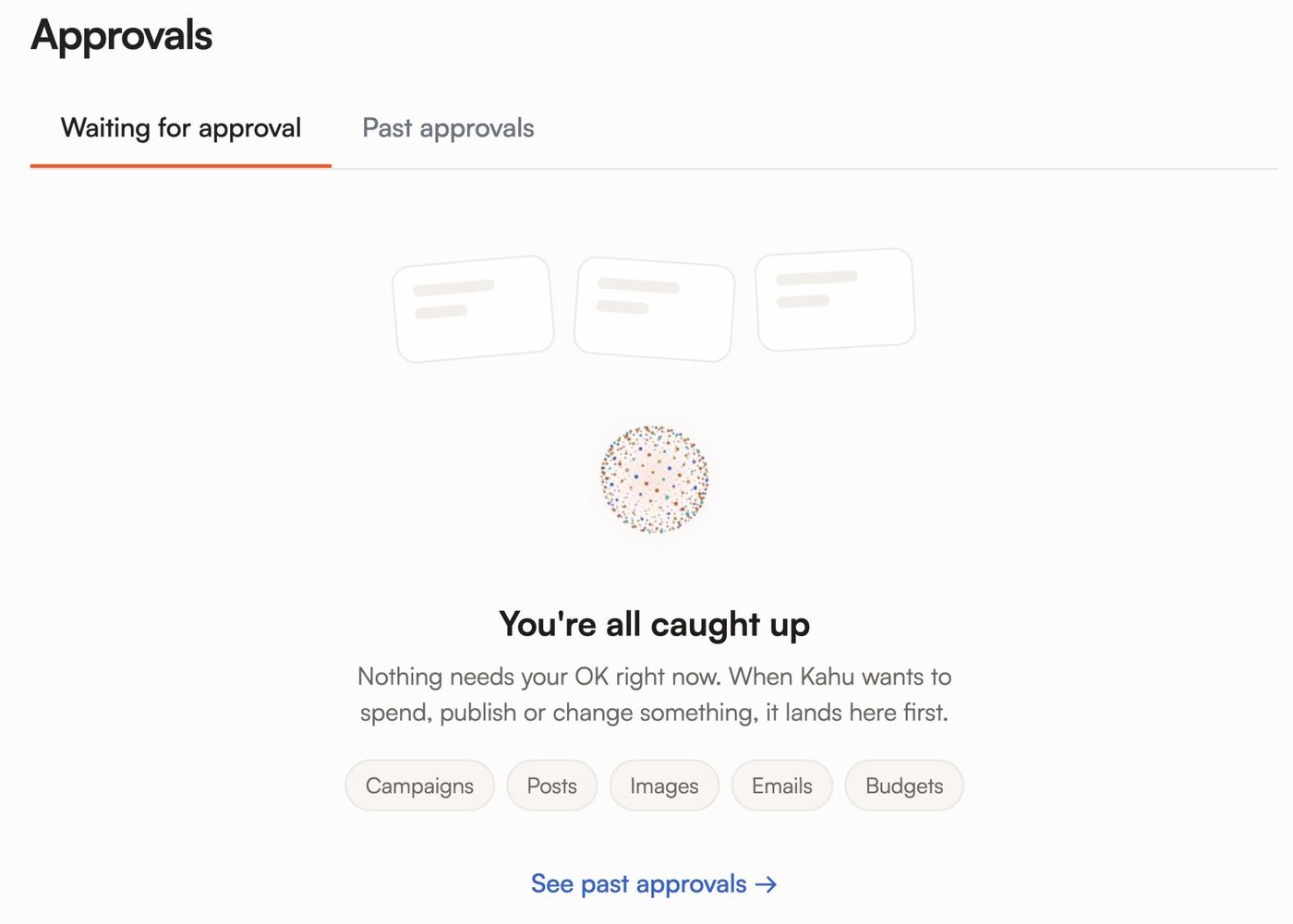
This is how we build Kahu, and I'll be specific about it because it's the part I care most about. Kahu drafts work for you: changes to your website, Google and Meta ads, social posts and replies. Every piece waits in Approvals until you say yes. Nothing goes out without your approval, and automations run only when you switch them on.
We chose that design on purpose. I don't think a small business owner should have software making decisions in their name. What I want for them is the drafting done, so the decision is quick and stays theirs.
The hype check: what Gartner expects
If you feel sceptical about agents, you're in good company. In June 2025, Gartner predicted that over 40% of agentic AI projects will be cancelled by the end of 2027. The reasons it gave are worth reading twice: rising costs, unclear business value and inadequate risk controls.
Gartner also has a name for something you've probably noticed: agent washing. Its analysts estimate that only about 130 of the thousands of vendors selling agentic AI are offering the real thing. The rest are rebranding chatbots, assistants and older automation as agents. So when a tool calls itself an agent, check what it can actually do on its own, and what it can't.
The interest is real, though. Gartner expects 15% of day-to-day work decisions to be made autonomously by agents by 2028, up from none in 2024, and a third of enterprise software to include agentic AI by then. Those are forecasts about large companies, not cafés, but the tools small businesses use are built by the same software companies.
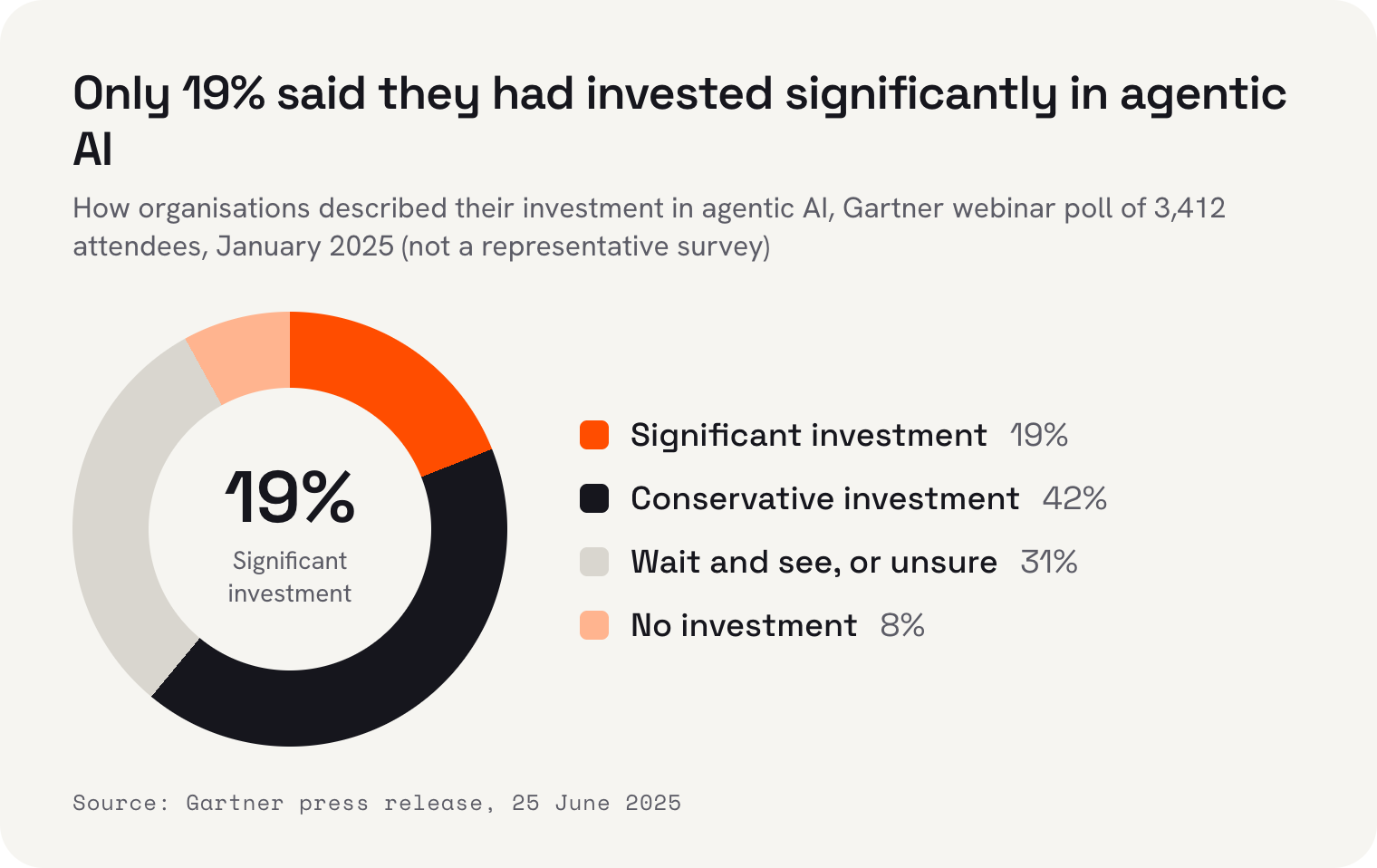
Gartner's January 2025 webinar poll shows how cautious most organisations are. Of 3,412 attendees, 19% said they had made significant investments in agentic AI, 42% conservative ones, 8% none, and 31% were waiting to see or unsure. It's a poll of people who chose to attend a webinar, not a representative survey, but it's a useful reminder: if you haven't jumped in yet, most people haven't either.
How to start small with an AI agent
You don't need a strategy document. You need one small job, a way to check the agent's work, and a few weeks to see whether it actually saves you time. Here's how I'd go about it.
- 1Pick one repetitive jobChoose something you do every week that takes time but follows a pattern: replying to the same questions, writing product descriptions, or summarising the week's bookings.
- 2Check whether a workflow will doIf the job is identical every time, a simple rule-based automation is cheaper and more reliable. Save the agent for jobs that need some judgement.
- 3Decide where it stops and asksWrite down which actions need your approval. Anything that spends money, promises something or goes out under your name should wait for you.
- 4Give it only the tools it needsIf the job is drafting replies, the agent needs to read messages, not issue refunds. Fewer permissions means fewer surprises.
- 5Review everything for a few weeksRead every draft before it goes out. You'll quickly see where it's reliable and where it needs a closer eye.
- 6Keep it, change it or drop itIf it saves you time and the drafts are good, give it the next job. If not, stop paying for it. Plenty of projects end here, and that's fine.
The order matters. Most of the trouble with agents comes from giving them too many tools and too much freedom too early. Start narrow, keep your hand on the approval step, and widen the job only when the agent has earned it.
If you want to try this with your website, ads and social posts in one place, Kahu's Growth plan includes your website, CRM, SEO reports and Google and Meta ads, at US$179 a month, or US$149 billed yearly. Asking Kahu for changes in chat uses credits: Growth includes 1,500 a month, and top-ups are US$10 per 100. Every plan starts with a free 7-day trial, no card needed.
 Where Kahu fits

 Two Thursday gaps at 11:00 and 14:30. Drafted texts to 6 regulars who asked about Thursdays.
 New hours drafted for your site: Sat and Sun, 8am to 2pm.
 One post about the new hours, using your Sunday counter photo.
Where I think this is heading
Agents will get better, and the jobs they can do alone will grow. But for a small business, I don't think the right goal is software that runs your business for you. The right goal is software that does the drafting, the tidying and the remembering, so you can spend your time on the decisions only you can make and the customers in front of you.
So be curious, and be picky. Ask every vendor what their agent can do on its own, where it stops and asks you, and what happens when it gets something wrong. The good ones will have clear answers.
I'm Rajesh Sharma, founder of KahuLogic, a New Zealand company with a team across Australia, New Zealand and India. We build and look after websites and marketing for small businesses, and this is how I'd approach AI agents whether or not you ever use us.
Frequently asked questions
What is an AI agent, in simple terms?
An AI agent is software that works towards a goal you give it, using tools such as your email, store or customer records, over several steps and with some independence. A chatbot answers a question and stops; an agent can look things up, change records and report back on what it did.
What can AI agents automate for a small business?
Today, agents are most useful for drafting and tidying work: replies to customer messages, updates to customer records, product or service descriptions, and weekly reports. They work best when a person checks the result before anything is sent, published or paid for.
Is an AI agent the same as a chatbot?
No. A chatbot answers questions in a conversation. IBM describes non-agentic chatbots as ones without tools, memory or reasoning. An agent has tools and can take steps towards a goal, such as finding an order and drafting a reply about it.
Should an AI agent be allowed to act without my approval?
For anything that spends money, makes a promise to a customer or goes out under your name, a person should approve it first. NIST's AI Risk Management Framework calls for defined processes for human oversight, and agent toolkits from Anthropic and OpenAI include ways for agents to pause for a person's approval.
Are AI agent projects worth it, or just hype?
Both exist. Gartner predicted in June 2025 that over 40% of agentic AI projects will be cancelled by the end of 2027, because of costs, unclear value and weak risk controls. Starting with one small, repetitive job and checking whether it saves you time is the safest way to find out.
Do I need an agent, or is ordinary automation enough?
If a job is the same every time, like sending a confirmation or copying an enquiry into a spreadsheet, ordinary rule-based automation is cheaper and more reliable. Gartner's advice is to use agents when decisions are needed and automation for routine workflows.
Sources and further reading
- Google Cloud: what are AI agents?cloud.google.com
- AWS: what are AI agents?aws.amazon.com
- IBM: what are AI agents?ibm.com
- Anthropic: Building effective agents (19 Dec 2024)anthropic.com
- OpenAI Agents SDK: human in the loopopenai.github.io
- Gartner: over 40% of agentic AI projects will be canceled by end of 2027 (25 Jun 2025)gartner.com
- NIST AI Risk Management Framework: coreairc.nist.gov
- Shopify Help Center: Sidekickhelp.shopify.com
- HubSpot: Breeze AI agentshubspot.com
- HubSpot: AI customer service agenthubspot.com
- Microsoft Learn: agents for Microsoft 365 Copilotlearn.microsoft.com