AI agent vs chatbot vs automation: which one does your business need?
Anurag Shukla·Updated 8 Oct 2026·12 min read

A chatbot answers questions in a conversation. Automation follows rules you set: when a trigger happens, it runs an action, the same way every time. An AI agent works towards a goal, uses tools such as your records or inbox, and decides its own steps, ideally asking you before it acts. Most small businesses need automation for routine jobs first, a chatbot for quick questions, and an agent only for work that needs judgement.
Chatbot, automation, AI agent. The three words get used as if they mean the same thing, usually by someone trying to sell you one of them. They don't. Each does a different job, costs a different amount and goes wrong in a different way.
The short version: a chatbot answers, automation follows the rules you set, and an agent works towards a goal using tools, and should ask before it acts. Once you can tell them apart, it's much easier to work out which one your business actually needs, and which sales pitch to ignore.
Those numbers come from Pew Research Center's Americans and AI 2026 report, published in June 2026 from a survey of 5,119 US adults in February. They're US figures, but the pattern is familiar everywhere: about half of people now use AI chatbots, and plenty of them don't fully trust how businesses use AI. Your customers are in both groups.
One disclosure first. We build websites and AI tools for small businesses at KahuLogic, so our product comes up near the end. I'm a tech writer, and my job here is to explain the three tools plainly. The definitions and prices below come from the companies that make them, and they apply whatever you use.
Three tools, three jobs
The easiest way to tell them apart is to ask who decides what happens next. With a chatbot, you ask and it replies, and you decide what to do with the answer. With automation, you decided in advance: you wrote the rule, and it runs the same way every time. With an agent, you set the goal and it decides the steps, within the limits you give it.
| Chatbot | Automation | AI agent | |
|---|---|---|---|
| What it does | Answers questions in a conversation | Runs an action when a trigger happens | Works towards a goal over several steps |
| Who decides | You, after reading the answer | You, when you set up the rule | The agent plans; you approve key actions |
| Uses your tools? | Not on its own | Yes, the apps you connect | Yes, and chooses which to use |
| Best for | Quick questions and drafting | Routine jobs that never change | Jobs that need some judgement |
| Watch out for | Confident wrong answers | Breaking when something changes | Acting without your say-so |
| Example | ChatGPT | Zapier or Make | Agents built into business software |
Google Cloud draws a similar three-way line, though it uses slightly different words. In its explainer on AI agents, an agent is proactive and pursues goals, an assistant is reactive and the user makes the decisions, and a bot follows pre-defined rules. Same idea: the difference is how much deciding the software does for you.
A chatbot answers
IBM's definition is the clearest I've found: “A chatbot is a software application that communicates with people through text or voice.” That's it. You type or speak, it replies.
There are two kinds. Rule-based chatbots follow predefined rules or scripts: press 1 for opening hours, press 2 for bookings. AI chatbots interpret natural language, so you can ask a question in your own words and get an answer written for you. ChatGPT, Gemini, Copilot and Meta AI are all AI chatbots.
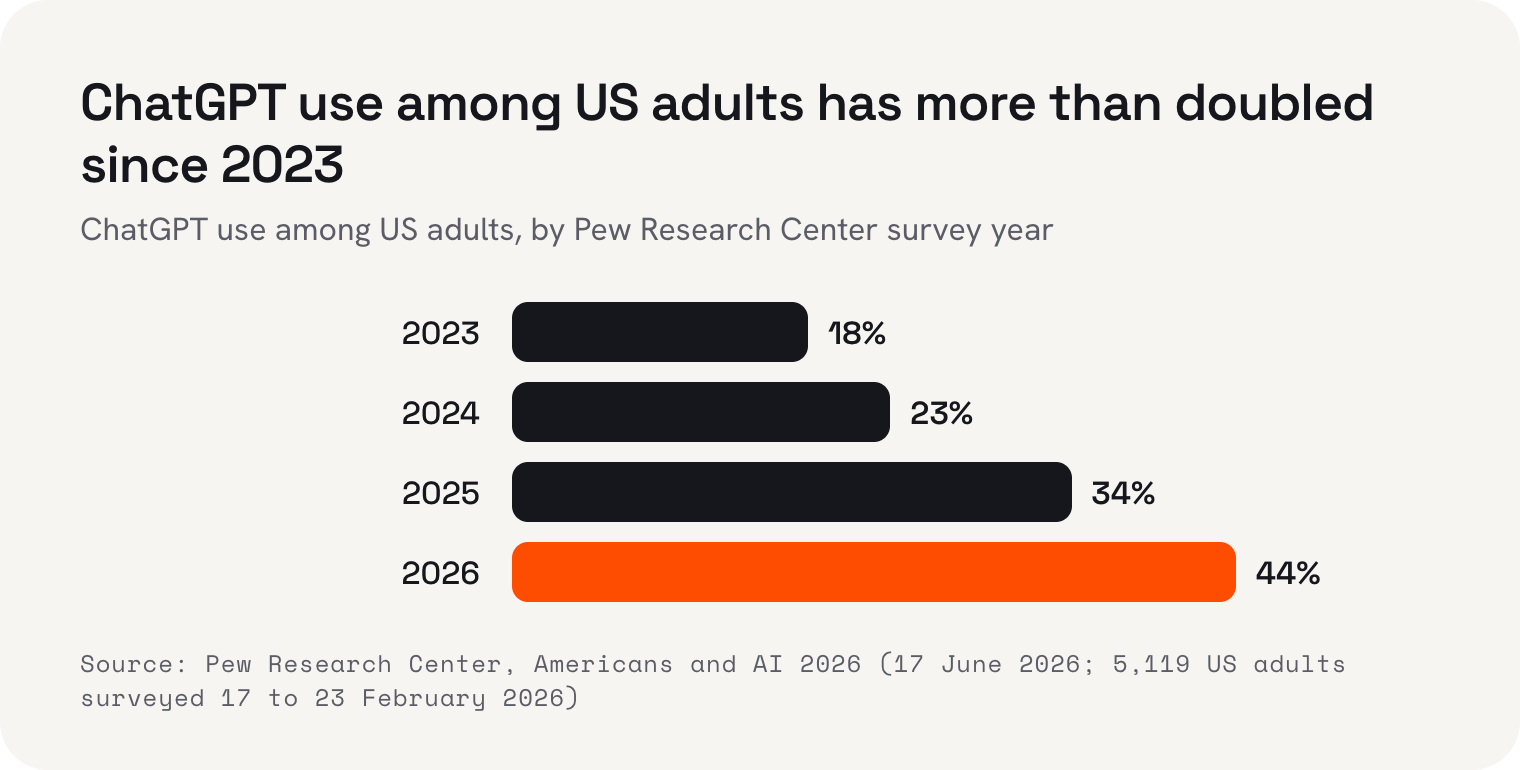
ChatGPT is by far the most used. In Pew's 2026 survey, 44% of US adults used it, up from 18% in 2023. Gemini came next at 24%, then Copilot at 17% and Meta AI at 14%. And 51% of US adults never use AI chatbots at all, which is worth remembering if you're thinking of putting one between your customers and you.
What a chatbot doesn't do, on its own, is act. IBM describes non-agentic chatbots as ones “without available tools, memory or reasoning.” It can write you a perfect reply to an unhappy customer, but you still have to copy it, open your inbox and send it. That's not a flaw. For drafting, explaining and thinking out loud, it's often exactly what you want.
For a small business, a chatbot is the easiest of the three to start with, because there's nothing to set up. Ask it to rewrite your opening hours notice so it sounds friendlier, explain a confusing supplier invoice, or suggest five names for a new menu item. Treat what it gives you as a first draft. It can sound sure of itself and still be wrong, so check any fact, price or promise before you use it.
Automation follows the rules you set
Automation is the oldest of the three and, for most small businesses, the most useful. Zapier, one of the best-known tools, explains it simply: “A Zap is a workflow that connects your apps to automate repetitive tasks.” Every automation has a trigger, the event that starts it, and one or more actions, the things it does next.
The strength of automation is that it doesn't think. It does exactly what you told it, every time, at any hour. The weakness is the same thing. If a customer writes something unexpected, or an app changes, the automation carries on doing exactly what you told it, even when that's no longer right.
Automation tools are cheap to start with. These are the published prices, checked on 8 October 2026, and they change often, so check before you sign up.
- ChatGPT
- Zapier
- Make
- Google Cloud
- IBM
Zapier has a free plan at US$0 with 100 tasks a month and two-step Zaps. Its Professional plan starts from US$19.99 a month and Team from US$69 a month, and paying yearly lowers the monthly fee. Zapier says it connects to more than 9,000 apps.
Make, a similar tool, has a free plan at US$0 with 1,000 credits a month and two active scenarios (Make's word for automations). Paid plans start from about US$12 a month for Core, US$21 for Pro and US$38 for Teams, each with 10,000 credits. Make says it connects to more than 3,000 apps. For comparison, ChatGPT Plus, OpenAI's paid chatbot plan, is US$20 a month.
Whichever tool you choose, start with the job you do most often and resent the most. Copying enquiries into a spreadsheet, sending the same confirmation email, moving a new customer's details from one app to another: these are perfect for automation because they never change. Set up one, watch it run for a week, and only then add the next. A pile of half-tested automations is harder to trust than doing the job by hand.
An AI agent works towards a goal
An agent sits between the two. Like a chatbot, it understands plain language and can deal with messy situations. Like automation, it can use your tools: read your records, draft an email, update a customer's details. The difference is that nobody wrote the steps in advance. You give it a goal, and it works out the steps.
That freedom is what makes agents useful, and what makes them risky. An agent that can send emails can send the wrong email. So the good ones are built to pause. Gartner, the research firm, puts the division of labour neatly: use agents when decisions are needed, automation for routine workflows and assistants for simple retrieval.
The other way to keep an agent safe is to limit what it can touch. An agent that drafts replies needs to read your messages, not issue refunds or change your prices. Give it only the tools the job needs, read what it produces for the first few weeks, and widen its job only once you trust its work. That's slower than switching everything on at once, and much less likely to end in an apology to a customer.
If an agent talks to your customers directly, the same principle applies: there should always be a way to reach a person. WhatsApp's Business Messaging Policy, for example, allows automated conversations as long as there are clear escalation paths to a human. That's a good rule for any channel, not only WhatsApp.
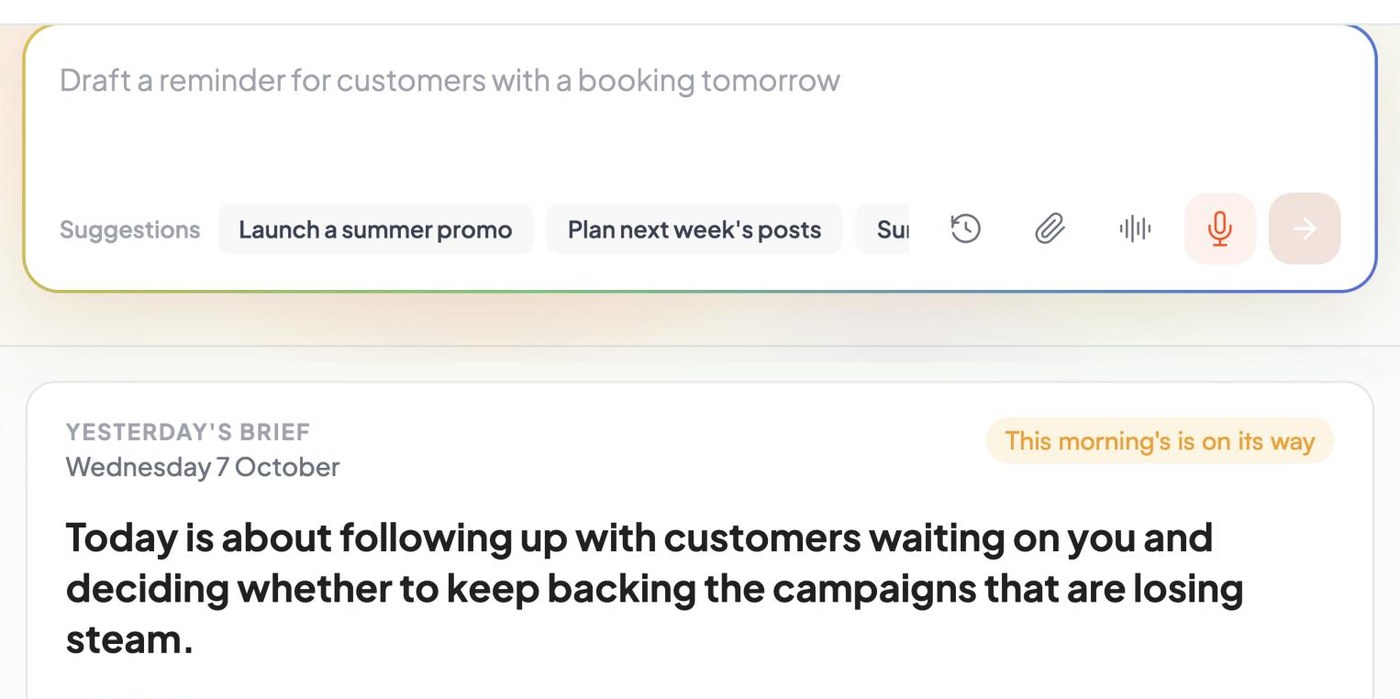
This is the approach we take with Kahu. You ask for work in one chat box, like a summer promotion or a summary of your week, and Kahu drafts it: a website change, an ad, a post. Every draft waits in Approvals until you say yes. Nothing goes out without your approval, and automations run only when you switch them on.
Asking Kahu for work in chat uses credits. Chat comes with the Starter plan at US$69 a month, alongside social posting and Creative Studio. The Growth plan, at US$179 a month or US$149 billed yearly, adds your website, CRM, SEO reports and Google and Meta ads, and includes 1,500 credits a month. Top-ups are US$10 per 100. Every plan starts with a free 7-day trial, no card needed.
What each one looks like in a real business
Definitions are easier with examples. Here's how the three tools might each help four different kinds of small business. These are illustrations of the idea, not case studies.
- A café: a chatbot drafts this week's specials board; an automation adds every catering enquiry from the website to a spreadsheet; an agent drafts replies to the catering enquiries for the owner to check and send.
- A salon: a chatbot suggests wording for a price list; an automation sends a confirmation when someone books; an agent finds clients who haven't booked in a while and drafts a note to each for approval.
- A clinic: a chatbot explains a new form in plain language; an automation reminds patients the day before an appointment; an agent drafts answers to routine questions, with anything clinical going straight to a person.
- A motel: a chatbot writes a description of the family room; an automation emails check-in details to every new guest; an agent pulls together a weekly summary of bookings and enquiries and drafts a promotion for quiet nights.
Notice the pattern. The automation jobs are identical every time, so a rule handles them. The agent jobs need a bit of reading and judgement, so an agent helps, and in every case a person approves what it drafts. The chatbot jobs are one-off pieces of writing or explaining that the owner uses however they like.
You'll also notice that none of these businesses needs all three on day one. The motel could start with the check-in email and nothing else. The clinic might never want an agent near patient questions, and that's a perfectly sensible choice. The right mix depends on where your time goes each week, not on what's newest.
How to choose the right one
You don't have to pick only one. Most small businesses end up with a mix. But if you're starting from nothing, these four questions will point you to the right tool for each job.
- 1Is the job identical every time?If the same trigger always leads to the same action, use automation. It's cheaper, more predictable and easier to fix than an agent.
- 2Do you just need words or an answer?If you need help writing, explaining or thinking something through, and you'll do the acting yourself, a chatbot is enough.
- 3Does it need judgement and your tools?If the job means reading something messy, looking things up in your records and drafting a response, that's agent work.
- 4Could a mistake cost money or trust?Then a person approves before anything goes out, whichever tool you use. If a tool can't pause for your approval, don't give it that job.
If you're unsure, start with automation. It's the cheapest way to take routine work off your plate, and both Zapier and Make have free plans to try it. Add a chatbot for writing help. Bring in an agent when you have a job that genuinely needs judgement, and keep the approval step.
One more tip before you buy anything: write the job down in a single sentence first. “When someone books, send them directions” is automation. “Help me word this apology” is a chatbot. “Go through this week's enquiries and draft a reply to each” is an agent. If you can't write the sentence, you're not ready to choose a tool yet, and no tool will fix that for you.
 Where Kahu fits

 Two Thursday gaps at 11:00 and 14:30. Drafted texts to 6 regulars who asked about Thursdays.
 New hours drafted for your site: Sat and Sun, 8am to 2pm.
 One post about the new hours, using your Sunday counter photo.
Keep a person in the loop
Pew found that 59% of US adults aren't confident companies will use AI responsibly. That's your customers telling you something. Whatever you use, be honest about when they're talking to software, make it easy to reach a real person, and check what goes out under your name.
The labels will keep shifting. Today's chatbots are gaining tools, and plenty of products called agents are really automation with a new name. Ignore the label and look at the job: does it answer, follow a rule, or work towards a goal? Then ask where it stops and checks with you.
I'm Anurag Shukla, a tech writer at KahuLogic, a New Zealand company with a team across Australia, New Zealand and India. We build and look after websites and marketing for small businesses, and this is how I'd choose between these tools whether or not you ever use us.
Frequently asked questions
What is the difference between an AI agent and a chatbot?
A chatbot answers questions in a conversation, and you decide what to do with the answer. An AI agent works towards a goal, uses tools such as your records or inbox, and decides its own steps. IBM describes non-agentic chatbots as ones without tools, memory or reasoning.
Is automation the same as AI?
No. Automation follows rules you set in advance: when a trigger happens, it runs an action, the same way every time. It doesn't need AI at all. Tools like Zapier and Make let you build these rules by connecting your apps.
How much do automation tools cost?
Both Zapier and Make have free plans. When checked on 8 October 2026, Zapier's Professional plan started from US$19.99 a month and Team from US$69 a month, and Make's paid plans started from about US$12 a month. ChatGPT Plus was US$20 a month. Prices change often, so check before you buy.
Does a small business need an AI agent?
Not always. Most routine jobs are better handled by simple automation, which is cheaper and more predictable. An agent helps with jobs that need judgement, like reading a messy enquiry and drafting a reply, and a person should approve anything it drafts before it goes out.
How many people use AI chatbots?
Pew Research Center's 2026 survey of 5,119 US adults found 49% use AI chatbots, up from 33% in 2024, and 24% use them daily. ChatGPT was the most used, at 44% of US adults. 51% never use AI chatbots.
Can I use a chatbot or agent to talk to customers?
Yes, as long as customers can reach a person when they need to. WhatsApp's Business Messaging Policy, for example, allows automated conversations with clear escalation paths to a human. Check every message that makes a promise or goes out under your name.
Sources and further reading
- Google Cloud: what are AI agents?cloud.google.com
- IBM: what is a chatbot?ibm.com
- IBM: what are AI agents?ibm.com
- Zapier Help: learn key concepts in Zapierhelp.zapier.com
- Zapier pricingzapier.com
- Make pricingmake.com
- OpenAI Help: what is ChatGPT Plus?help.openai.com
- Pew Research Center: Americans and AI 2026 (17 Jun 2026)pewresearch.org
- Gartner: over 40% of agentic AI projects will be canceled by end of 2027 (25 Jun 2025)gartner.com
- WhatsApp Business Messaging Policybusiness.whatsapp.com