How much do Google Ads cost? Budgets, cost per click and cost per lead for a small business
Muskaan Sharma·Updated 3 Nov 2026·16 min read
Google Ads has no set price and no minimum spend. You pay when someone clicks, and an auction for each search sets the price, so a click can cost under a dollar or more than fifty. WordStream by LocaliQ's 2026 benchmarks put the average search click at US$5.42 and the average lead at US$66.69, but your own figures depend on your trade, your area and how good your ad and page are. Work your budget backwards from what a customer is worth, start with a monthly amount you can keep up for three months, and judge it on customers, not clicks.
“How much should I spend on Google Ads?” is usually the first question an owner asks, and “it depends” is no help. This guide explains what sets the price of a click, shows what businesses typically pay according to published benchmarks, and walks through a budget from start to finish with made-up numbers you can swap for your own. There's a worksheet and a negative keyword list to copy further down.
I'm a user researcher at KahuLogic, where we build websites and marketing tools for small businesses. I'll mention our own tool once, near the end; everything else works in any Google Ads account.
The first two figures come from WordStream by LocaliQ, which publishes benchmarks from more than 13,000 US search campaigns it manages, this time covering April 2025 to March 2026. It reports that the average cost per lead fell for the first time in five years. Use them for a sense of scale, not as a forecast: a café and a family lawyer live in completely different worlds.
You don't pay a price, you win an auction
Every time someone searches on Google, an auction runs in a fraction of a second among the advertisers who want to appear for that search. You don't pay to enter. You pay only when someone clicks your ad, which is why it's called pay-per-click.
Two things decide whether your ad shows and where: the most you're willing to pay for a click (your maximum bid), and how good and relevant Google thinks your ad and landing page are for that search. Google combines them into something it calls Ad Rank. A business with a sharper ad and a better page can sit above a competitor who bids more.
The price you actually pay is usually lower than your maximum. Google's help page on actual cost per click says you pay only what's needed to beat the Ad Rank of the advertiser directly below you and clear Google's minimum thresholds. So you'll rarely pay your full bid, and improving your ad and page is one of the few ways to pay less for the same spot.
What makes some clicks cheap and others expensive
The price of a click is set by how many businesses want that searcher, and how much a customer is worth to them.
- What a customer is worth. Searches that lead to big jobs (legal work, roofing, dental implants, renovations) attract high bids because one customer can pay for hundreds of clicks.
- How many competitors are bidding. A plumber in a large city competes with dozens of firms and lead-generation sites; one in a country town may compete with two.
- Where and when. Clicks usually cost more in big cities and at busy times. You can limit your ads to the areas you serve and the hours you answer the phone.
- How specific the search is. “Plumber” is broad and expensive. “Hot water cylinder replacement” is narrower, often cheaper, and closer to a booking.
- Your ad and landing page. A relevant ad that leads to a page about exactly that service raises your Ad Rank, which can lower what you pay.
- Your settings. Leaving on broad match, search partners and the Display Network can spend money on searches and sites you never meant to pay for.
To see how far apart trades are, here are a few industry averages from the same 2026 benchmarks, as reported in WordStream's summary. Treat them as a feel for the range, not as quotes.
| Industry (WordStream by LocaliQ, 2026) | Average cost per click | What it tells you |
|---|---|---|
| All industries | US$5.42 | The middle of a very wide range |
| Arts and entertainment | US$1.63 | The cheapest category in the report |
| Animals and pets | US$4.06 | Close to the overall average |
| Home and home improvement | US$8.33 | Big jobs, many bidders |
| Attorneys and legal services | US$9.87 | The most expensive category in the report |
Notice that a low cost per click doesn't guarantee a low cost per lead. What you really pay for a customer depends on how many clickers get in touch, and that's mostly down to your offer, your page and how fast you reply.
How to find what clicks cost in your area
You don't have to guess. Google's free Keyword Planner, inside any Google Ads account, shows an estimated bid range for each search, filtered to the locations you choose. Google's help page explains the two numbers it shows: the “top of page bid (low range)” is roughly the 20th percentile of what advertisers have paid to appear at the top of the results, and the “high range” is roughly the 80th percentile.
- 1List the searches that mean businessWrite down ten to twenty things a customer types when they're ready to buy: the service plus your area, a specific job, “near me”. Skip anything that sounds like research or DIY.
- 2Set your real service areaIn Keyword Planner, set the location to the suburbs, city or region you actually serve. Prices change a lot between a whole country and one city.
- 3Read the high range, not the lowUse the high-range figure for your budget sums. If you plan on the low end and the auction is busy, you'll run out of money halfway through the month.
- 4Check the searches are realIf a search shows almost no monthly volume in your area, it won't bring enough enquiries to judge. Keep the ones people actually type.
Work your budget backwards from a customer
The most useful number isn't the cost per click. It's the most you can afford to pay for one new customer and still be glad you did. Work it out before you spend anything, because it tells you whether Google Ads can work for you at all.
Here's a worked example. The business and every number in it are made up, so swap in your own. Imagine a mobile dog groomer whose first visit brings in US$90, and whose regulars come back about four times a year. After costs, a new regular customer is worth around US$200 in their first year. The owner decides they're happy to spend up to US$100 to win one.
| Worked example (made-up numbers) | Figure | How it's worked out |
|---|---|---|
| Most you'd pay for a new customer | US$100 | About half the first year's profit from a regular |
| Share of enquiries that become customers | 40% | From the owner's own diary: 4 in 10 enquiries book |
| Most you can pay per enquiry | US$40 | US$100 × 40% |
| Share of clicks that send an enquiry | 8% | A clear page with prices and a booking button |
| Most you can pay per click | US$3.20 | US$40 × 8% |
| Keyword Planner high range in the area | US$2.80 | Read from Keyword Planner for the owner's searches |
In this example the sums work: the groomer can afford US$3.20 a click and the area's high range is US$2.80, so there's room. If Keyword Planner had shown US$6, the honest answer would be that Google Ads won't pay for itself until something changes: a higher-value service to advertise, a better page that turns more clicks into enquiries, or a better follow-up that books more of them.
Setting a monthly budget
Once the sums work, pick a monthly amount you could keep spending for at least three months. Google needs time to learn, and enquiries often turn into customers weeks after the click.
Google Ads asks for an average daily budget rather than a monthly one. Google's help pages explain how it's used: on a busy day a campaign can spend up to twice its average daily budget, but over a month you won't be charged more than 30.4 times it, which is the average number of days in a month. So to spend about US$600 a month, set an average daily budget of US$19.70 (600 ÷ 30.4). Expect some days to spend nearly US$40 and quiet days to spend less.
| Same made-up business | Starter budget | Steadier budget |
|---|---|---|
| Monthly budget | US$600 | US$1,200 |
| Average daily budget to set | US$19.70 | US$39.50 |
| Clicks at US$2.80 each | About 214 | About 428 |
| Enquiries at 8% of clicks | About 17 | About 34 |
| New customers at 40% of enquiries | About 7 | About 14 |
| Cost per new customer | About US$86 | About US$86 |
Finish the sum in money. On the starter budget, about 7 new regulars a month × the made-up US$200 each is worth in their first year = about US$1,400 of first-year profit for US$600 of spend. Over a three-month test that's US$1,800 spent for about 21 customers worth about US$4,200 in their first year. On the steadier budget, 14 customers × US$200 = about US$2,800 a month for US$1,200.
Two things to notice. First, doubling the budget doesn't make each customer cheaper by itself; it just buys more of the same, until you run out of good searches and start paying for weaker ones. Second, on the starter budget, a couple of bad weeks can swing the numbers a lot. Seventeen enquiries a month is enough to learn from, but not enough to judge in a week: one week might bring 2 and the next 7.
If your sums only allow a very small budget, say under US$10 a day, keep the campaign narrow: your best handful of searches, your core area and your opening hours. A small budget spread over everything gets a few clicks on each and teaches you nothing.
Where small budgets leak
Most wasted spend in a small account comes from settings, not from Google being expensive. These are the settings I'd check first.
- Broad match on everything. Broad match lets Google show your ad for searches it thinks are related. Start with exact and phrase match on the searches that clearly mean business, and widen later.
- No negative keywords. Add the words you never want to pay for. There's a starter list to copy below.
- Search partners and Display left on. New Search campaigns can include Google's search partner sites and the Display Network. Turn both off until search itself is paying for itself.
- Location set to “interest in” your area. Choose people in or regularly in your locations, or you'll pay for clicks from people researching from the other side of the world.
- Ads running while nobody answers. If an enquiry at 9 pm waits until tomorrow afternoon, it has often gone to someone else. Schedule ads for the hours you can reply.
- Sending every ad to the home page. A click about one service should land on a page about that service, with the price or a price guide and a way to book.
Two reports catch leaks every week. The search terms report shows the exact words people typed before clicking, so you can add negatives. The change history shows what was changed and when, which matters when a week suddenly looks very different.
Track enquiries, not clicks
Google Ads will happily report clicks and impressions. Neither pays a bill. Before you judge any budget, set up conversion tracking so Google counts the things that matter: form enquiries, calls from the ad or the website, bookings and sales. Count each real enquiry once, and leave out page views and button taps that don't mean anything.
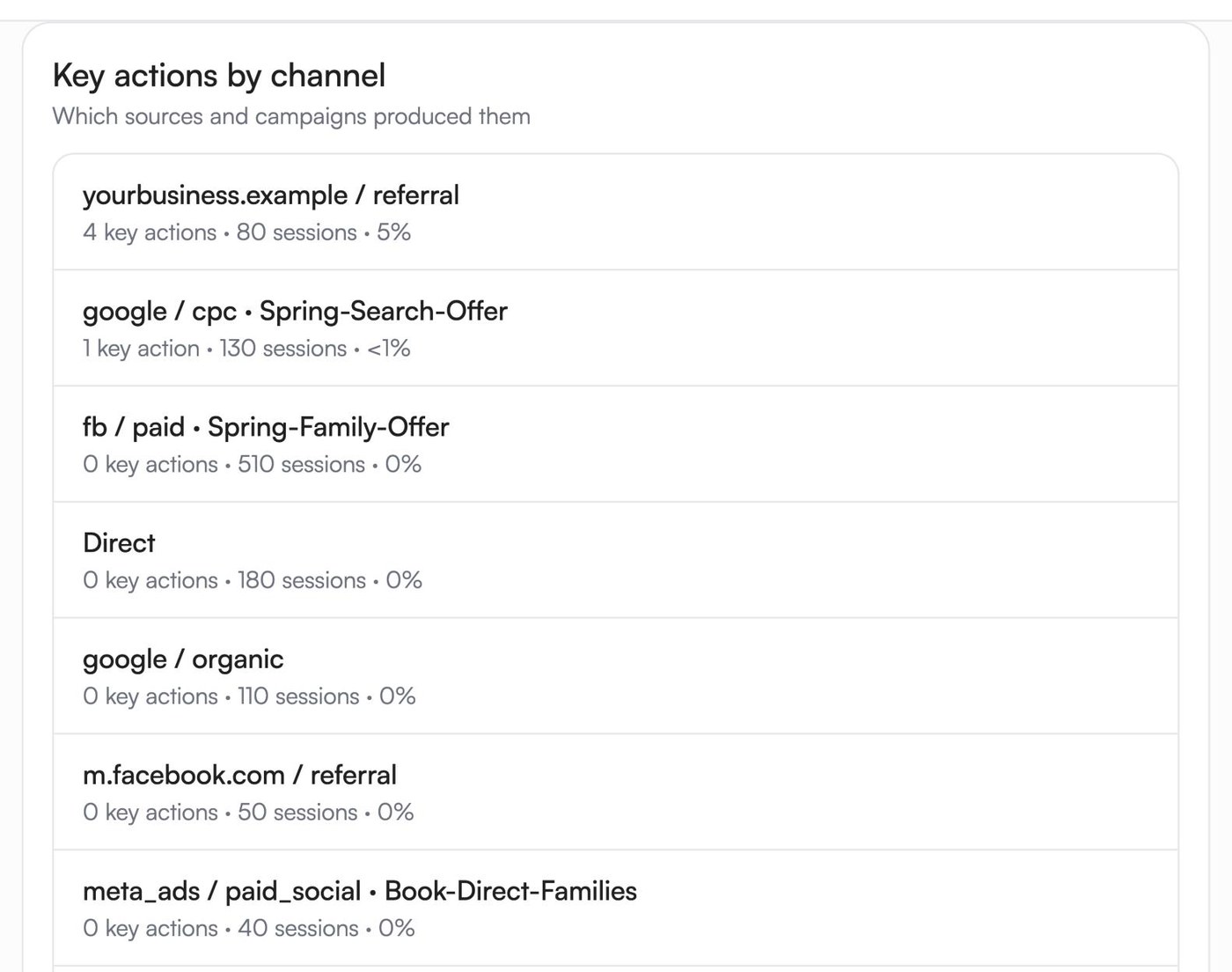
Then look at the same numbers outside Google Ads. Your website analytics should show visits and key actions by source and campaign, so you can see whether the clicks you paid for turned into enquiries. In the example below, from a sample business with sample data, a Google search campaign brought 130 visits and a single key action. That's exactly the kind of gap to investigate: the searches, the page or the offer.
If you use Google's automated bidding, give it enough to learn from. Google's Smart Bidding guidance suggests judging results over longer periods with at least 30 conversions. On a small budget that can take a month or two, so don't switch strategies every week.
Copy these: a budget worksheet and a negative keyword starter list
Here's the budget sum from this guide as a worksheet you can rebuild in any spreadsheet, one line per row. The example column uses the made-up dog groomer from above; replace it with your own numbers, and if line H says no, don't start the campaign until one of the earlier lines changes.
| Line | What to write | Example (made up) |
|---|---|---|
| A. First-year value of a customer | Profit from a new customer in their first 12 months | US$200 |
| B. Most you would pay per customer | Your choice; half of A is a sensible start | US$100 |
| C. Enquiries that become customers | From your diary or CRM for the last 3 months | 40% |
| D. Most you can pay per enquiry | B × C | US$40 |
| E. Clicks that become enquiries | Your website figure, or 5% to 8% if you have none yet | 8% |
| F. Most you can pay per click | D × E | US$3.20 |
| G. Keyword Planner high range | The high-range bid for your best searches in your area | US$2.80 |
| H. Go or no go | Go if G is below F; if not, change A, C or E first | Go |
| I. Monthly budget | An amount you can keep up for 3 months | US$600 |
| J. Average daily budget to set | I ÷ 30.4 | US$19.70 |
| K. Customers to expect each month | (I ÷ G) × E × C | About 7 |
And here is a starter list of negative keywords: words that tell Google not to show your ad when they appear in a search. Google's help page on negative keywords explains how to add them to a campaign or a shared list. Paste each group in, then delete anything you actually sell.
- 11. Jobs and trainingjobs, job, careers, hiring, vacancy, vacancies, salary, wage, apprentice, apprenticeship, course, courses, training, qualification, certificate
- 22. Free and do-it-yourselffree, diy, how to, yourself, tutorial, video, youtube, template, guide, tips
- 33. Second-hand and partssecond hand, used, cheap, parts, spare, wholesale, supplier, bulk
- 44. Services you do not offer[the related jobs you don't do, e.g. for a dog groomer: training, boarding, vet, adoption, puppies for sale]
- 55. Places you do not serve[towns, suburbs and regions outside your area that share searches with yours]
- 66. Research, not buying[review sites, competitor names you don't want to bid on, 'definition', 'meaning', 'salary of a']
Two cautions. A negative keyword can block good searches too: “free” blocks “free quote”, so if people search for free quotes in your trade, leave it out. And the list is a start, not a finish. Each week, open the search terms report, and any search you'd never want to pay for again goes on the list.
Other costs to budget for
The click price isn't the whole bill. Include these when you compare Google Ads with other ways to find customers.
- Your time, or someone else's. A small account needs about an hour a week: search terms, negatives, budgets and replies. If you pay an agency or freelancer, their fee sits on top of the ad spend.
- The landing page. If your website doesn't have a clear page for the service you're advertising, building one is part of the cost of advertising.
- Tax. Depending on your country, Google may add GST or VAT to your ad spend, or you may need to account for it yourself. Check your billing settings and ask your accountant.
- Follow-up. An enquiry that waits a day is often lost. Whatever answers your phone and inbox is part of what makes ads work.
When Google Ads isn't the right first spend
Google Ads works best when people already search for what you sell. If they don't, you're paying to stand in an empty street. A new kind of product, an impulse purchase or something people discover by seeing it often does better on social media, where you can show it to people who weren't looking.
Fix the free things first, too: a complete business listing on maps, a website that loads quickly on a phone and says what you do and what it costs, and fast replies all make every paid click worth more.
If you only do three things this week
- Fill in lines A to H of the worksheet with your own numbers, so you know whether Google Ads can pay for itself before you spend anything.
- Open Keyword Planner, set the location to the area you actually serve, and write down the high-range bid for your ten best searches.
- If you already run ads, open the search terms report for the last 30 days, add every search you'd never want to pay for as a negative keyword, and paste in the starter list groups that fit.
Where Kahu fits
If you'd like help without handing over the keys, here's what our tools do. Kahu Reach drafts Google ads for your approval, and your ad spend is paid to Google from your own ad account, with no cut to KahuLogic. Website and form enquiries arrive in Kahu CRM as contacts tagged with their source, so lines C and E of the worksheet can come from real numbers. Work Kahu drafts waits in your approvals queue until you approve it, and automations run only when you switch them on. Your website, ads and CRM are included from Growth (US$179 a month, or US$149 billed yearly). Starter (US$69) covers social posting, Creative Studio and chat. Starter, Growth and Pro start with a 14-day free trial.
 Where Kahu fits




I'm Muskaan Sharma, User Researcher at KahuLogic, a New Zealand company with a team across Australia, New Zealand and India. My honest view is that the budget sum matters more than any setting: if an owner does it before their first dollar goes in, most of the expensive surprises never happen.
Frequently asked questions
How much do Google Ads cost per month for a small business?
There's no minimum and no set price: you choose an average daily budget, and Google won't charge more than 30.4 times it in a month. What matters is whether the clicks in your area cost less than a customer is worth to you. Work out the most you'd pay for one new customer, check click prices in Keyword Planner, then set a monthly amount you can keep up for at least three months.
What is the average cost per click on Google Ads?
WordStream by LocaliQ's 2026 benchmarks, from US search campaigns it manages, put the average cost per click at US$5.42 across industries, from about US$1.63 in arts and entertainment to US$9.87 for legal services. Your own price depends on your trade, your area, your competitors and the quality of your ad and page. Keyword Planner shows estimated bid ranges for your own searches and locations.
What is a good cost per lead on Google Ads?
A good cost per lead is one that leaves a profit after you turn some of those leads into customers. WordStream by LocaliQ's 2026 benchmarks put the average across industries at US$66.69, down from US$70.11 a year earlier. Multiply the most you'd pay for a customer by the share of enquiries you usually win to find your own limit.
Can Google charge me more than my daily budget?
On a single day, yes: Google can spend up to twice your average daily budget on a busy day. Over a month it won't charge more than your average daily budget multiplied by 30.4, the average number of days in a month. Changing your budget partway through the month changes those limits.
Do I pay if someone sees my ad but doesn't click?
On a standard Search campaign, no. You pay when someone clicks the ad, and the price is set by the auction for that search. Other campaign types and bidding options can charge differently, so check the bidding setting on each campaign.
How long before I know if Google Ads is working?
Give a new campaign about three months on a budget you can keep up. You need enough enquiries to tell a good week from a lucky one, and Google's own Smart Bidding guidance suggests judging automated bidding over longer periods with at least 30 conversions. Review the search terms every week, but judge the budget on cost per customer.
Sources, checked 3 November 2026
- Google Ads Help: actual cost per click (CPC)support.google.com
- Google Ads Help: about average daily budgetssupport.google.com
- Google Ads Help: why daily costs might exceed your average daily budgetsupport.google.com
- Google Ads Help: about Keyword Planner forecastssupport.google.com
- Google Ads Help: about keyword matching optionssupport.google.com
- WordStream by LocaliQ: 2026 Google Ads benchmarks (vendor data)wordstream.com
- Google Ads Help: about negative keywordssupport.google.com
- Google Ads Help: about Smart Biddingsupport.google.com