Google Ads vs Facebook ads: which should a small business run first?
Muskaan Sharma·Updated 3 Nov 2026·13 min read
Google Ads reaches people who are already searching for what you sell, so the clicks cost more but the intent is high. Facebook and Instagram ads reach people who weren't looking, so views and clicks are cheaper but you have to create the interest. Start with Google if people search for your service when they need it, especially urgent or high-value jobs. Start with Facebook and Instagram if your work sells on sight or people don't know to look for it. Run one channel well before splitting a small budget, and compare both on cost per customer, not cost per click.
Ask ten marketers whether a small business should spend on Google or on Facebook and you'll get both answers, delivered with total confidence. They do different jobs. Google Ads catches people who are already looking; Facebook and Instagram ads put you in front of people who weren't. This guide gives you a way to decide, a worked budget with made-up numbers, and a scorecard and comparison sheet to copy.
I'm a user researcher at KahuLogic, where we build websites and marketing tools for small businesses. I'll mention our own tool once, near the end; everything else works whichever tools you use. By Facebook ads I mean Meta ads, which run on Facebook, Instagram and Messenger from one Ads Manager account.
On those averages, a Facebook click costs about a ninth of a Google click. Hold that thought. A Google click usually comes from someone who typed what they want, and a Facebook click from someone who was scrolling past. The fair comparison is what each channel costs you per customer, which only your own tracking can tell you. The last two figures matter just as much: both platforms need a steady flow of results before their automatic bidding settles.
Searchers and scrollers
The biggest difference isn't price, it's the moment you catch someone in. On Google, the customer starts. They type “blocked drain plumber” or “wedding cake order” and your ad appears beside the answer. They already want what you sell; your job is to be the obvious choice. That's why Google clicks cost more, and why a Google campaign can bring enquiries in its first week if people search for your service.
On Facebook and Instagram, you start. Meta shows your ad to people it predicts will respond, while they're catching up with friends or watching Reels. Most of them weren't thinking about you a second earlier. Your ad has to stop the scroll, make the case and make the next step easy. That's harder, but it reaches people Google never can: those who don't yet know your business, your product or even that the problem has a solution.
| Google search ads | Facebook and Instagram ads | |
|---|---|---|
| Who sees your ad | People searching for something related to your keywords | People Meta predicts will respond, based on the audience and result you choose |
| What it's best at | Catching existing demand at the moment of need | Creating demand and staying top of mind |
| How you're usually charged | Per click | Per thousand views, with the cost per click as a result |
| What a click usually costs | More, often several dollars (US$5.42 average in WordStream by LocaliQ's 2026 benchmarks) | Less, often under a dollar (US$0.60 average on traffic campaigns) |
| What the ad needs | A relevant headline and a page about exactly that service | A thumb-stopping image or video and a clear offer |
| How quickly it can work | Quickly, if people search for what you sell | Usually slower: it needs creative testing and time to learn |
| Budget rules | Up to 2x the average daily budget on a day, at most 30.4x in a month | Up to 75% over the daily budget on a day, at most 7x in a week |
Which one should come first for your business
Run through these questions. Most businesses land clearly on one side.
- Do people search for what you sell when they need it? Plumbers, electricians, locksmiths, accountants, physios and vets: start with Google. The demand already exists and your job is to catch it.
- Is it urgent? Burst pipes, broken phones and same-week appointments go to Google first. Nobody waits for an ad to appear in their feed.
- Does your work sell on sight? Cafés, bakeries, salons, florists, tattoo studios, landscapers and anything with a great before-and-after: Facebook and Instagram let the picture do the selling.
- Are you creating a new habit? A meal kit, a new class, a product people don't know exists: social ads can introduce it, because there's little search demand to catch.
- Is each customer worth a lot, and is the decision considered? Renovations, legal work and weddings often need both: Google for people ready to compare, and social ads to stay in front of them while they decide.
- Is your area small? In a small town, a Google campaign may find only a handful of searches a week. Social ads can reach the whole town for less.
A worked example: splitting a first budget
Here's how I'd think about it for one business. The business and every number are made up, so swap in your own. Imagine a garden landscaping business with a US$900 monthly ad budget. A typical job is worth around US$2,500, and the owner is happy to spend up to US$300 to win one.
People do search for landscapers, but the work also sells on sight: a photo of a finished garden does more than any headline. So the owner starts with Google, where the searches are, and runs a smaller Facebook and Instagram campaign showing finished gardens to homeowners in their area.
| Worked example (made-up numbers) | Google search | Facebook and Instagram |
|---|---|---|
| Monthly budget | US$600 | US$300 |
| Cost per click | US$4.00 | US$0.90 |
| Clicks | 150 | About 330 |
| Quote requests | 12 (8% of clicks) | 7 (2% of clicks) |
| Quotes that became jobs | 3 (25%) | 1 (15%) |
| Cost per job won | US$200 | US$300 |
In this example, Google wins on cost per job even though its clicks cost more than four times as much. Facebook sits right at the owner's limit. That doesn't mean switching it off. A homeowner who saw the garden photos in March may search for the business by name in May, and that search will show up under Google or direct visits, not Facebook. So the owner keeps the social campaign small and steady, refreshes the photos monthly, and watches whether branded searches and direct enquiries grow over a few months.
Here's the year in money. Google brings about 36 jobs (3 × 12) and social about 12 (1 × 12): 48 jobs from US$10,800 of ad spend, or US$225 a job, comfortably under the owner's US$300 limit. At the made-up US$2,500 a job, that's about US$120,000 of work. If the owner moved the whole US$900 to Google and its cost per job held at US$200, it would bring about 54 jobs a year, but only if there are enough searches in the area to absorb the extra budget, which Keyword Planner can tell you before you try.
If the numbers had come out the other way, with Facebook winning on cost per job, the same logic applies in reverse: move money towards the channel that wins customers, keep the other small enough to learn from, and look again in a month.
Why small budgets should start with one channel
Both platforms need data to work well. Google's Smart Bidding guidance suggests judging automated bidding over periods with at least 30 conversions, and Meta's learning phase works towards about 50 of your chosen results in a week. A US$300 budget split three ways reaches neither. You end up with a little data everywhere and a clear answer nowhere.
So on a small budget, put most of it into the channel that fits your business best, run it properly for two to three months, and only then test the second. If you have enough for both, give the second channel its own budget from the start, so a busy week on one doesn't starve the other.
How to compare them fairly
Each platform reports its own results, and each counts conversions in its own way. Both can take credit for the same customer. So make the comparison outside both of them, with one yardstick: what each channel cost, divided by the customers it brought.
- 1Tag every linkAdd UTM tags to the website links in your ads (source, medium and campaign), so your analytics can tell Google and Meta visits apart, and one campaign from another.
- 2Track the same actions on bothCount the same things everywhere: a quote request, a booking, a call from the website. On Google that's conversion tracking; on Meta, the Pixel and ideally the Conversions API.
- 3Ask every new customer“How did you hear about us?” catches what tracking misses, especially the customer who saw an Instagram ad and then searched your name.
- 4Compare monthly, not dailyDaily numbers on a small budget are noise. Each month, note spend, enquiries and customers per channel, and compare cost per customer.
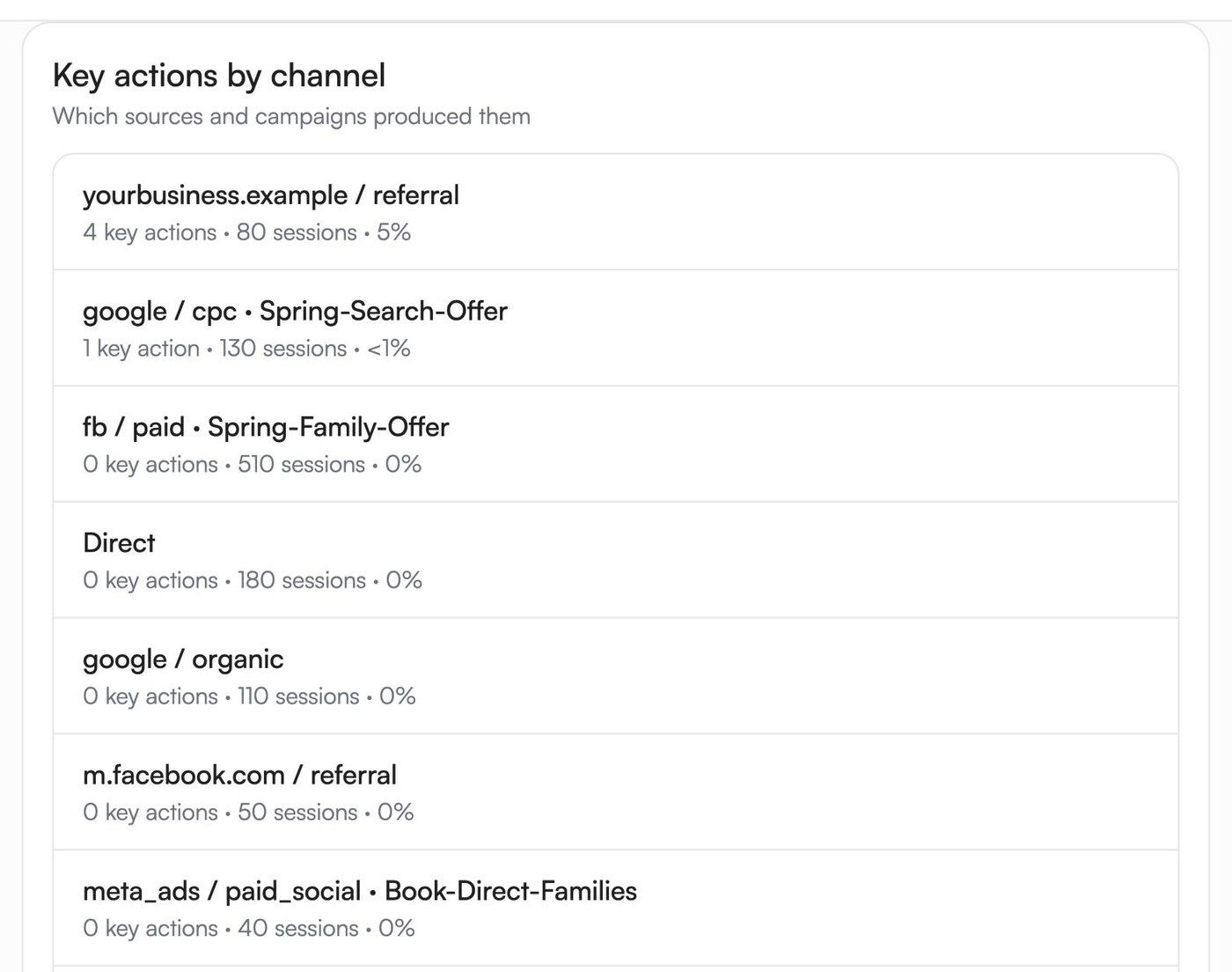
Your website analytics should show sessions and key actions per source and campaign. In the sample below, with sample data, the Google search campaign brought 130 sessions and one key action, the paid Facebook campaign brought 510 sessions and none, and visitors from the business's own site produced four. For this sample business, the Facebook campaign is bringing lots of visits but no enquiries, which points to the offer or the landing page rather than the channel.
Copy these: a channel scorecard, link tags and a monthly comparison sheet
Four things to copy. The scorecard settles which channel goes first. The link tag and the customer question make the comparison possible. The sheet is where the comparison happens, once a month.
- 11. The first-channel scorecardScore one point for Google for each yes: Do people type my service into Google when they need it? Is the need often urgent? Is a typical job worth more than [your number, e.g. US$500]? Score one point for social for each yes: Does a photo of my work make people want it? Are many of my customers buying something they didn't know they needed? Is my area small enough that a handful of searches a week is all Google would bring? Start with the higher score. A tie means start with Google if you have one strong page per service, and social if you have strong photos.
- 22. A link tag for Meta adsAdd this to the end of the website link in each Meta ad, or in the ad's URL parameters field these tags, joined with “&” after a “?”: utm_source=facebook, utm_medium=paid_social, utm_campaign=[campaign-name], utm_content=[ad-name]. Use lower case and hyphens, and the same campaign name you use in Ads Manager.
- 33. A link tag for anything else you promoteAdd these tags to the end of the link, joined with “&” after a “?”: utm_source=[where, e.g. newsletter], utm_medium=[type, e.g. email], utm_campaign=[campaign-name]. For Google Ads, linking your Google Ads and Google Analytics accounts handles this for you.
- 44. The question to ask every new customerOn your enquiry form, as a required drop-down: “Where did you first hear about us?” with Google search, Facebook or Instagram, A friend or neighbour, Saw our van or sign, Other. On the phone: “Before we finish, where did you first come across us?”, and write the answer in the same list.
| Month | Channel | Spend | Enquiries | Customers | Cost per customer | Note |
|---|---|---|---|---|---|---|
| May (made up) | Google search | US$600 | 12 | 3 | US$200 | New page for garden design |
| May (made up) | Facebook and Instagram | US$300 | 7 | 1 | US$300 | Same photos as April; refresh |
| May (made up) | First heard via social, booked via Google | n/a | n/a | 2 | n/a | From the form question; count it, but do not add it to either channel |
Fill in one row per channel at the start of each month, from your website analytics and your own customer list rather than each platform's dashboard, since both platforms can claim the same customer. After three months, move money towards the lower cost per customer, and keep reading the last row: if “first heard via social” keeps growing, the social campaign is doing more than its own row suggests.
Mistakes to avoid on both platforms
- Judging on clicks. Cheap clicks that never enquire are the most expensive kind.
- Sending every ad to the home page. A Google ad about one service and a Facebook ad about one offer should each land on a page about exactly that.
- Changing everything every week. Both platforms reset their learning when you make big edits. Change one thing at a time and give it a fortnight.
- Copying the same ad to both. A Google ad is words that answer a search. A Facebook ad is a picture or video that interrupts a scroll. They need different creative.
- Slow replies. Whichever channel brought the enquiry, a reply the next day loses many of them.
If you only do three things this week
- Score your business on the first-channel scorecard and write down which channel goes first and why.
- Add the “Where did you first hear about us?” drop-down to your enquiry form and the question to your phone routine.
- Set up the monthly comparison sheet with last month's spend and customers for each channel, even if one row is zero.
Where Kahu fits
If you'd like help without handing over the keys, here's what our tools do. Kahu Reach drafts Google and Meta ads for your approval in one place, with ad spend paid to Google and Meta from your own ad accounts and no cut to KahuLogic. Website and form enquiries arrive in Kahu CRM as contacts tagged with their source, which is the column the comparison sheet needs. Work Kahu drafts waits in your approvals queue until you approve it, and automations run only when you switch them on. Your website, ads and CRM are included from Growth (US$179 a month, or US$149 billed yearly). Starter (US$69) covers social posting, Creative Studio and chat. Starter, Growth and Pro start with a 14-day free trial.
 Where Kahu fits




I'm Muskaan Sharma, User Researcher at KahuLogic, a New Zealand company with a team across Australia, New Zealand and India. My honest view is that the Google-or-Facebook argument matters less than most owners think. Pick the one that matches how your customers find you, run it properly, and let your own numbers settle it.
Frequently asked questions
Is Google Ads or Facebook ads better for a small business?
Neither is better in general; they do different jobs. Google Ads suits businesses people search for when they need them, especially urgent or high-value services. Facebook and Instagram ads suit businesses that sell on sight or that people don't yet know to look for. Many businesses end up using both, with one leading.
Which is cheaper, Google Ads or Facebook ads?
Facebook clicks are usually cheaper. WordStream by LocaliQ's 2026 benchmarks put the average Facebook traffic campaign click at US$0.60, against US$5.42 for search ads. But Google clicks usually come from people already searching for what you sell, so the cost per customer can favour Google. Compare the two on cost per customer, from your own tracking.
Should I run Google Ads and Facebook ads at the same time?
On a small budget, start with one and run it properly for two to three months, because both platforms need enough results to learn from. Once the first channel pays its way, test the second with its own separate budget.
How do I know which channel brought a customer?
Add UTM tags to every ad link, track the same actions (quote requests, bookings, calls) on both platforms and in your website analytics, and ask every new customer how they heard about you. Compare spend and customers per channel each month.
Do Facebook ads help Google searches?
They can. Someone who sees your Instagram ad may search for your business by name later, and that visit shows up as a Google or direct visit rather than a Facebook one. Watch whether branded searches and direct enquiries grow while a social campaign runs, and ask new customers where they first heard of you.
How much should I spend to test each one?
Enough to reach the platform's learning threshold within a reasonable time: on Meta, about 50 of your chosen results in a week, and on Google, enough clicks to bring a steady flow of enquiries for your searches. For many small businesses that means a few hundred US dollars a month on the channel you test, for at least two to three months.
Sources, checked 3 November 2026
- Google Ads Help: about average daily budgetssupport.google.com
- Google Ads Help: actual cost per click (CPC)support.google.com
- Meta Business Help Centre: about budgetsfacebook.com
- Meta Business Help Centre: about the learning phasefacebook.com
- Meta Business Help Centre: about Meta Pixelfacebook.com
- WordStream by LocaliQ: 2026 Google Ads benchmarks (vendor data)wordstream.com
- Search Engine Land: Facebook ad costs fall as traffic and lead performance improves (WordStream by LocaliQ 2026 benchmarks)searchengineland.com
- Google Ads Help: about Smart Biddingsupport.google.com