Website builder, AI builder or web designer: which should a small business pay for?
Anurag Shukla·Updated 8 Oct 2026·12 min read

Build it yourself on a website builder if your site is a standard one (services, prices, proof, a form or a booking) and you'll keep it up to date: plans start around US$17 to US$19 a month billed yearly. An AI builder gets you a first draft faster, but you still check every line. Pay a web designer when the site must do something unusual, your brand depends on how it looks, or you won't write it yourself, and ask them to build on a platform you can edit. A fully custom build only earns its cost when no builder can do the job. Whichever you choose, keep the domain, the logins and the content in your own name.
Most small businesses don't choose between a website builder and a custom website. They choose between a handful of routes that blur into each other: doing it yourself, letting an AI draft it, hiring a freelancer, hiring a studio, or paying someone to look after it for good. The useful question isn't which is best. It's which costs you the least in money, time and control for the site you actually need.
I'm a tech writer, so I've read the pricing pages, help centres and contract terms behind each route, checked on 8 October 2026, and set out what each one asks of you after launch day. One disclosure first: we build and look after websites for small businesses at KahuLogic, which is one of the routes below, so I've marked it clearly and said where the others are the better pick.
Read that band left to right and two things change at once. You spend less of your own time, and you hand over more control. Neither end is wrong. The mistake is paying for the right-hand end when your site is a left-hand job, or choosing the left-hand end and then never having time to update it.
The four routes side by side
| You, on a builder | AI builder, you check | Designer, on a builder | Custom build | |
|---|---|---|---|---|
| Who builds it | You | The AI drafts, you correct | A designer, then hands it over | A developer or agency |
| What you pay | A plan: Wix Light US$17, Squarespace Basic US$19 a month, billed yearly | Often a free start; GoDaddy Airo Starter is US$9.99 a month billed annually | The designer's fee, plus the builder plan | A quote, plus hosting and a developer for changes |
| Who changes it later | You, any time | You, any time | You, if they set it up for you to edit | Usually the developer |
| What you can take with you | Depends on the builder | Depends on the builder | Depends on who owns the account | The code, if your contract says so |
| Best when | Your site is standard and you'll keep it current | You want a fast first draft to edit | You want expert design but your own control | No builder can do what you need |
We've worked through the price of each route line by line, with studio quotes from several countries, in our guide to what a business website costs, so I won't repeat it here. This guide is about the other two costs: who controls the site, and who keeps it current.
Doing it yourself: cheap in cash, paid in hours
A website builder rents you the software, the hosting and the security in one monthly fee. Wix Light is US$17 a month billed yearly, and Squarespace Basic is US$19 billed annually, or US$25 if you pay month to month. Wix's help centre puts the upkeep plainly: Wix performs software updates and releases new features for you automatically. That's the real product. You never patch a server.
What you pay instead is time. Choosing a template, writing every page, sorting the photos, setting up the contact form, then coming back every time a price or an opening hour changes. For an owner who enjoys it, that's a fair trade. For one who doesn't, the site goes stale, and a stale site is the most common problem I see.
An AI builder: a faster first draft, the same job after it
Every major builder now drafts a site from a description of your business. Squarespace lists built-in AI tools on every plan. GoDaddy's Airo AI Builder starts free with 50 AI credits a month, and its paid Starter plan is US$9.99 a month billed annually. GoDaddy says editing text and images doesn't use credits, which matters, because editing is most of the work.
An AI builder changes how fast you get a first draft. It doesn't change who's responsible for the result. Your prices, your service area, your real photos and your reviews still have to come from you, and every line needs checking. Will an AI-built site look generic? It can, if you leave the stock images and the stock phrases in. Real photos and specific words are what make it look like your business. Our guide to AI website builders goes builder by builder through what each one drafts and what's still your job.
Paying a designer: what you're buying, and what to own
A good designer brings things a builder can't: a structure that fits how your customers decide, words that sound like you, and someone accountable for the launch. Rates vary enormously. Upwork, the freelance marketplace, publishes its own figure: web designers on Upwork cost US$15 to US$30 an hour as a median, by Upwork's own count. For a sense of the other end, the US Bureau of Labor Statistics put the median pay of employed web developers and digital designers at US$47.85 an hour in May 2025. That's what employers pay staff, not what a freelancer or studio charges a client, so don't read it as a price.
 Upwork
 Fiverr
 Wix Studio
 Squarespace Circle
 Webflow
Marketplaces add their own costs. On Upwork's free Basic plan, clients pay a marketplace fee of up to 7.99% on every payment to a freelancer, or 3% for eligible US clients paying by bank account, plus a one-off contract fee of US$0.99 to US$14.99 for each new contract. Other marketplaces, such as Fiverr, set their own fees, so on any marketplace, read the total at checkout rather than the advertised price. Say you hire someone for 20 hours at US$30 an hour: that's US$600, plus up to about US$48 in Upwork's marketplace fee and up to US$14.99 to start the contract.
Ownership is the part people skip. Upwork's optional service contract terms, which a client and freelancer can use for a job, say the work becomes the client's once the freelancer has been paid in full, apart from the freelancer's own background tools, which the client gets a licence to use. That's a sensible default, but it's a default. Off a marketplace, ownership is whatever your agreement says, so write it down.
The middle path most owners should consider
The choice between builder and designer is often a false one, because many designers now build on the same builders you would. Wix runs Wix Studio for designers and agencies building client sites, with site plans from US$19 a month billed yearly. Webflow's freelancer plans include a free client seat on each paid site. Squarespace runs a partner programme, Circle, for freelancers and agencies.
Done well, this gives you the best of both: a designer's structure and words, on a platform you can log into and edit yourself afterwards. Done badly, the site sits in the designer's account and every change becomes an email. So ask who owns the account the site lives in, and whether you'll get a login with editing rights on day one.
There's a lighter version of this too, and it's the one I'd suggest to most owners on a tight budget. Build the site yourself on a builder, then pay a designer or copywriter for a few hours to do the parts that matter most: the structure of the site, the home page and your main service page. You keep the low monthly cost and the control, and you get expert help exactly where visitors decide whether to contact you. Agree the hours and the pages in writing before they start.
One more question is worth asking politely. Squarespace says Circle partners can earn commissions on new subscriptions, and other platforms run partner programmes too. That doesn't make a recommendation wrong, and it's a normal part of how designers earn a living. It's still fair to ask whether a designer gets paid for the platform they suggest, and why it suits your business.
A fully custom build: when it earns its cost
A custom site, written from scratch or built on self-hosted software, gives you anything you can pay for. That's its strength and its cost. It earns its price when you need something builders can't do well: a quote calculator with your own pricing rules, a customer portal, unusual booking logic, or an integration with a system no builder connects to. For a café, a salon or a plumber, that's rare. And a custom site needs someone to keep it running after launch: updates, security fixes, backups and the small changes every business makes. Before you sign, ask who will do that, and what it costs each month.
The myth I hear most often is that custom sites are faster, or better for Google. The data doesn't support it. The HTTP Archive's Web Almanac, which measures real-world performance across the web, found that in 2025 74% of mobile Wix sites and 69% of Squarespace sites had good Core Web Vitals, Google's measures of loading, responsiveness and stability. For WordPress, where every site picks its own themes and plugins, the figure was 45%.
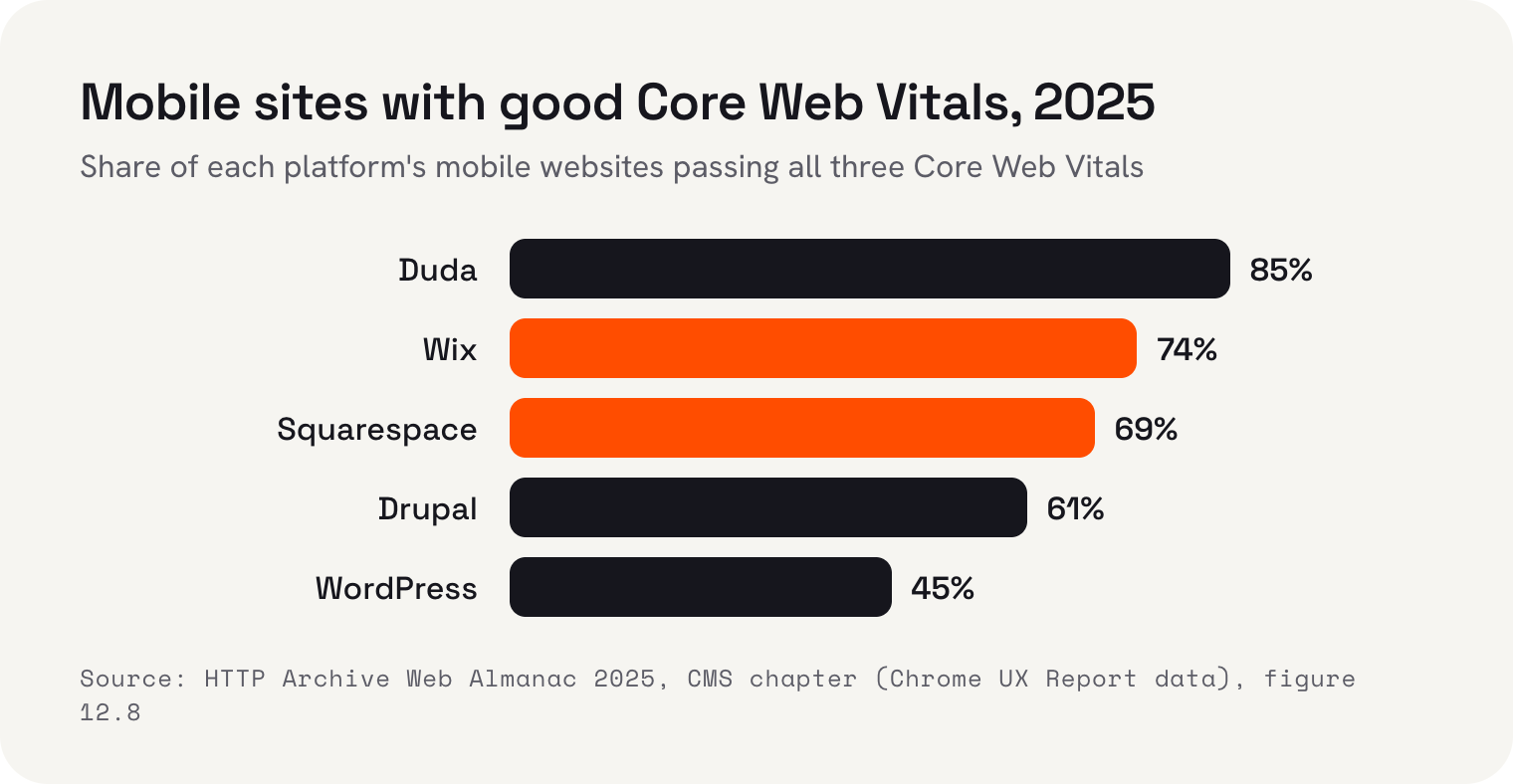
The Almanac's own explanation is the useful part. Tightly managed platforms deliver more consistent results, while self-hosted systems vary widely depending on themes, plugins and third-party add-ons, and implementation matters more than the platform. In plain terms: a custom site can be very fast, if someone builds it carefully and keeps it that way. A builder makes speed the default. Google uses the mobile version of a site for indexing and ranking, so that default is worth having.
Upkeep: the cost that decides it
Launch day is the cheapest day in a website's life to get right. What decides whether a route was worth it is the following year: new prices, a new service, a seasonal offer, a photo of the new team member, an outdated page taken down. Each route handles that differently. On a builder, a change is your evening. With a designer, it's an email, a wait and sometimes a fee. With a custom build, it may be a developer's ticket.
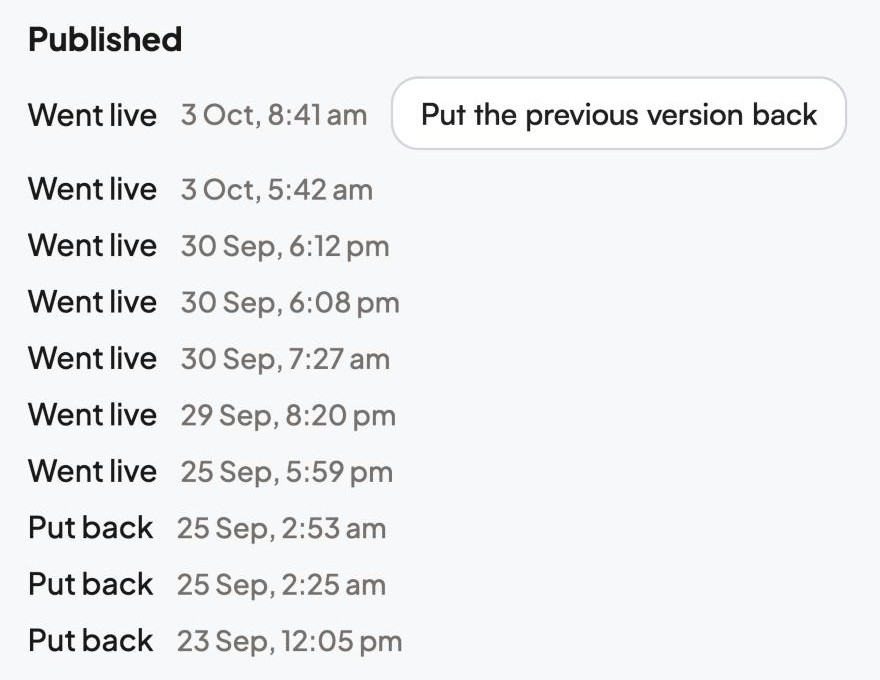
Before you pay for any route, count the changes you made to your business in the last year, then ask how each of them would reach the website. If the honest answer is “they wouldn't”, solve that first.
What to put in writing before you pay anyone
- 1The domain is registered in your nameICANN, which oversees domain names, says the registration sits under an agreement with the registrar and you must keep the contact details accurate. Make them yours, not the designer's.
- 2You own the account the site lives inOr you can take it over at any time. On builders where sites can't be exported, such as Wix, the account is the site.
- 3Who owns the work, and whenWrite down that the design, words and images become yours once you've paid, and list anything the designer keeps, like fonts or tools on their own licence.
- 4How changes are handled after launchCan you edit it yourself? If not, what does a change cost, and how quickly is it done?
- 5What you can take with youWix sites run only on Wix's servers. Webflow exports code only on its paid Workspace plans, without the CMS content. Ask before you build, not when you leave.
If you'd rather nobody had to build it
There's one more route between a designer and doing it yourself, and it's ours, so I'll describe it plainly. Kahu Sites is a done-for-you service. Pick a design and Kahu writes your site in your own words, hosts it, and changes it whenever you ask. Hosting, SSL and a free web address are included, and you can bring your own domain when you're ready. Nothing goes live until you say so, and every enquiry from your website lands in Kahu CRM with where it came from.
It suits owners who want a designer's result without the designer's wait, and it costs more each month than a builder plan. The website comes with the Growth plan, US$179 a month or US$149 billed yearly, which also includes Kahu CRM, SEO reports, and Google and Meta ads. Asking Kahu for changes in chat uses credits: Growth includes 1,500 a month, and top-ups are US$10 per 100. Every plan starts with a free 7-day trial, no card needed. If you love building, a builder is cheaper. If you need a quote calculator or a portal, a developer is the right hire.
 Where Kahu fits


I'm Anurag Shukla, tech writer at KahuLogic, a New Zealand company with a team across Australia, New Zealand and India. We build and look after websites and marketing for small businesses, and this is the advice I'd give whether or not you ever use us.
Frequently asked questions
Is a website builder or a web designer better for a small business?
A website builder suits a standard site (services, prices, reviews, a form or booking) that you'll keep up to date yourself. A web designer is worth paying when the site must do something unusual, your brand depends on how it looks, or you won't write it yourself. Many designers now build on builders, which gives you expert design and your own control.
Is an AI website builder better than hiring a web designer?
An AI builder gives you a first draft faster and cheaper, but you still check every line and add your real prices, photos and reviews. A designer brings structure, words and accountability. If you'll do the checking, start with an AI builder; if you won't, pay for help.
Do custom websites rank better on Google?
Not because they're custom. The HTTP Archive's 2025 Web Almanac found 74% of mobile Wix sites and 69% of Squarespace sites had good Core Web Vitals, against 45% for WordPress. Speed and usefulness come from how a site is built and kept, not from being custom.
How much does a freelance web designer charge?
Upwork says the median web designer on its marketplace charges US$15 to US$30 an hour. Upwork adds a client marketplace fee of up to 7.99% on its free plan and a one-off contract fee of US$0.99 to US$14.99. Studio prices vary by country and are usually a fixed project fee.
Who owns my website if a designer builds it?
Whatever your agreement says. Upwork's optional service contract terms say the work becomes the client's once the freelancer is paid in full. Off a marketplace, put it in writing, and register the domain and the builder account in your own name.
Can I start on a builder and go custom later?
Yes, and it's a sensible order. Learn what customers actually use first. Check before you start what the builder lets you export: Wix sites can't be exported, and Webflow exports code only on paid Workspace plans. Your domain can always move if it's in your name.
Sources and further reading
- Wix: plans and pricingwix.com
- Wix Help Center: exporting or embedding your Wix site elsewheresupport.wix.com
- Squarespace: pricingsquarespace.com
- GoDaddy: Airo AI Builder plansgodaddy.com
- Upwork: web designer hourly ratesupwork.com
- Upwork Help Center: what is the Client Marketplace Fee?support.upwork.com
- Upwork Help Center: contract initiation feesupport.upwork.com
- Upwork: optional service contract termsupwork.com
- US Bureau of Labor Statistics: web developers and digital designersbls.gov
- Wix Studio: planswix.com
- Webflow: pricingwebflow.com
- Webflow Help Center: export your site codehelp.webflow.com
- Squarespace Circle: partner programmesquarespace.com
- HTTP Archive Web Almanac 2025: CMSalmanac.httparchive.org
- Google Search Central: mobile-first indexing best practicesdevelopers.google.com
- ICANN: registrants' benefits and responsibilitiesicann.org