The best website builder for a small business, matched to the job
Anirudh Yadav·Updated 8 Oct 2026·13 min read

There isn't one best website builder, there's a best one for the job your site has to do. For a shop with a real catalogue, Shopify (from US$29 a month, billed yearly). For a portfolio where the look sells the work, Squarespace (from US$19) or Webflow (from US$15). For a booking-led business, a plan with scheduling built in, such as Wix Core (US$29) or GoDaddy Airo Professional (US$24.99). For a content-heavy site you want to grow with plugins, WordPress.com Business (US$25). Before you choose, check three things features lists hide: the plan you'll actually need, what you can take with you if you leave, and who answers when it breaks.
When people ask me which website builder is best, I ask them what their website has to do on an ordinary Tuesday. A café needs its menu and hours to be right. A furniture maker needs a checkout that works. A photographer needs the pictures to look as good as the work. A physio needs people to book a slot without ringing. Those are four different jobs, and the builder that's best at one is often the wrong pick for another.
So this guide is organised by job, not by brand. I'm a user researcher, which means I spend my days watching how people actually use software, and I've read each builder's own pricing pages and help centres for the details that matter after launch. Prices are in US dollars as each company published them, checked on 8 October 2026. One disclosure first: we build websites for small businesses at KahuLogic, so I've included where our service fits, and been plain about where the builders below are the better pick.
Those four numbers tell most of the story. The cheapest plan you see on a pricing page is rarely the one you end up on. Taking money, taking bookings or removing a transaction fee usually means a plan or two higher, and sometimes a separate subscription on top.
Start with the job, not the brand
Every builder in this guide can make a good-looking five-page site. The differences show up in what happens next: whether it can take a deposit, send a booking reminder, list 400 products, or let you leave with your content in a file. Here are the six I see small businesses weigh up most often.
 Wix
 Squarespace
 Shopify
 Webflow
 WordPress.com
 GoDaddy
If you're still choosing between Wix and WordPress specifically, we've compared just those two, including what each costs over three years and how to keep a WordPress site safe, in a separate guide. If you're curious what the AI inside each builder actually drafts for you, that has its own guide too. This one is about matching the builder to the work.
If you sell a service and need enquiries
Electricians, accountants, cleaners, tutors, clinics, consultants: the site's job is to turn a visitor into a message or a phone call. You need clear services, prices or a starting price, proof you're good, and a contact form that actually reaches you. You don't need a shop, and you don't need a hundred design controls.
Almost any builder handles this well, so choose on price and on how easy it is for you to keep it current. Squarespace Basic is US$19 a month billed annually, or US$25 paid monthly. Wix Light is US$17 a month billed yearly, but Wix only lists taking payments from its Core plan, at US$29, so if you want deposits later, budget for Core. GoDaddy's Airo AI Builder has a Starter plan at US$9.99 a month billed annually, and GoDaddy says annual plans get an extra discount in the first year, so check the renewal price before you commit.
One thing I'd check on any builder: open a demo site on your own phone. Google uses the mobile version of a site's content for indexing and ranking, and for most local businesses, most visitors arrive on a phone anyway. A template that looks lovely on a laptop and makes people pinch and zoom on a phone is the wrong template.
If you run a shop
If selling products online is the business, not a side line, start with Shopify. It's built around the catalogue, the checkout, stock and shipping, and the rest of the site hangs off that. Basic is US$29 a month billed yearly, or US$39 paid monthly. With Shopify Payments, online card rates on Basic start at 2.9% + 30¢. If you use a different payment provider, Shopify adds its own fee of 2% on Basic, 1% on Grow and 0.6% on Advanced. It offers 24/7 support by live chat on Basic, a free 3-day trial, and then most plans cost US$1 a month for the first three months.
You don't need Shopify for a handful of products. Squarespace Core (US$29 a month billed annually) charges no transaction fee on online store sales, against 2% on Basic, so if you expect more than a little revenue, Core can pay for itself. Webflow's Ecommerce Standard plan is US$29 a month billed yearly for up to 500 items, with a 2% transaction fee. WordPress.com's Commerce plan, at US$45 a month billed yearly, is built around WooCommerce.
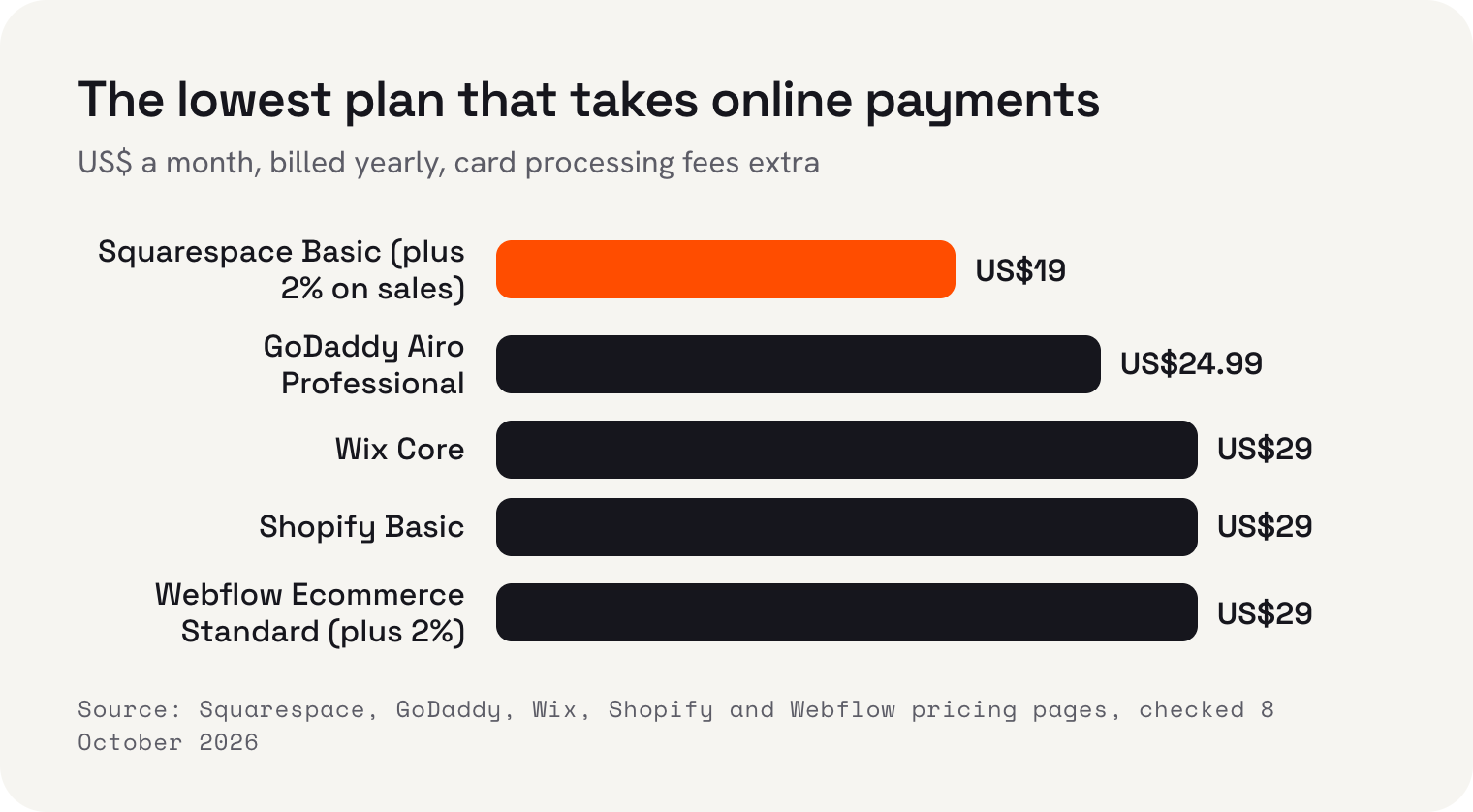
The monthly price is only half of a shop's cost. Run your own numbers: if you expect US$2,000 a month in online sales, a 2% platform fee is US$40 a month, which is more than the plan itself. That's when moving up a plan to remove the fee makes sense.
If your work is the advert
Photographers, designers, architects, florists, makers: when people judge the work by how the site looks, design control matters more than anything else. Squarespace has long been the safe choice here, with templates built around big images, and its Basic plan at US$19 a month billed annually is enough for a portfolio that doesn't sell online.
Webflow gives a designer far more control over layout and animation, and its Basic site plan is US$15 a month billed yearly for a site without a content system. If you want a blog or a project list you can add to easily, you need Premium, which adds the Webflow CMS, at US$25. Webflow takes longer to learn than the others in this guide. If you'll build it yourself and you enjoy that kind of thing, it rewards the effort. If you won't, a designer working in Webflow or Squarespace is the usual route, and our guide to paying for a builder, an AI builder or a web designer covers what that costs.
If bookings are the business
Salons, studios, clinics, tutors, guides and anyone selling time: here the booking tool is the product, and the website is the shop window around it. This is where builders differ most, and where the cheapest plan is most misleading.
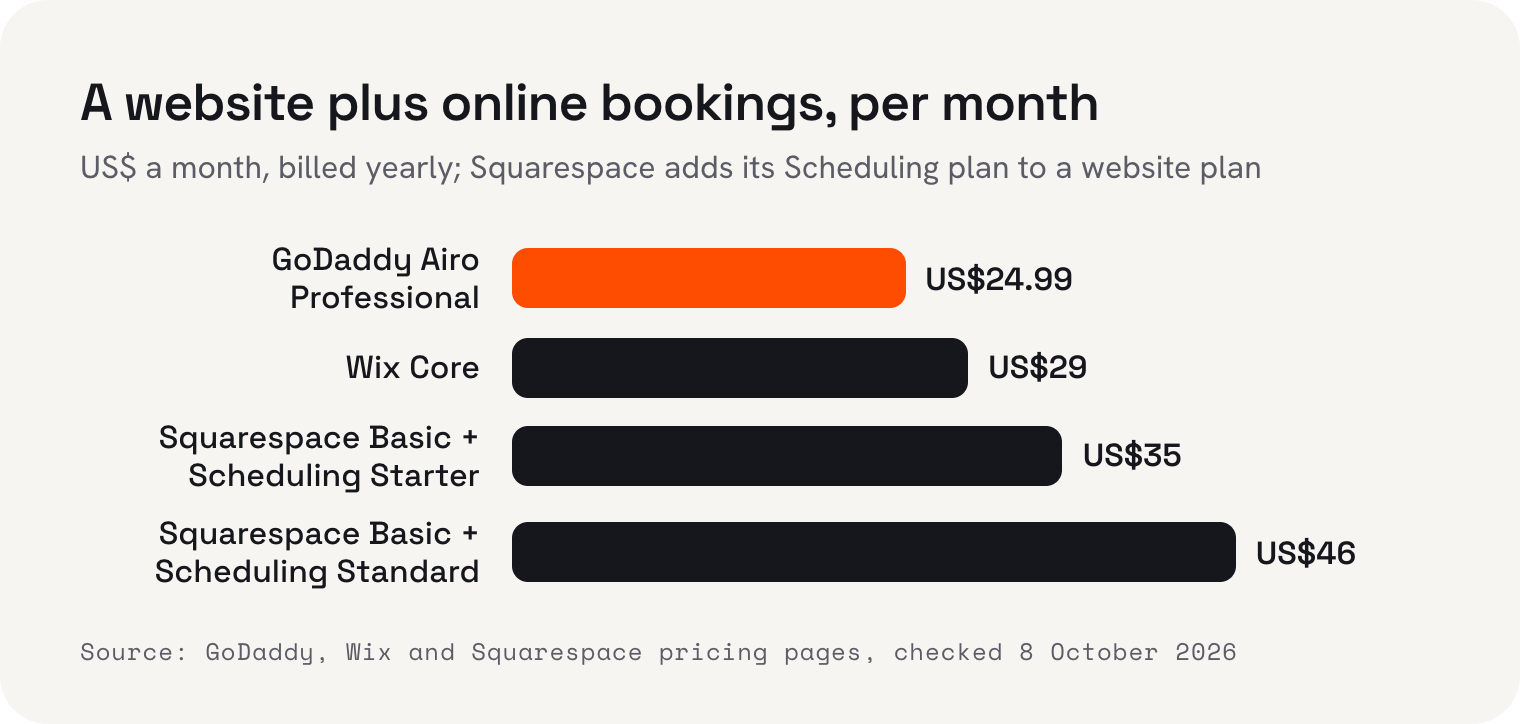
Wix lists scheduling and services on Core and above, so at US$29 a month billed yearly the website and the booking system come in one plan. GoDaddy's Airo Professional plan, US$24.99 a month billed annually, includes appointment bookings, online payments and deposits. Squarespace sells its scheduling tool separately: Starter is US$16 a month billed annually for one bookable calendar, with deposits through Stripe, Square or PayPal and email reminders. Standard, at US$27, gives up to six calendars and text message reminders. So a two-chair salon on Squarespace pays for the website plan and for Standard scheduling.
Price isn't the only test. Before you choose, make a test booking on the builder's demo or trial as if you were a customer, on your phone. Count the taps. Check whether the confirmation and reminder arrive, whether you can take a deposit, and how a cancellation works. Then check it from your side: how you'll see tomorrow's bookings, and what happens if two people book the same slot.
If you'll publish a lot, or need something unusual
If your site is mostly articles, guides or listings, or you need a feature no builder offers, WordPress is the usual answer, because there's a plugin for nearly everything. WordPress.com takes the hosting off your hands. Personal is US$4 a month, Premium US$8, Business US$25 and Commerce US$45, all billed yearly, and its pricing page says paid plans can install plugins from a marketplace of over 60,000. Business and Commerce include 24/7 priority support. One catch for selling: WordPress.com adds a transaction fee of up to 10% to its standard payment tools on its cheaper plans, so read the fee row before you take money.
Self-hosted WordPress is cheaper in cash and freer still, but you, or someone you pay, has to keep it updated. Our Wix vs WordPress guide goes through that trade in detail, including a monthly safety routine.
Three questions that matter more than features
In research sessions, the regrets I hear about websites are rarely about a missing feature. They're about a bill that doubled at renewal, a site that couldn't be moved, or a problem on a Saturday with nobody to ask. These three questions catch most of them.
Pricing pages lead with the yearly price, paid up front. Squarespace's Basic plan is US$19 a month on an annual plan and US$25 month to month. Shopify's Basic is US$29 yearly and US$39 monthly. Free domains are usually free for the first year only; Squarespace, for example, says the domain then renews at its standard rate. Add the plan you'll really need, any add-on like scheduling, and the fees on what you sell.
The second question is what you can take with you if you leave. This is where builders differ most, and few people check until it's too late. Here's what each company's own help pages say.
- Wix: the site has to be hosted and run on Wix's servers, so it can't be exported. Your domain can move.
- Squarespace: exports some content as a file for WordPress, including one blog and basic pages, but not store pages, products, video blocks or style settings, and not from a trial site.
- Shopify: products export to a spreadsheet file (CSV) you can import elsewhere.
- Webflow: code export is only on paid Workspace plans, not on Site plans, and the exported code doesn't include the CMS content or the shop, though collections export separately as CSV.
- GoDaddy Airo: says on its pricing page that paid plans let you download your code at any time.
- WordPress: its built-in export tool saves your posts and pages as a file you can take to a new host.
Whichever you pick, register the domain in your own name and keep the login. ICANN, which oversees domain names, says your registration sits under an agreement with your registrar, that you're entitled to clear information on how to transfer and renew it, and that you must keep your contact details accurate. If the domain is yours, you can always move, even when the site itself has to be rebuilt.
Support varies more than the marketing suggests. Wix says its plans include 24/7 customer care, with English callbacks around the clock, but its help centre lists English chat hours as Monday to Friday, 2am to 6pm Eastern time. Squarespace's help centre says email support is available 24/7, and live chat is in English only. Shopify lists 24/7 live chat on its Basic plan. GoDaddy lists 24/7 expert support on all paid Airo plans, and WordPress.com promises 24/7 priority support on Business and Commerce. Look up the page for your plan, your language and your time zone.
My shortlist, by job
- Shopify, for a real online shopFrom US$29 a month billed yearly. Built around the catalogue and checkout. Overkill if you only sell a few things.
- Squarespace, for a portfolio or a simple service siteFrom US$19 a month billed annually. Strong templates; bookings cost extra with Squarespace Scheduling.
- Wix, for a do-it-yourself site with bookingsCore at US$29 a month billed yearly takes payments and lists scheduling. The site can't be exported.
- GoDaddy Airo, for a quick start on a budgetProfessional at US$24.99 a month billed annually covers bookings and payments. Check the renewal price.
- Webflow, for a design-led siteFrom US$15 a month billed yearly, US$25 with a CMS. Most control, steepest learning curve.
- WordPress.com, for content and pluginsBusiness at US$25 a month billed yearly installs plugins. Watch the payment fees on cheaper plans.
If you'd rather not build it at all
Every option above assumes someone, usually you, will build the site and keep it current. Plenty of owners know that won't happen. That's the job Kahu Sites is for. Pick a design and Kahu writes your site in your own words, hosts it, and changes it whenever you ask. Hosting, SSL and a free web address are included, and you can bring your own domain when you're ready. Nothing goes live until you say so.
It's not the cheapest route, and I'd rather be clear about the price. The website comes with the Growth plan, US$179 a month or US$149 billed yearly, which also includes Kahu CRM, SEO reports, and Google and Meta ads. Every enquiry from your website lands in Kahu CRM with where it came from. Asking Kahu for changes in chat uses credits: Growth includes 1,500 a month, and top-ups are US$10 per 100. Every plan starts with a free 7-day trial, no card needed. If you need a big catalogue, Shopify is the better pick. If you love designing, Squarespace or Webflow will suit you more.
 Where Kahu fits


I'm Anirudh Yadav, a user researcher at KahuLogic, a New Zealand company with a team across Australia, New Zealand and India. We build and look after websites and marketing for small businesses, and this is how I'd choose a builder whether or not you ever use us.
Frequently asked questions
What is the best website builder for a small business?
It depends on the job. Shopify suits a business that mainly sells products online. Squarespace and Webflow suit portfolios where design sells the work. Wix Core and GoDaddy Airo Professional include bookings and payments in one plan. WordPress.com suits content-heavy sites that need plugins. Choose by the job, then check renewal prices, export options and support hours.
Which website builder is cheapest for taking payments?
From published prices on 8 October 2026, billed yearly: Squarespace Basic is US$19 a month but adds a 2% fee on online sales, GoDaddy lists payments on Airo Professional at US$24.99, and Wix Core, Shopify Basic and Webflow Ecommerce Standard are each US$29. Card processing fees are extra on all of them.
Which website builder is best for appointments and bookings?
Look for scheduling included in the plan. Wix lists scheduling on Core (US$29 a month billed yearly) and GoDaddy Airo Professional (US$24.99 billed annually) includes appointment bookings and deposits. Squarespace sells Scheduling separately, from US$16 a month billed annually for one calendar.
Can I move my website to another builder later?
It depends on the builder. Wix sites can't be exported. Squarespace exports some content for WordPress but not store pages or style settings. Shopify exports products as a CSV file. Webflow exports code only on paid Workspace plans. Keep your domain registered in your own name so you can always move it.
Do I need Shopify if I only sell a few products?
No. Squarespace, Wix, Webflow and WordPress.com can all sell a small range. Shopify earns its place when online sales are the main business and you need stock, shipping and a checkout built around them.
Is a website builder good enough for Google?
Yes. Google uses the mobile version of a site's content for indexing and ranking, so what matters most is how the site works on a phone. Any of these builders can produce a fast, mobile-friendly site if you keep images sensible and write useful pages.
Sources and further reading
- Wix: plans and pricingwix.com
- Wix Help Center: contacting Wix Customer Caresupport.wix.com
- Wix Help Center: exporting or embedding your Wix site elsewheresupport.wix.com
- Squarespace: pricingsquarespace.com
- Squarespace Scheduling: planssquarespace.com
- Squarespace Help Center: exporting your sitesupport.squarespace.com
- Shopify: pricingshopify.com
- Shopify Help Center: exporting productshelp.shopify.com
- Webflow: pricingwebflow.com
- Webflow Help Center: export your site codehelp.webflow.com
- WordPress.com: pricingwordpress.com
- GoDaddy: Airo AI Builder plansgodaddy.com
- WordPress.org: the export screenwordpress.org
- Google Search Central: mobile-first indexing best practicesdevelopers.google.com
- ICANN: registrants' benefits and responsibilitiesicann.org