What is marketing automation? How it works, with small business examples
Muskaan Sharma·Updated 3 Nov 2026·13 min read

Marketing automation is software that sends marketing messages or takes marketing actions for you when something happens, such as a new sign-up, a finished job or a customer who hasn't been back. You set the rule once, for example when someone joins the list send a welcome email, and it runs every time. It's different from scheduling, which runs on a date, and from AI, which drafts the words. It saves repeated work, but it still needs consent, a clear stopping rule and a person checking the results.
Most small business owners already know the feeling marketing automation is meant to fix. You meant to email the customer who asked for a quote last Tuesday. You meant to send a thank-you after the wedding flowers went out. You meant to remind regulars it's been three months since their last appointment. None of it is hard. It's just easy to forget when the phone is ringing.
Marketing automation is the name for software that does those jobs for you, the same way every time. This guide explains what it is, how it differs from scheduling and from AI, what the law says about who you can message, and what a sensible first automation looks like, with a brief and three starter emails to copy.
I'm a user researcher at KahuLogic, where we build websites and marketing tools for small businesses. I'll mention our own tool once, near the end; everything else works whichever tools you use.
What is marketing automation, in plain English?
Marketing automation is software that sends a marketing message or takes a marketing action for you when something happens. You set the rule once, for example “when someone joins my list, send a welcome email”, and it runs every time that thing happens, without you remembering to do it.
Think of it as a set of if-this-then-that rules for your marketing. Something happens: a trigger. Optionally, the software checks a condition, such as whether this person is a new customer or a returning one. It may wait a set time. Then it does something: an action. That's the whole idea, whether the tool is a free email plan or an enterprise platform.
How does marketing automation work?
Every automation has the same building blocks, and once you can name them you can read any tool's settings page.
| Part | What it means | Example for a salon |
|---|---|---|
| Trigger | The event that starts it | A client books a colour appointment |
| Condition | Who it applies to | Only first-time clients |
| Wait | How long before acting | Two days after the appointment |
| Action | What happens | Send an email with aftercare tips |
| Exit rule | When it stops | Stop if they book their next appointment |
The exit rule is the part owners most often forget, and it's the one that causes the embarrassing moments. A follow-up that keeps chasing a customer who already said yes, or a “we miss you” email to someone who was in yesterday, makes automation feel robotic. Every automation needs a clear answer to “when should this stop?”
What are common examples of marketing automation?
These are the automations I'd expect most small businesses to get real use from, roughly in order of how simple they are to set up.
- A welcome email when someone signs up to your list, with what to expect and one useful thing.
- A thank-you and review request after a job or appointment is finished.
- A rebooking reminder to customers who haven't been back in a set number of months.
- A follow-up when a quote has had no reply after a few days, which stops as soon as they answer.
- Tagging a contact by the service they asked about, so later emails are about something they care about.
- A birthday or anniversary message with a small offer, for businesses where that fits.
- An abandoned-booking or abandoned-cart reminder, for businesses that sell or book online.
Klaviyo, an email platform used mostly by online shops, publishes benchmark data showing that automated flows produced about 41% of email revenue from only 5.3% of sends. That's vendor data from ecommerce brands, so I wouldn't expect a plumber or a physio to see the same split. But it points at something I'd expect to hold more widely: messages triggered by something a customer just did tend to be more relevant than a newsletter sent to everyone on the same day.
Marketing automation vs scheduling vs AI
These three get mixed up, and the difference changes what you should expect from a tool.
| Scheduling | Marketing automation | AI drafting | |
|---|---|---|---|
| What starts it | A date and time you pick | Something a customer does | You ask for something |
| Who receives it | Everyone who sees the post or email | Only the people the rule applies to | Nobody until you send it |
| Is the message the same each time? | Yes | Usually, with names and details filled in | No, it's written fresh for each case |
| Example | A Facebook post on Friday at 9am | A welcome email the day someone joins | A reply drafted to a customer's question |
| What to check | That the post still fits the day | That the rule fires at the right moment | That every fact in the draft is right |
Scheduling is about time. Automation is about events. AI is about writing. Modern tools blend them, so you might have an automation that triggers on a new enquiry and uses AI to draft a reply. That's useful, but it's worth knowing which part is doing what, because each one fails differently. A scheduled post can be badly timed. An automation can fire for the wrong person. An AI draft can be confidently wrong.
Is marketing automation only for big companies?
No. Many tools aimed at small businesses include simple automations. Mailchimp's own guide to its automation tools says its free plan allows a single email automation, typically a welcome or birthday email. Its help pages say the Essentials plan allows flows of up to four steps, and Standard and Premium allow flows with up to 200 steps, several triggers and split paths.
The bigger risk for a small business isn't missing out on features. It's buying more than you'll use. Gartner's 2023 survey of 405 marketing leaders found they were using only 33% of their marketing technology's capabilities, down from 42% the year before. If large marketing teams leave two-thirds of their tools unused, a two-person business should start with one automation and add the next only when the first is working.
What the law says about automated marketing messages
Automation makes it easy to send a lot of messages, which is exactly why consent matters. In Australia, the Spam Act requires consent before you send commercial email or SMS, accurate identification of your business, and a working unsubscribe. The ACMA's unsubscribe fact sheet says the unsubscribe option must be clear, free, and honoured within five working days.
In New Zealand, the Unsolicited Electronic Messages Act 2007 is enforced by the Department of Internal Affairs. The DIA's guidance says commercial electronic messages need the recipient's consent and a working unsubscribe facility, and its page on unsubscribing treats continuing to send messages five working days after someone tries to unsubscribe as a breach.
- Ask before adding anyone to a marketing list, and keep a record of when and how they agreed.
- Consent for one channel isn't consent for another. Someone who agreed to emails hasn't agreed to texts.
- Put your business name and contact details in every message.
- Make unsubscribing one click or one reply, and test that it actually works.
- Don't buy or borrow lists. You can't show consent for people who never heard of you.
What marketing automation doesn't do
Marketing automation doesn't decide what to say or who you should be talking to. A poor message sent automatically is still a poor message, just sent more often. It doesn't know that your best customer's dog just died, that the road outside your shop is closed this week, or that the offer in the welcome email ended in March.
It also needs checking. Offers end, links break, and rules fire at the wrong moment. I'd put a fifteen-minute review in the calendar once a month: look at what each automation sent, open one of each yourself, and check the links and the offer still make sense.
A worked example: a physio clinic's rebooking reminder
Here's a worked example. The business and every number in it are made up, so swap in your own. Picture a physio clinic where many patients come for a course of treatment, feel better, and then drift away. Some of them would benefit from a check-in, and some would book one if reminded.
The clinic sets up one automation. The trigger is a patient's last appointment, the condition is that they haven't booked another in eight weeks and have agreed to emails, and the action is a short email from their physio: how are you going, here are three exercises to keep doing, and a link to book a check-in if anything's flared up. The exit rule is that it stops the moment they book.
In this made-up case, the clinic sees 120 patients finish a course over three months. Ninety have agreed to emails. Eighteen of them book a check-in after the reminder. The clinic can't be sure all eighteen wouldn't have come back anyway, so it asks them when they book. Say it decides half were genuinely prompted by the email: 9 check-ins every three months, or 36 a year. At a made-up NZ$95 a check-in, that's about NZ$3,400 a year from one afternoon of setup, before counting any further treatment those check-ins lead to.
What I like about this example is how small it is. One trigger, one message, one clear exit. That's the right size for a first automation.
How to choose your first automation
- 1List what you forgetWrite down the follow-ups and reminders you mean to send and often don't. Those are your candidates.
- 2Pick the closest to the customerStart with people who already know you, like new subscribers or recent customers. They respond best, and mistakes are easy to spot.
- 3Write it as a sentence“When X happens, wait Y, then send Z, and stop if W.” If you can't finish the sentence, the automation isn't ready.
- 4Check consentMake sure everyone the rule could reach has agreed to hear from you on that channel.
- 5Test it on yourselfTrigger it with your own email or phone and check what arrives and when.
- 6Review it monthlyLook at what it sent, what happened next, and whether the wording still fits.
Where AI fits in marketing automation
Rule-based automation sends the same message every time, with a name filled in. AI can draft something different for each case: a follow-up that mentions what the customer actually asked about, a caption written from a photo of today's work, a reply to a question about prices. That makes it more useful, and it makes checking more important.
My recommendation is to let AI draft and a person approve, at least until you've seen enough drafts to trust the pattern. Keep anything to do with complaints, refunds, prices you haven't published, or sensitive news firmly in human hands.
Copy these: an automation brief and three starter emails
Before you open any tool, fill in the brief. It forces the decisions the software will ask you for, and the gaps show you what isn't ready. Then adapt the email that fits your first automation, and add the footer to every one.
- 11. The one-page automation briefName: [e.g. Rebooking check-in]. When this happens: [trigger]. Only for people who: [condition, including “have agreed to emails”]. Wait: [time]. Then send: [message, by email or text]. Stop if: [exit rule]. Who reads the replies: [name]. How we'll know it works: [a number, e.g. check-ins booked a month]. Review date: [date, a month from launch].
- 22. Welcome email for new subscribersSubject: Welcome to [business], [first name]. Body: Thanks for joining. About [once a month] I'll send [what they get, e.g. seasonal tips and first look at new dates], and nothing else. To start, here's [one useful thing, e.g. our price guide / how to prepare for your first visit]: [link]. When you're ready, you can [book / order / ask a question] here: [link]. [Your name], [business]
- 33. Rebooking check-inSubject: How are you going, [first name]? Body: It's been [eight weeks] since your last [appointment / visit / service]. I hope [the result they came for] is holding up. If it would help, here are [two or three things to keep doing]. If [the problem] is back, or it's just time, you can book here: [link]. [Your name]
- 44. Thank-you after a first purchase or bookingSubject: Thanks for choosing [business]. Body: Hi [first name], thanks for [what they bought or booked]. A quick tip to get the most from it: [one practical tip]. If anything isn't right, just reply to this email and it comes straight to me. [Your name]
- 55. The footer for every marketing emailYou're getting this because you [signed up on our website / asked to hear from us when you booked]. [Business name], [business address or contact details]. Unsubscribe: [one-click link]. Replies come to a real person.
Two tips. Write each email as if to one person you know, then read it on your phone before you switch the automation on. And keep the footer honest: the reason line should say exactly how that person joined your list. If you can't write it, you probably don't have their consent, and the law sections above apply.
If you only do three things this week
- Write down three follow-ups you mean to send and often don't, and fill in the automation brief for the one closest to existing customers.
- Check your email list: can you say how and when each person agreed to hear from you? Remove or re-ask anyone you can't.
- Adapt one of the starter emails, add the footer, and send it to yourself on your phone before switching anything on.
Where Kahu fits
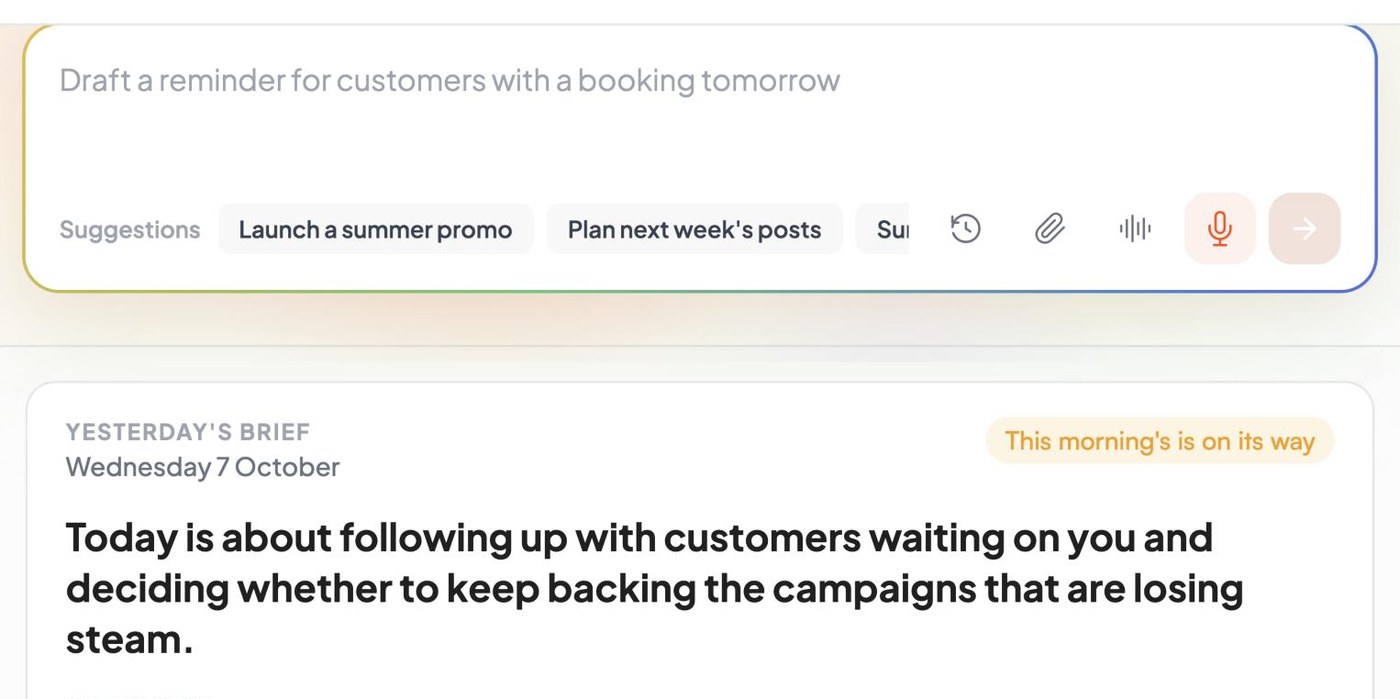
If you'd like help without handing over the keys, here's what our tools do. Website and form enquiries arrive in Kahu CRM as contacts tagged with their source, and Kahu drafts the follow-up for you to check, which is the trigger-and-action pattern in this guide. Kahu Bookings handles online booking with reminders, and Kahu Reach drafts email and SMS campaigns (SMS sends in Australia, with New Zealand in progress and launching soon). Work Kahu drafts waits in your approvals queue until you approve it, and automations run only when you switch them on. Your website, ads and CRM are included from Growth (US$179 a month, or US$149 billed yearly). Starter (US$69) covers social posting, Creative Studio and chat. Starter, Growth and Pro start with a 14-day free trial.
 Where Kahu fits


 Website form · asked for a valuation · 2h ago
 Email · quiet 6 days
I'm Muskaan Sharma, User Researcher at KahuLogic, a New Zealand company with a team across Australia, New Zealand and India. My view is that the best marketing automation is the follow-up you always meant to send, finally sent on time, and nothing more ambitious than that until it works.
Frequently asked questions
What is marketing automation in simple terms?
It's software that sends a marketing message or takes an action for you when something happens, such as a new sign-up, a finished job or a quiet customer. You set the rule once and it runs every time. A person still decides the message and checks the results.
What is an example of marketing automation?
A welcome email sent automatically when someone joins your email list is the classic example. Others include a review request after a completed job, a rebooking reminder after a set number of months, and a quote follow-up that stops when the customer replies.
Is marketing automation the same as AI?
No. Automation follows rules you set: when this happens, do that. AI can draft or personalise the content inside those rules, and its output should be checked before it goes out. Many tools now combine the two.
Is marketing automation worth it for a small business?
Usually, for a few simple automations. Welcome emails, follow-ups and rebooking reminders save repeated work and make sure nothing is forgotten. Start with one, check it works, and add more only when you'd use them.
Do I need consent for automated marketing emails?
Yes. In Australia the Spam Act requires consent, identification and a working unsubscribe for commercial email and SMS. In New Zealand the Unsolicited Electronic Messages Act 2007 requires consent and a working unsubscribe. Automation doesn't change those rules.
What should my first marketing automation be?
A welcome email for new subscribers or a thank-you and review request after a completed job. Both are simple, go to people who already know you, and are easy to check.
Sources, checked 3 November 2026
- Klaviyo: email marketing benchmarks (vendor data)klaviyo.com
- Mailchimp: marketing automation tools (free plan automation)mailchimp.com
- Mailchimp Help: about marketing automation flowsmailchimp.com
- Gartner: survey finds marketers use 33% of their martech stack's capabilities (August 2023)gartner.com
- ACMA: email and SMS unsubscribe rules fact sheetacma.gov.au
- business.gov.au: promoting your business by email or text messagesbusiness.gov.au
- NZ Department of Internal Affairs: New Zealand spam lawdia.govt.nz
- NZ Department of Internal Affairs: about unsubscribingdia.govt.nz