How to use AI for lead generation without buying lists or spamming anyone
Muskaan Sharma·Updated 3 Nov 2026·13 min read

For a small business, AI generates leads best by helping you win more of the people who already find you, not by hunting strangers. Use it to make your website answer the questions visitors ask, reply to enquiries within minutes, ask a few qualifying questions in conversation instead of a long form, and draft relevant messages to past customers who agreed to hear from you. Track enquiries as key events in your analytics so you know which sources bring leads. Avoid scraped or bought lists: Australian and New Zealand spam law requires consent.
Search for “AI lead generation” and you'll find tools promising to find thousands of prospects, write to them all and fill your calendar while you sleep. For a café, a plumber or a bookkeeper, most of that is the wrong answer to the wrong question. Your problem usually isn't that nobody knows you exist. It's that people visit your website, look around and leave, or message you and wait too long for a reply.
That's where AI earns its keep for a small business. It can help you turn more of your existing visitors and past customers into enquiries, and make sure each one gets a quick, useful answer. That's cheaper than buying more traffic, and it doesn't risk a spam complaint.
I'm a user researcher at KahuLogic, where we build websites and marketing tools for small businesses. I'll mention our own tool once, near the end; everything else works whichever tools you use.
What is AI lead generation for a small business?
AI lead generation means using AI tools to attract, capture and qualify people who might become customers. For a small business, the useful part is mostly capture and qualification: answering a visitor's question so they enquire instead of leaving, asking the right follow-up questions, and making sure every enquiry is recorded with where it came from.
The flashier part, finding and messaging people who've never heard of you, is where I'd be most cautious. Some of it is legal and useful in business-to-business selling with care. Much of it, for a local service business, is a fast way to annoy people and break spam rules.
Start with the leads you're already losing
Before spending a cent on new traffic, find out where your current visitors drop off. Most small business websites get far more visits than enquiries, and the gap is usually a fixable leak: no clear next step, a long form, a slow page on a phone, or no answer to the one question people came with.
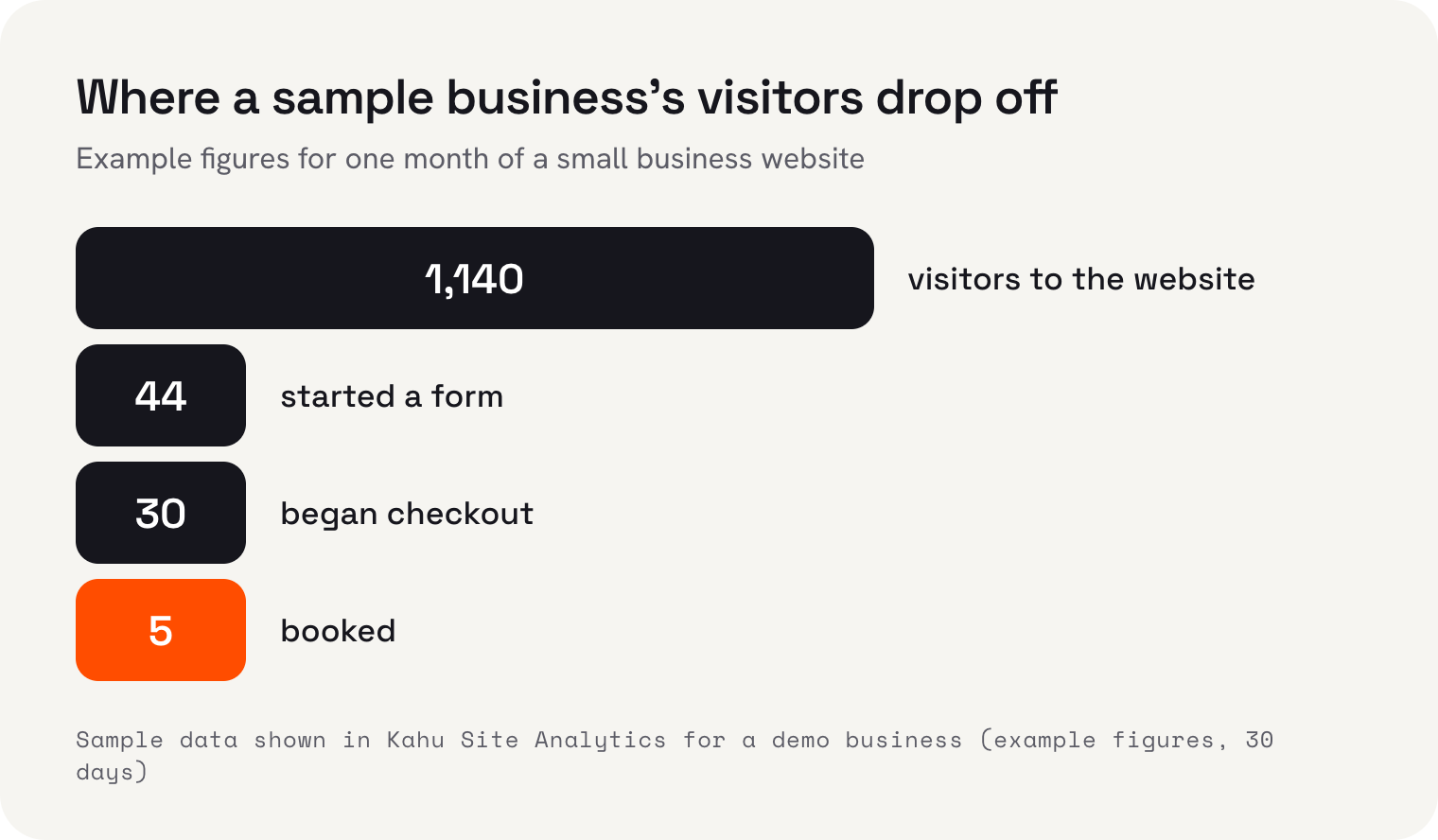
A drop like the one in that sample is common, and it tells you where to look. If plenty of people start a form but few finish, the form is the problem. If almost nobody starts one, the page isn't answering their question or the next step is hidden. AI can help with both, but only once you know which one you have.
How AI turns more website visitors into enquiries
AI helps most by making your website answer real questions, in the visitor's words, at the moment they're asking. That can mean a chat assistant that answers from your own pages, better service pages written around what people actually search, or a shorter enquiry path.
- Answer the top five questions on the page itself. Price ranges, service area, how soon you can come, what's included, what happens next. AI can help you draft these from your notes and past emails.
- Give every page one clear next step. A booking button, a short form or a message link, not all three competing.
- Shorten the form. Ask for what you need to reply well (name, contact, what they need, rough timing) and gather the rest in the conversation.
- If you add a chat assistant, make it answer only from your own website and facts, and hand over to a person when it doesn't know.
- Check it on a phone. Many visitors browse on one, so read every page and form on a small screen.
Qualify leads in conversation instead of a long form
Long forms put people off, but you still need to know whether a lead is a good fit. AI is good at asking qualifying questions naturally, one or two at a time, as part of a helpful reply. Picture a guesthouse enquiry: someone asks if you have a room in March. A good drafted reply confirms what's available, then asks how many guests and which nights, and offers to hold the room. The guest feels helped; you get the details.
- 1Write your qualifying questionsFour or five at most: what they need, when, where, rough budget, how they found you.
- 2Put them in orderAsk the easy, useful ones first. Budget usually comes after you've helped a little.
- 3Let AI weave them inHave it ask one or two per reply, alongside a real answer, instead of a list of demands.
- 4Record the answersEach answer should land on the customer's record, so you don't ask twice.
- 5Set a hand-over ruleDecide what makes a lead hot enough for you to call personally, and have AI flag those.
Reply in minutes, not hours
A lead that waits goes cold, because the customer keeps looking while you're busy. A drafted first reply, ready for you to approve from your phone, is the most practical way I know for a small team to answer within minutes during the working day. Outside working hours, an honest automatic acknowledgement that says when you'll reply is better than silence.
Keep privacy in mind when you set this up. Australia's privacy regulator, the OAIC, recommends that businesses don't enter personal information, especially sensitive information, into publicly available AI chatbots. If you're drafting replies with a free AI tool, leave the customer's name and contact details out of what you paste in.
Win back past customers, with their consent
Your past customers and old enquiries are often your best source of new work, and AI makes it practical to contact them with something relevant instead of a generic blast. A dog groomer could message customers whose last visit was three months ago. A landscaper could remind last autumn's customers about a pre-winter tidy. AI can sort the list and draft a personal note for each group.
The rules matter here. In Australia, the ACMA says commercial emails and texts need consent, must identify the sender with contact details that stay correct for at least 30 days, and must include a free, working unsubscribe that's actioned within five working days. You also need to be able to show evidence of consent if asked. New Zealand's Department of Internal Affairs sets out the same three steps under the Unsolicited Electronic Messages Act, and notes that it's up to the sender to prove consent exists.
If you email in volume, Google's rules apply too. Gmail's sender guidelines say that senders of around 5,000 or more messages a day to personal Gmail accounts must meet stricter requirements, including one-click unsubscribe in marketing messages, and should keep their spam rate below 0.1% and never let it reach 0.3%. Gmail's FAQ also lists not honouring unsubscribe requests within 48 hours as a failure. Most small businesses send far less than that, but the habits are worth copying at any size.
| Lead source | How AI helps | Rule to watch |
|---|---|---|
| Website visitors | Drafts clearer answers for your pages, answers questions in chat, shortens the path to enquire | Chat should answer from your own facts and hand over when unsure |
| New enquiries | Drafts fast first replies with one or two qualifying questions | Keep customers' personal details out of public chatbots |
| Past customers | Sorts the list and drafts relevant, personal messages | Consent, sender identification and a working unsubscribe |
| Search and social | Drafts useful pages and posts on the questions people ask | Write for people first; content made mainly to manipulate rankings breaks Google's spam policies |
| Bought or scraped lists | Not recommended | Consent rules make these a serious risk for marketing messages |
Can AI find new leads for me?
It can help people find you, but I wouldn't use it to find and message strangers who never asked to hear from you. Australian and New Zealand spam law needs consent for commercial emails and texts, and a list of scraped addresses doesn't come with it. That's a legal risk and, frankly, a poor first impression of your business.
The legitimate way to reach new people is to be useful where they're already looking. AI can help you draft service pages, answers to common questions and social posts faster. Google's guidance is that using AI to create content isn't a problem in itself, but using automation mainly to manipulate search rankings breaks its spam policies. So write about the questions your customers really ask, add what only you know, and check every page before it goes live.
A worked example: the maths of converting more visitors
Here's a worked example. The business and every number in it are made up, so swap in your own. Picture a bookkeeper whose website gets 900 visits a month. Right now 9 of those visitors enquire, a 1% rate, and she turns 3 of those enquiries into clients.
She rewrites her services page to answer the five questions people ask most, shortens her enquiry form from nine fields to four, and replies to every enquiry within the hour with a drafted reply she checks. Say that lifts enquiries to 14 a month, about 1.6%, and she still turns a third into clients. A third of 14 is about 4.7 new clients a month instead of 3, so roughly 1.7 extra a month, or 20 extra clients over a year, from the same 900 visits. At a made-up NZ$1,800 a year in fees per client, that's about NZ$36,000 of extra annual fees.
To get 14 enquiries at her old 1% rate, she'd need 1,400 visits a month, 500 more than now. At a made-up NZ$2.50 a click, that's NZ$1,250 a month, or NZ$15,000 a year, in ads. That's why I'd always fix conversion before buying reach. Do the same sum with your own analytics.
Copy these: a chat assistant brief, a four-field form and two messages
These are the pieces I'd set up first, in this order. Paste the brief into whatever chat assistant or AI tool you use, copy the form fields into your website builder, and save the two messages as templates. Change everything in square brackets.
- 11. Brief for a website chat assistantYou answer questions on the website of [business], a [type] serving [area]. Answer only from the facts below and the pages of [yourbusiness.example]. Facts: services [list], prices [ranges], hours [hours], service area [suburbs], lead time [e.g. usually within 2 weeks], we don't do [list]. Keep answers to three sentences. After answering, ask one helpful question from this list, in order: what they need, when, where, how they found us. If you don't know, or the person asks about a complaint, a refund, medical or legal matters, say "I'll get [name] to reply by [time]" and ask for their email or number. Never invent a price, a date or availability.
- 22. A four-field enquiry formName. Email or mobile (one field: "Best way to reach you"). What do you need? (a text box with the hint "e.g. [a typical job]"). When would you like it? (a drop-down: As soon as possible / Within a month / In 1 to 3 months / Just looking). Then a thank-you page at its own address, such as [/thanks], so you can mark it as a key event.
- 33. Instant acknowledgement (out of hours or busy)Hi [name], thanks for your enquiry about [job]. I've got it and I'll reply properly by [time/day]. If it helps, our prices start from [price] and you can see examples of our work at [link]. [Your name], [business]
- 44. Win-back message to past customers who agreed to hear from youHi [first name], it's [your name] from [business]. It's been about [3 months] since your last [service], which is usually when [reason, e.g. the hedge needs another trim / your dog's coat gets matted]. I have spots on [days] in the next two weeks. Reply with a day that suits and I'll book you in. Reply STOP and I won't message you again.
- 55. "How did you find us?" optionsGoogle search / Google Maps / An AI assistant such as ChatGPT / Facebook or Instagram / An ad / A friend or neighbour / We've used you before / Other: [box]
Message 4 includes an opt-out because it's a marketing message, and in Australia and New Zealand that means consent, a clear sender and a working unsubscribe. Send it only to people who agreed, and record when they did. The brief in item 1 does most of its work in the last two sentences: a chat assistant that hands over and never guesses is worth having; one that improvises prices is not.
How to track which leads AI is actually helping
You can't improve what you can't see, so set up tracking before you change anything. In Google Analytics, mark your enquiry as a key event. Google's help pages say a standard property can have up to 30 key events, and Google's own tutorial shows building a generate_lead event from a page view of your form's thank-you page, rather than marking every page view. An event has to be a key event in Analytics before you can import it into Google Ads as a conversion.
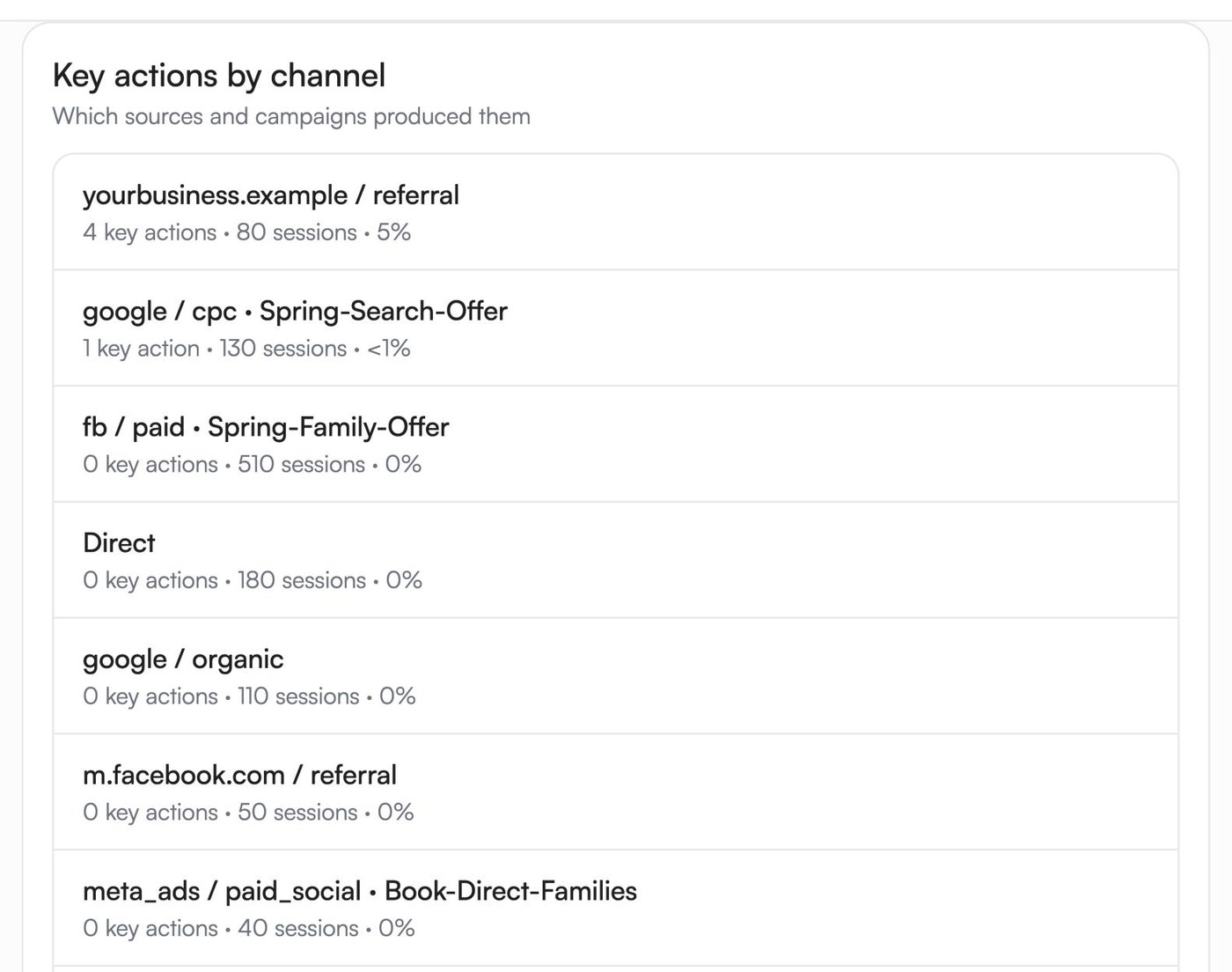
A view like that, enquiries by source, is the one to check monthly. It stops you judging a channel on visits alone. In the sample above, the source that sent the most visits produced no key actions at all, which is exactly the kind of thing you only learn by tracking.
If you only do three things this week
- Mark your enquiry thank-you page as a key event in Google Analytics, so next month you can count enquiries by source.
- Cut your enquiry form down to the four fields above and test it on your phone.
- Pick the past customers who agreed to hear from you and whose last visit was three or more months ago, and send them message 4.
Where Kahu fits
If you'd like help without handing over the keys, here's what our tools do. Kahu Sites gives you a website on your own domain, and website and form enquiries arrive in Kahu CRM as contacts tagged with their source, with a follow-up drafted for you; WhatsApp Inbox, live on every plan, drafts each reply from your prices and hours and a person on your team taps send. Work Kahu drafts waits in your approvals queue until you approve it, and automations run only when you switch them on. Your website, ads and CRM are included from Growth (US$179 a month, or US$149 billed yearly). Starter (US$69) covers social posting, Creative Studio and chat. Every plan starts with a free 7-day trial, no card needed.
 Where Kahu fits


I'm Muskaan Sharma, User Researcher at KahuLogic, a New Zealand company with a team across Australia, New Zealand and India. My honest view is that most small businesses don't have a lead problem so much as a leak problem, and AI is best at helping you plug it.
Frequently asked questions
How can a small business use AI for lead generation?
Use AI to help your website answer visitors' questions, reply to enquiries within minutes, ask qualifying questions in conversation and draft relevant messages to past customers who agreed to hear from you. Track enquiries as key events so you can see which sources bring leads.
Can AI find leads for me?
It can help people find you through useful pages and posts. I wouldn't use it to scrape and message strangers, because Australian and New Zealand spam law requires consent for commercial emails and texts. Converting the visitors and customers you already have is cheaper and safer.
Is an AI chatbot on my website worth it?
It can be, if it answers from your own website and facts and hands over to a person when it doesn't know. A chatbot that guesses prices or dodges questions does more harm than good. Start by putting the answers to your top five questions on the page itself.
Do I need consent to email past customers?
For marketing messages, yes. In Australia and New Zealand, commercial emails and texts need consent, must identify the sender and must include a working unsubscribe actioned within five working days. Keep records of who agreed and when.
How do I measure AI lead generation?
Mark your enquiry form or thank-you page as a key event in Google Analytics, then track enquiries by source each month, along with reply time and enquiry-to-customer rate. Compare the numbers from before and after you make changes.
Will AI-written content hurt my search rankings?
Not because AI wrote it. Google's guidance says content made mainly to manipulate rankings breaks its spam policies, however it was made. Pages that answer real customer questions with your own knowledge, checked by you, are fine.
Sources, checked 3 November 2026
- Google Analytics Help: mark events as key eventssupport.google.com
- Google Analytics Help: tutorial, set up a key eventsupport.google.com
- Gmail Help: email sender guidelinessupport.google.com
- Gmail Help: email sender guidelines FAQsupport.google.com
- ACMA: avoid sending spamacma.gov.au
- NZ Department of Internal Affairs: three steps to ensure you are not spammingdia.govt.nz
- OAIC: guidance on privacy and the use of commercially available AI productsoaic.gov.au
- Google Search Central: Google Search's guidance about AI-generated content (February 2023)developers.google.com