WhatsApp business for small business: free app, paid platform, rules
Pooja Sharma·Updated 1 Nov 2026·12 min read

Most small businesses should start with the free WhatsApp Business app, which gives you a business profile, greeting and away messages, quick replies, labels, a catalogue, and QR codes and links so customers can message you. Move to the paid WhatsApp Business Platform when several people need to answer, or you want to send updates and offers at scale. On the platform, Meta charges per message you send, by category and country, and customers' messages are never charged. You can only message people who have opted in, outside the 24-hour window you must use approved templates, and any automation must offer a clear way to reach a human.
Your customers are probably already on WhatsApp. They use it to message their family, their friends and, more and more, the businesses they buy from. If you run a café, a salon, a clinic, a guesthouse or a small shop, the question isn't really whether to be on WhatsApp. It's which version to use, what it will cost, and which rules you can't break.
I'm a content writer, so my job is to turn pricing pages and policy documents into something you can read over a coffee. We build websites and tools for small businesses at KahuLogic, and Kahu has a WhatsApp Inbox too, but nothing in this guide depends on it. Everything here was checked on 8 October 2026, and the part about Kahu was updated on 1 November 2026, when its WhatsApp Inbox went live.
Why customers would rather message you
WhatsApp says “More than 3 billion people in over 180 countries use WhatsApp”. That's the reach. What matters more for a small business is that people now expect to message businesses the way they message anyone else: a quick question, a photo, a reply when it suits them.
Meta, which owns WhatsApp, said in June 2026 that there are more than 1 billion active threads with businesses every day across WhatsApp, Messenger and Instagram. In India, Meta quoted a 2025 Kantar study finding that 91% of online adults chat with businesses every week. Those are Meta's own figures, so read them as vendor data, but the direction is clear. In 2023, WhatsApp said more than 200 million people were using its Business app.
Two products with nearly the same name
This is where most owners get confused. There are two different things called WhatsApp Business, and they suit different stages of a business.
The WhatsApp Business app is a free app you install on your phone, much like ordinary WhatsApp, with tools for a business added on. WhatsApp's own FAQ says the Business app is free to use. It suits a sole trader, a small team sharing one phone, or anyone getting started.
The WhatsApp Business Platform, which many people still call the WhatsApp API, is the paid version. It isn't the phone app. It's used through software, usually an inbox tool or a CRM, and it's for businesses whose messages have outgrown one phone. You pay Meta per message you send.
Setting up the free Business app properly
Most owners install the app, add a logo and stop there. The app does more than that, and each feature takes a few minutes. Here's what's in it, according to WhatsApp's own feature list, in the order I'd set it up.
- 1Business profileAdd your logo, a short description, your opening hours and your website, so a customer can see who you are before they type a word.
- 2Greeting messageAn automatic first reply to someone who messages you for the first time. Say hello, say what you do, and say when you'll answer.
- 3Away messageWhatsApp describes it as a way to “Respond automatically to messages received outside your business hours”. Set it to your real opening hours.
- 4Quick repliesSaved answers to the questions you get every day: prices, parking, opening times, how to book. Send them in a couple of taps instead of typing them out each time.
- 5LabelsTag chats as new enquiry, waiting on payment, booked or follow up, so nothing gets lost in a long list of conversations.
- 6CatalogueShow your products or services inside WhatsApp, so customers can browse without leaving the chat.
A salon could put its price list in the catalogue and use labels to track who's booked. A café could use quick replies for its opening hours and catering menu. A clinic could set an away message that points people to the right number for anything urgent. None of this costs anything.
One tip from writing a lot of these: keep automatic messages short and human. A greeting that reads like a terms-and-conditions page puts people off before they've asked their question.
Writing automatic messages people don't mind getting
Writing is my job, so here's where I'd spend ten extra minutes. A greeting message has three jobs: say who you are, say what you can help with, and set an honest expectation for when a person will reply. If you can only answer between appointments, say so. People are far more patient with a business that tells them when to expect an answer than with one that leaves them guessing.
Away messages should do the opposite of a greeting: keep it brief, give your opening hours, and point to anything people can do without you, such as your website's booking page or price list. Quick replies are where your tone shows, so write them the way you'd talk to a regular at the counter, not like a policy document. Read each one aloud before you save it. If it sounds stiff to you, it'll sound stiff to your customers too.
Getting people to message you in the first place
 WhatsApp
 Meta
 Facebook
 Instagram
A WhatsApp number nobody knows about doesn't bring in enquiries. The Business app gives you a few ways to fix that. QR codes let someone scan a sign on your counter, a flyer or a menu and land straight in a chat with you. Short links do the same on your website, in an email signature or on a business card.
You can also add WhatsApp buttons to your Facebook page and Instagram profile, so people who find you there can message you in one tap. And click-to-WhatsApp ads, which run on Facebook and Instagram, open a WhatsApp chat with you instead of sending people to a website. For a business that does most of its selling in conversation, like a tailor, a tour operator or a tutor, that can be a more natural route than a form.
When you've outgrown the free app
The free app is built around one phone. That works until it doesn't. These are the signs I'd look for: more than one or two people need to answer chats; messages are getting missed at busy times; you want to send order or booking updates automatically; or you want chats to sit next to your other customer records.
At that point the WhatsApp Business Platform is the next step. Because it's used through software, you'll be choosing an inbox or CRM provider as well as paying Meta for messages. That's the part that needs a budget, so it helps to understand how Meta prices it before you sign up for anything.
When you compare providers, ask three questions. Can more than one person answer from the same number? Can a customer always reach a person, not just a bot? And will they show you clearly which messages are marketing, utility or service, so you can see what you're paying Meta for? A provider that can't answer those plainly isn't the right one for a small team.
How Business Platform pricing works
Since 1 July 2025, Meta has charged for the Business Platform per message. The rules in its developer documentation are simpler than they first look. Meta only charges for messages your business sends, never for messages customers send you. And each message you send falls into one of four categories: marketing, utility, authentication or service.
- 1MarketingOffers, announcements and invitations to come back. The most expensive category in every country in the sample below.
- 2UtilityUpdates about something the customer has already started, such as a booking or an order. Much cheaper than marketing.
- 3AuthenticationOne-time codes that let a customer log in or confirm who they are.
- 4ServiceYour replies when a customer has messaged you. From 1 October 2026, the first 1,000 a month per business number are free.
Two things make WhatsApp cheaper than it first looks. Messages in the 72 hours after someone clicks a click-to-WhatsApp ad are free. And from 1 October 2026, each business number gets its first 1,000 service messages a month free; service messages after that are charged. For many small businesses, most of what they send is answering questions, so this matters.
Prices depend on the country of the person you're messaging. Here's a sample from the rate card that took effect on 1 October 2026, in US dollars per message. I've added what 1,000 marketing messages would cost, simply by multiplying.
| Country or region | Marketing, per message | Utility, per message | 1,000 marketing messages |
|---|---|---|---|
| India | US$0.0118 | US$0.0014 | US$11.80 |
| North America | US$0.025 | US$0.0034 | US$25.00 |
| South Africa | US$0.0379 | US$0.0095 | US$37.90 |
| UAE | US$0.0576 | US$0.0157 | US$57.60 |
| Brazil | US$0.0625 | US$0.0068 | US$62.50 |
| UK | US$0.0635 | US$0.022 | US$63.50 |
| Germany | US$0.1365 | US$0.055 | US$136.50 |
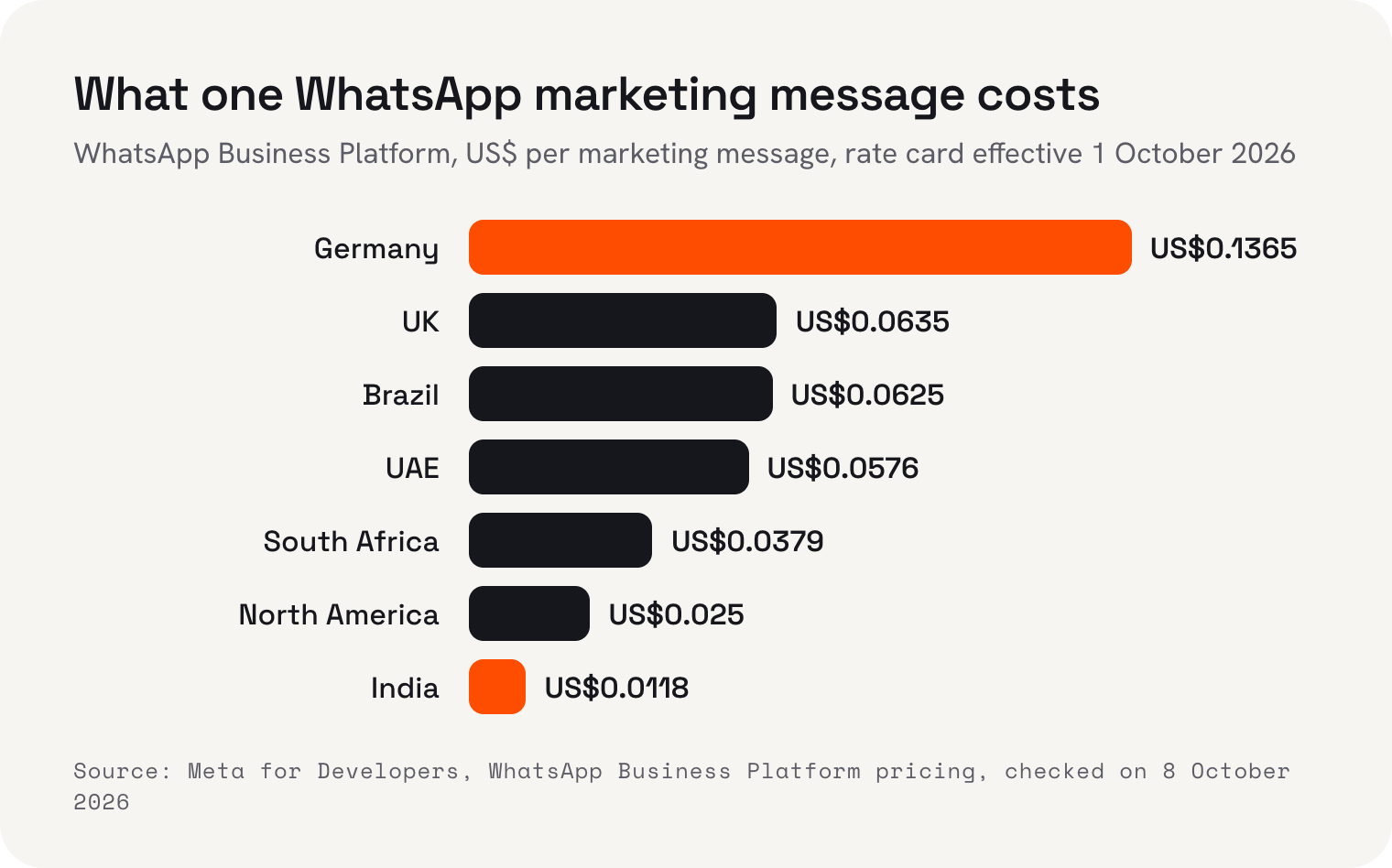
The spread is wide. A marketing message to someone in Germany costs more than eleven times one to someone in India. And within each country, utility messages cost a fraction of marketing ones: in the UK, US$0.022 against US$0.0635. So a shop in the UK sending 1,000 order updates would pay about US$22, while sending the same number of offers would cost about US$63.50.
The practical lesson is to send marketing messages sparingly and to people who'll want them, and to use WhatsApp mainly for conversations and updates. That keeps costs low and keeps you on the right side of the rules below.
The rules you can't skip
WhatsApp's Business Messaging Policy applies to everyone, free app or platform. These are the main points, in plain words.
- Only message people who gave you their number and agreed to hear from you on WhatsApp.
- Honour opt-outs. If someone asks you to stop, stop.
- Outside the 24-hour window after a customer's message, you can only send approved message templates.
- If you use automation, such as a bot, offer a clear way to reach a human: a chat transfer, a phone number or an email address.
Opt-in is the one that catches small businesses out. Having someone's number on a booking form or in your phone isn't the same as permission to message them on WhatsApp. Ask clearly, for example with a tick box on your booking form or a line at the counter, and keep a note of who said yes.
The 24-hour rule matters most on the Business Platform. While a customer's last message is less than 24 hours old, you can reply freely. After that, you can only start the conversation again with an approved template, which is a pre-written message Meta has checked, and that message is charged at its category's rate. So if a customer asks about a booking on Monday and you reply on Wednesday, plan for a template, not a casual reply.
The escalation rule is worth reading twice if you're thinking about a chatbot or AI replies. A bot that answers opening hours is fine. A bot that traps a customer with a complaint is not, and the policy expects you to offer a real person.
Where Kahu fits
Kahu's WhatsApp Inbox puts every WhatsApp chat in one team inbox, on your existing WhatsApp Business number. Kahu reads each message and drafts the answer from your prices and hours, and a person on your team taps send. It's part of every KahuLogic plan, including the 7-day trial, and WhatsApp campaigns are included on the Pro and Agency plans. WhatsApp's own per-conversation fees, where they apply, are billed by Meta and are separate from your plan. If you're just starting out, the free WhatsApp Business app is still the right first step, and everything in this guide applies to it.
 Where Kahu fits


What Kahu does today is the website side. From the Growth plan, US$179 a month (US$149 billed yearly), Kahu includes a website, CRM, SEO reports and Google and Meta ads, and every enquiry from your website lands in Kahu CRM with where it came from. Every plan starts with a free 7-day trial, no card needed.
A simple plan for this month
If you take one thing from this guide, make it this: set up the free app properly before you spend anything. Fill in the profile, write a greeting and an away message, save five quick replies, and print a QR code. Then ask customers to message you and see what happens over a few weeks.
Only look at the Business Platform when the free app is clearly holding you back. When you do, price it with the rate card for the countries your customers are in, count how many messages are replies (and so free up to 1,000 a month) and how many are marketing, and choose an inbox tool that makes reaching a human easy.
I'm Pooja Sharma, content writer at KahuLogic, a New Zealand company with a team across Australia, New Zealand and India. We build and look after websites and marketing for small businesses, and this is the advice I'd give whether or not you ever use us.
Frequently asked questions
Is WhatsApp Business free for small businesses?
The WhatsApp Business app is free to use, according to WhatsApp's own FAQ. The WhatsApp Business Platform, used through software, is paid: Meta charges per message the business sends, by category and the customer's country. Customers' messages to a business are never charged.
What's the difference between the WhatsApp Business app and the Business Platform?
The Business app is a free phone app with a business profile, greeting and away messages, quick replies, labels, a catalogue, QR codes and short links. The Business Platform, often called the WhatsApp API, is a paid service used through an inbox or CRM tool, suited to teams and to sending updates at scale.
How much does a WhatsApp marketing message cost?
On Meta's rate card effective 1 October 2026, one marketing message costs US$0.0118 in India, US$0.025 in North America, US$0.0635 in the UK and US$0.1365 in Germany, among other countries. Utility messages, such as order updates, cost much less.
Are customer service replies on WhatsApp free?
From 1 October 2026, the first 1,000 service messages per business number per month are free on the WhatsApp Business Platform, and service messages after that are charged. Messages in the 72 hours after someone clicks a click-to-WhatsApp ad are also free.
Can I message customers on WhatsApp without their permission?
No. WhatsApp's Business Messaging Policy says you may only contact people who gave you their number and agreed to receive messages from you on WhatsApp. You must honour opt-outs, and outside the 24-hour window after a customer's message you can only send approved templates.
Does Kahu have a WhatsApp inbox?
Yes. WhatsApp Inbox is part of every KahuLogic plan, including the 7-day trial. Kahu drafts each reply from your prices and hours, and a person on your team taps send. WhatsApp's own per-conversation fees, where they apply, are billed by Meta and are separate from your plan.
Sources and further reading
- WhatsApp: aboutwhatsapp.com
- WhatsApp Business blog: ads that click to WhatsApp (27 June 2023)whatsappbusiness.com
- WhatsApp Business: Business app featureswhatsappbusiness.com
- WhatsApp Business: the Business appbusiness.whatsapp.com
- WhatsApp Business: FAQwhatsappbusiness.com
- Meta for Developers: WhatsApp Business Platform pricingdevelopers.facebook.com
- WhatsApp Business Messaging Policybusiness.whatsapp.com
- Meta newsroom: Meta Business Agent (3 June 2026)about.fb.com
- Meta newsroom: new tools for business engagement, support and discoverability (18 September 2025)about.fb.com